
Endpoint detection and response (EDR) is a cybersecurity solution that continuously monitors endpoint activity in real time to detect, investigate, and respond to threats. Unlike traditional antivirus, EDR does not simply ask whether a file is malicious. It asks whether a sequence of events constitutes an attack. This distinction makes EDR one of the most effective tools available for identifying complex, multi-stage threats across laptops, servers, and cloud workloads. Understanding how endpoint detection response works is the foundation for any serious cybersecurity strategy in 2026.
What are the key stages of the endpoint detection and response lifecycle?
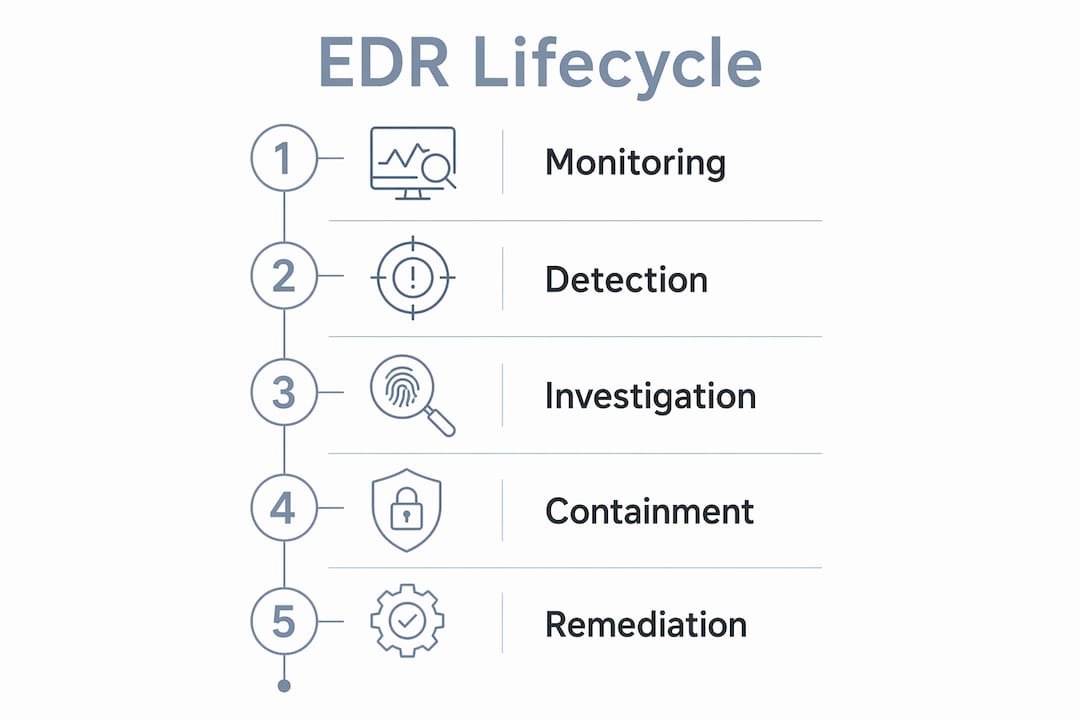
EDR operates as a continuous lifecycle built around four interconnected stages: monitoring, detection, investigation, and response. Each stage feeds the next, creating a closed loop that transforms raw endpoint data into security decisions.
Stage 1: Continuous monitoring
EDR agents run on every protected endpoint and record activity constantly. They capture file executions, process launches, registry changes, network connections, and user behaviour. This creates a baseline of normal activity for each device. Deviations from that baseline become the starting point for detection.
Stage 2: Behavioural detection
Detection in EDR is not signature-based. The system applies behavioural engines and machine learning models to identify attack-like sequences across multiple events. A single suspicious process launch may not trigger an alert. A chain of events, such as a script spawning a network connection that writes to a system directory, will. This approach catches threats that evade traditional defences by never touching a known-bad file.

Stage 3: Incident investigation
Once a threat is flagged, analysts receive a full evidence package. This includes visual timelines, process trees, parent-child process chains, command lines, file hashes, and network metadata. Investigators can trace an attack path across multiple endpoints without switching tools. The goal is to reconstruct exactly what happened, when it happened, and what was affected.
Stage 4: Containment and remediation
Response actions range from isolating a device from the network to stopping a malicious process or deleting a file. Many EDR solutions automate containment by triggering predefined playbooks when a high-confidence detection occurs. Analysts can also act manually when the situation requires judgement. The combination of speed and control is what separates EDR from passive monitoring tools.
Pro Tip: Set your automated containment rules to trigger only on high-confidence detections. Overly aggressive automation can isolate legitimate devices during business-critical hours, creating operational disruption that rivals the incident itself.
How does endpoint telemetry collection and behavioural analysis work?
The technical foundation of EDR is telemetry. Lightweight agents collect granular data including file executions, registry changes, process activity, and network connections, then stream it to a centralised management console. That console becomes the system of record for everything happening across your environment.
The analysis layer is where EDR earns its value. Behavioural engines, machine learning models, and anomaly detection algorithms process the incoming telemetry. They do not evaluate files in isolation. They correlate events across time and across endpoints, chaining weak signals into high-confidence alerts.
The contrast with traditional antivirus is stark. Antivirus asks: "Is this file bad?" EDR asks: "Is this sequence of actions an attack?" That shift in framing is why EDR detects complex threats that signature-based tools miss entirely. A fileless attack that lives entirely in memory, for example, leaves no file for antivirus to scan. EDR sees the process behaviour and flags it anyway.
EDR vs. traditional endpoint protection
| Capability | Traditional antivirus | EDR |
|---|---|---|
| Detection method | Signature matching | Behavioural and sequence analysis |
| Telemetry depth | Minimal | Granular, continuous |
| Investigation support | None | Timelines, process trees, evidence bundles |
| Response actions | Quarantine file | Isolate device, stop process, delete file |
| Threat intelligence integration | Limited | Native, with automated enrichment |
EDR does not replace antivirus. It operates at a different layer, catching what antivirus cannot see. Mature security programmes run both, with EDR providing the depth of visibility that antivirus was never designed to deliver.
What investigation tools and evidence does EDR provide?
EDR platforms give analysts the evidence they need to make fast, informed decisions. Evidence bundles include exact commands, parent-child process chains, file hashes, involved endpoints, and timestamps. This operational detail allows an analyst to validate or dismiss a hypothesis in minutes rather than hours.
Visual timelines and process trees let investigators reconstruct an attack path without writing queries or pivoting between tools. Cross-endpoint tracing connects activity on one device to related events on another, which is critical for identifying lateral movement. An attacker who compromises one workstation and then moves to a domain controller leaves traces on both. EDR links those traces automatically.
File-level analysis goes even deeper. Microsoft Defender for Endpoint's deep analysis executes suspicious files in a fully instrumented cloud sandbox, revealing dynamic behaviours that static analysis cannot detect. The resulting report includes dropped files, registry changes, and IP communications. This prevents over-reliance on static indicators and produces richer intelligence for remediation decisions.
Mature EDR operations treat investigation as attack story reconstruction, using graph-based correlation of alerts to preserve entity context. Analysts work from a single investigation interface that connects every related alert, entity, and action. Remediation steps can be executed directly from that interface without losing the surrounding context.
Pro Tip: When reviewing an attack story graph, start from the earliest confirmed event and trace forward. Working backwards from the alert is tempting but often causes analysts to miss the initial access vector, which is the most important piece for preventing recurrence.
What file-level response actions does EDR support?
EDR platforms support a range of file-level actions beyond simple quarantine. Response actions on a file typically include stopping and quarantining the file, managing indicators to block future execution, collecting the file for forensic analysis, and submitting it for deep sandbox analysis. Each action is logged with a timestamp and analyst attribution, creating an audit trail for compliance and post-incident review.
How do EDR systems contain and remediate threats effectively?
Containment is where EDR moves from detection to impact reduction. The goal is to stop an active threat from spreading while preserving enough evidence to complete the investigation. EDR platforms support both manual and automated response actions, and the choice between them depends on the confidence level of the detection and the operational context.
Manual containment actions available in most EDR platforms include:
- Device isolation: Cuts the endpoint's network access while keeping the EDR agent connected, so investigation can continue.
- Process termination: Stops a malicious process without rebooting the device or disrupting other services.
- File deletion and quarantine: Removes or quarantines malicious files and blocks their hash from executing elsewhere in the environment.
- Indicator management: Adds file hashes, IP addresses, or domains to a block list to prevent re-infection.
- Forensic collection: Pulls memory dumps, log files, or specific artefacts for offline analysis.
Automated playbooks handle high-confidence detections without waiting for analyst input. When a detection meets a predefined confidence threshold, the playbook triggers containment actions immediately. Automated investigations may perform remediation immediately or queue actions for analyst approval, depending on how the system is configured. This flexibility matters because not every environment tolerates the same level of automation.
XDR extends EDR's response capabilities by combining signals from multiple security domains, including identity, email, and cloud, into a single correlated incident. This cross-domain view enables automated responses that EDR alone cannot execute, such as disabling a compromised account while simultaneously isolating the affected device. EDR is the foundation; XDR is the extension that connects it to the rest of the security environment.
Key takeaways
EDR works by continuously monitoring endpoints, detecting attack sequences through behavioural analysis, providing rich investigation evidence, and enabling both automated and manual containment to stop threats before they spread.
| Point | Details |
|---|---|
| Continuous monitoring is the foundation | EDR agents record all endpoint activity to establish baselines and detect deviations in real time. |
| Behavioural analysis beats signatures | EDR identifies attack sequences rather than individual file indicators, catching fileless and complex threats. |
| Evidence bundles accelerate investigation | Process chains, hashes, and timelines let analysts validate incidents in minutes rather than hours. |
| Automation and manual control coexist | High-confidence detections trigger automated playbooks; lower-confidence alerts queue for analyst review. |
| EDR feeds XDR for broader coverage | EDR endpoint data integrates with identity, email, and cloud signals to enable cross-domain incident response. |
Why most organisations underestimate what EDR actually does
Nick, Sr. Executive
The teams I speak with most often think of EDR as a better antivirus. That framing undersells it by a wide margin. EDR is a continuous recording system that happens to include detection and response. The recording part is what changes your security posture fundamentally.
When an incident occurs without EDR in place, the investigation starts from almost nothing. You have logs, maybe, and whatever the attacker left behind. With EDR, you have a frame-by-frame record of everything that happened on every affected device. That changes the speed and quality of every decision that follows.
The piece I see organisations overlook most often is the balance between automated and manual response. Automation is powerful, but it requires careful tuning. I have seen automated isolation rules trigger during a software deployment and take down a hundred devices at once. The configuration matters as much as the capability.
EDR is also the prerequisite for XDR. You cannot build cross-domain detection on top of shallow endpoint visibility. If your EDR telemetry is incomplete or your agents are not deployed consistently, your XDR investment will underperform. Get the endpoint layer right first. Everything else builds on it.
For business leaders who are not security specialists, the practical takeaway is this: EDR gives your security team the evidence they need to act with confidence rather than guesswork. That translates directly into faster containment, lower breach costs, and a defensible compliance posture.
— Nick, Sr. Executive
AccountNext-Nexus: integrated endpoint security for your business
Fragmented security tools create gaps that attackers exploit. AccountNext-Nexus consolidates IT and cybersecurity services under one programme, giving your organisation real-time threat detection, cloud infrastructure management, and compliance support without the overhead of managing multiple vendors.

AccountNext-Nexus applies advanced endpoint security capabilities that cover the full EDR lifecycle, from continuous monitoring and behavioural detection through to containment and remediation. Transparent pricing and access to experienced IT professionals mean your team gets expert support without hidden costs. If your organisation needs a single, accountable partner for endpoint protection and broader cybersecurity, AccountNext-Nexus is built for that role.
FAQ
What is endpoint detection and response?
Endpoint detection and response (EDR) is a cybersecurity solution that continuously monitors endpoint activity, detects suspicious behaviour through behavioural analysis, and enables investigation and response to threats in real time.
How does EDR differ from traditional antivirus?
Traditional antivirus matches files against known signatures. EDR analyses sequences of events to identify attack patterns, catching fileless threats and complex multi-stage attacks that antivirus cannot detect.
What data does an EDR agent collect?
EDR agents collect granular telemetry including file executions, registry changes, process launches, network connections, and user activity, streaming it continuously to a centralised management console.
Can EDR respond to threats automatically?
Yes. EDR platforms support automated playbooks that trigger containment actions such as device isolation or process termination when a detection meets a high-confidence threshold, with options to require analyst approval for lower-confidence alerts.
How does EDR support compliance requirements?
EDR creates a detailed audit trail of all endpoint activity, investigation steps, and response actions. This record supports compliance frameworks that require evidence of threat detection, incident response, and remediation documentation.