
Cloud security logging is defined as the continuous capture of event data across cloud infrastructure to enable monitoring, threat detection, incident response, and compliance. The role of logging in cloud security goes far beyond record keeping. Logs from services like AWS CloudTrail, Google Cloud Audit Logs, and Azure Monitor are the primary evidence trail when a breach occurs. Without them, your security team is investigating blind. This guide breaks down what logs matter, how attackers target them, and how to build a logging strategy that holds up under real pressure.
What is the role of logging in cloud security?
Security logs provide real-time visibility into cloud activity, forming the baseline your team needs to detect malicious behaviour. This matters especially because customers operate under the shared responsibility model, where the cloud provider secures the infrastructure, but you own the data and configurations inside it. Logs are your primary tool for exercising that responsibility.
Cloud audit logs answer a deceptively simple question: who did what, where, and when. That question becomes critical during an incident investigation, a compliance audit, or a forensic review. Without complete, accurate log data, you cannot reconstruct an attacker's path through your environment.

The importance of logging in security is not theoretical. When an attacker exfiltrates data from an S3 bucket, the only record of that access is a data access log. When a misconfigured IAM role grants excessive permissions, the admin activity log captures the change. Logs are the connective tissue between your cloud activity and your security posture.
What types of logs are critical for cloud security monitoring?
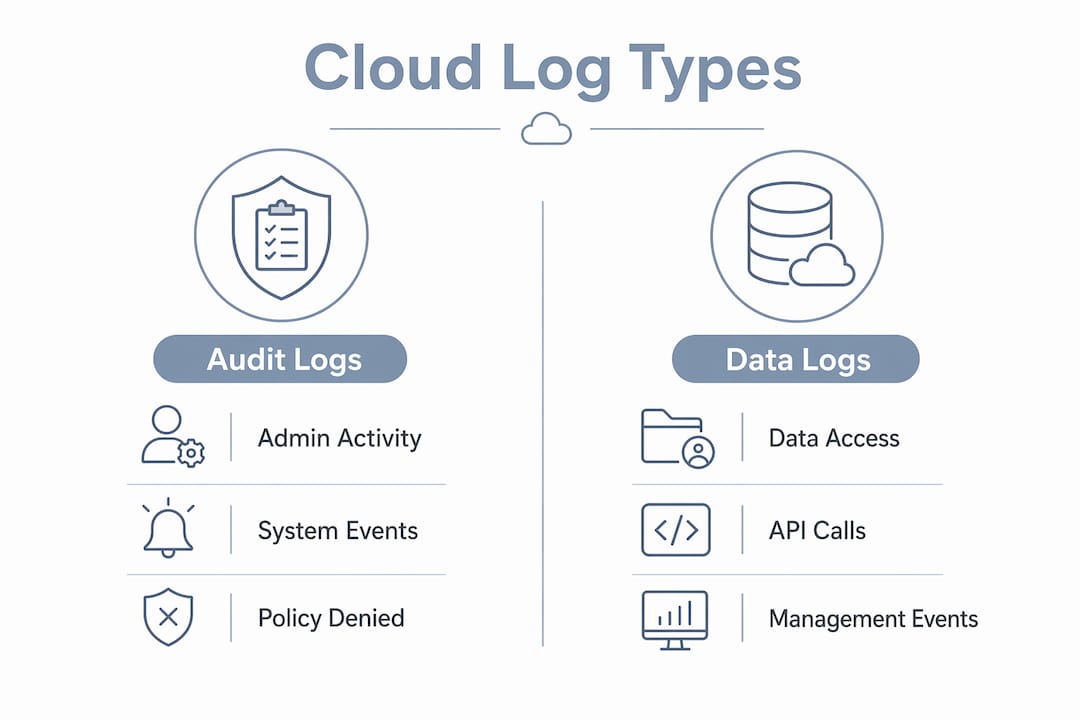
Cloud providers organise audit logs into distinct categories, each capturing a different layer of activity. Understanding what each category records determines whether your logging coverage is complete or full of gaps.
Google Cloud Audit Logs include four primary types: admin activity, data access, system events, and policy denied logs. Admin activity logs record configuration changes and are always enabled. Data access logs capture read and write operations on data, but they are disabled by default for most services. That default is a significant risk. An attacker reading your Cloud Storage objects leaves no trace unless you have explicitly enabled data access logging.
AWS CloudTrail records API calls across your AWS account, covering management events and, optionally, data events. Azure Monitor captures activity logs, resource logs, and Azure Active Directory sign-in logs. Each platform uses different terminology, but the underlying categories map closely.
| Log type | What it captures | Security value |
|---|---|---|
| Admin activity | Configuration and permission changes | Detects privilege escalation and policy tampering |
| Data access | Read/write operations on data resources | Identifies unauthorised data access or exfiltration |
| System events | Automated infrastructure changes | Supports change management and anomaly detection |
| Policy denied | Requests blocked by IAM or firewall rules | Reveals reconnaissance and access probing |
Policy denied logs are underused but highly valuable. A spike in denied requests often signals an attacker probing your environment for misconfigured permissions. Treating denied events as noise is a mistake most teams make until they investigate a breach and realise the attacker's reconnaissance was fully recorded and ignored.
How do attackers target logging systems to evade detection?
Attackers do not just exploit your applications. They target your logging infrastructure directly. Cloud audit logs are primary evidence in incident investigations, which is exactly why sophisticated attackers work to disable, alter, or delete them before or during an attack.
Palo Alto Unit 42 research documents techniques where attackers suspend log flows, modify log storage destinations, and delete log buckets to create blind spots. The goal is to extend dwell time. An attacker who disables CloudTrail in an AWS account can operate for days or weeks without generating a visible trail.
Common attacker techniques targeting logging systems include:
- Disabling AWS CloudTrail trails or reducing their scope to management events only
- Deleting or modifying S3 buckets that store log data
- Altering log retention settings to reduce the window of available evidence
- Modifying IAM policies to prevent log delivery to centralised storage
- Suspending log sinks in Google Cloud to stop log export
Defending against these techniques requires monitoring the logging infrastructure itself. Alerting on logging configuration changes is a direct countermeasure. Splunk's security analytics story mapping, for example, covers defence evasion techniques that include changes to CloudTrail and log deletion events. If someone modifies your logging configuration, that event should trigger an immediate alert.
Pro Tip: Store logs in a separate, dedicated account with write-once object storage policies. An attacker who compromises your primary workload account cannot delete logs they cannot write to. AWS S3 Object Lock and Google Cloud's Bucket Lock both support this pattern.
How should you design log retention for forensic readiness?
Log retention is where compliance requirements and forensic reality collide. PCI-DSS v4.0 requires at least 12 months of audit log retention, with 3 months immediately available for query without archival restoration. That standard reflects a practical truth: investigations rarely start the day an incident occurs.
Tiered storage is the standard approach for balancing cost and accessibility. Hot storage holds recent logs, typically 30–90 days, in a queryable format. Warm storage extends that window to 6 months at lower cost. Cold and archive tiers hold the remainder of the 12-month window at minimal cost but with retrieval delays. The critical constraint is that your investigation team must be able to query recent logs immediately, without waiting hours for archive restoration.
| Storage tier | Retention window | Query speed | Relative cost |
|---|---|---|---|
| Hot | 30–90 days | Immediate | High |
| Warm | 3–6 months | Minutes | Medium |
| Cold | 6–12 months | Hours | Low |
| Archive | 12+ months | Hours to days | Minimal |
Centralising logs across accounts and regions is equally critical. Forensic readiness depends on complete logging configurations with no blind spots from missing categories or per-account defaults. A multi-account AWS environment where each account ships CloudTrail logs to a centralised Security account gives your team a single query surface during an investigation.
Pro Tip: Tag your log storage resources with a "security-critical" label and apply a separate deletion protection policy. This prevents accidental or malicious deletion during routine infrastructure changes.
What are cloud logging best practices for IT managers?
Effective cloud logging strategies require deliberate design, not default settings. Most cloud providers enable only a subset of logging categories out of the box. Your first task is auditing what is actually being captured versus what your security objectives require.
Plan your log coverage before an incident
Map your critical assets, data flows, and access patterns before deciding what to log. Every S3 bucket holding sensitive data needs data access logging enabled. Every IAM role change needs to flow into your centralised log store. Missing audit categories or relying on per-account defaults creates gaps that attackers can exploit.
Centralise and protect log storage
Centralised logging across all accounts, regions, and cloud providers gives your security team a single source of truth. Use centralised logs for root cause analysis during incidents to cut investigation time significantly. Apply immutable storage policies to prevent tampering.
Automate analysis and alerting
Logs without analysis create no security value. OWASP's logging and monitoring failure guidance identifies failure modes where logs lack security-relevant context or never reach a SOC for review. Correlation rules, anomaly detection, and automated alerting convert raw log data into actionable signals.
Log analytics platforms transform raw logs into queryable, structured data. Google Cloud's Log Analytics, AWS CloudWatch Logs Insights, and third-party tools like Splunk all provide the search and visualisation capabilities your team needs for proactive threat detection.
- Enable all relevant audit log categories, including data access logs for sensitive resources
- Ship logs to a centralised, write-protected store in a dedicated security account
- Set retention policies that meet PCI-DSS minimums (12 months total, 3 months hot)
- Build alerting rules for logging configuration changes, IAM policy modifications, and log deletion events
- Run quarterly logging integrity tests to confirm all expected log sources are delivering data
- Review log volume and cost monthly to identify redundant sources and control spend
Pro Tip: Build a logging coverage matrix that maps each critical asset to its log source, category, and retention tier. Review it quarterly. This single document will save hours during your next incident investigation.
Key takeaways
Security audit logging in cloud environments is only effective when logs are complete, protected, centralized, and actively analyzed.
| Point | Details |
|---|---|
| Enable all log categories | Data access logs are disabled by default; enable them for all sensitive resources. |
| Protect logging infrastructure | Store logs in a separate account with immutable, write-once policies to prevent tampering. |
| Meet retention minimums | PCI-DSS v4.0 requires 12 months total retention with 3 months immediately queryable. |
| Automate analysis and alerting | Logs without correlation rules and SOC routing deliver no security value. |
| Monitor logging configuration changes | Alert immediately on any change to CloudTrail, log sinks, or log storage policies. |
Logging is not a checkbox: what I have learned after years in cloud security
The most common mistake I see organizations make is treating logging as a compliance deliverable rather than an operational capability. They enable CloudTrail, point it at an S3 bucket, and consider the work done. The logs sit there, unanalysed, until an auditor asks for them or a breach forces a retroactive investigation.
The uncomfortable truth is that logs alone protect nothing. Organisations consistently underestimate the risk from attackers impairing logging infrastructure. I have reviewed post-incident reports where the attacker disabled CloudTrail within the first hour of access. The organisation had logs right up until the moment they needed them most.
Forensic readiness is becoming a board-level concern in 2026, not just a security team priority. Regulators and cyber insurers are asking harder questions about log retention, chain of custody, and the speed at which organisations can reconstruct an incident timeline. The organisations that answer those questions confidently are the ones that treated logging as infrastructure, not an afterthought.
The other shift I keep seeing is attackers getting more precise about which log categories to disable. They are not blindly deleting everything. They are surgically removing the specific log sources that would capture their activity. That means your logging strategy needs to be equally precise. Know exactly what each log source captures and what goes dark if it disappears.
— Nick - Sr. Executive
How AccountNext-Nexus supports your cloud logging strategy
AccountNext-Nexus delivers IT and cybersecurity services that include cloud audit log integration, centralised log management, and real-time threat detection across AWS, Google Cloud, and Azure environments. The team works directly with your existing cloud infrastructure to close logging gaps, configure immutable storage, and build the alerting rules your SOC needs to act on log data rather than simply collect it. AccountNext-Nexus also supports compliance alignment for frameworks including PCI-DSS, with retention policies and audit-ready reporting built into every engagement. For organisations managing network monitoring and visibility across distributed cloud environments, that kind of consolidated support reduces both risk and operational overhead.
FAQ
What is cloud security logging?
Cloud security logging is the collection and storage of event data from cloud services, including API calls, configuration changes, and data access events. It provides the visibility needed for threat detection, incident investigation, and compliance reporting.
Why are data access logs disabled by default in Google Cloud?
Google Cloud disables data access logs by default because they generate high log volumes and associated storage costs. Security teams must explicitly enable them for services handling sensitive data to avoid blind spots.
How long should cloud audit logs be retained?
PCI-DSS v4.0 requires a minimum of 12 months of audit log retention, with at least 3 months immediately available for query. Most security frameworks align with this standard as a baseline.
How do attackers disable cloud logging?
Attackers disable cloud logging by modifying CloudTrail trail configurations, deleting S3 log buckets, altering IAM policies that control log delivery, or suspending log export sinks in Google Cloud. Monitoring for these configuration changes is a direct countermeasure.
What is the difference between audit logs and data access logs?
Audit logs record administrative actions such as configuration changes and permission modifications. Data access logs capture read and write operations on data resources. Both are required for complete security monitoring coverage.