
A business impact analysis is a structured process that quantifies the financial, operational, and reputational cost of a disruption, and then produces recovery objectives leadership must approve. The output is a prioritized list of critical business functions, paired with realistic recovery time targets and the investment options needed to hit them. If you're starting from zero, the first move is simple: name an executive sponsor and scope which business units the analysis will cover before you write a single questionnaire.
TL;DR:
- Most BIAs focus on critical processes, with an emphasis on validating dependencies through workshops to avoid inaccurate or outdated findings.
- Recovery time and data loss metrics must align with existing infrastructure capabilities; unrealistic RTOs and RPOs can undermine recovery plans.
- Regular updates driven by organizational changes are essential to keep BIA insights current and actionable, preventing stale or ineffective plans.
- Using workshops and validation exercises helps uncover undocumented workarounds and dependencies that surveys alone tend to miss.
- Integrating BIA results into technical recovery design and testing ensures that recovery objectives translate into real, tested response procedures.
Table of Contents
- What is a business impact analysis, exactly?
- RTO, RPO, MTPD, and MBCO: the four numbers that run your recovery plan
- How do you actually conduct a business impact analysis?
- Who needs to be in the room, and how do you get leadership sign-off?
- How BIA findings turn into recovery strategy and budget decisions
- What pitfalls sink most BIA projects?
- How Nexus turns BIA findings into funded recovery decisions
- Qualitative or quantitative: which type of BIA fits your situation?
- What tools actually help you collect and analyse BIA data?
- Does your industry change how you run a BIA?
- What does a BIA actually change in a real decision?
- How do you know your BIA findings are actually right?
- The gap between a BIA on paper and a BIA that changes anything
- Put your BIA findings to work with Nexus
- Sources
- FAQ
What is a business impact analysis, exactly?
A business impact analysis is a systematic process for quantifying what breaks, and how badly, when a process, system, or vendor goes down. It's the discipline that turns "IT says the server matters" into "losing this system for six hours costs $40,000 in lost orders and triggers a regulatory reporting breach." The NIST guidance on using BIA to inform risk prioritization frames it as the mechanism that identifies time-based recovery objectives and feeds them directly into continuity and recovery planning.
A well-run BIA measures impact across several dimensions, not just dollars:
- Financial — lost revenue, increased operating costs, contractual penalties.
- Operational — how long a process can be down before downstream work stalls.
- Reputational — customer churn, brand damage, negative press.
- Regulatory — fines, breach notification obligations, licence risk.
- Human and environmental — safety exposure, workforce disruption, site access.
Ready lists lost sales, added expenses, regulatory fines, and customer defection as the standard categories a BIA report should quantify. This is where BIA and risk assessment split: risk assessment asks how likely a threat is; business impact analysis asks what happens if it hits, regardless of probability. You need both, but they answer different questions, and confusing them is one of the most common planning mistakes.
RTO, RPO, MTPD, and MBCO: the four numbers that run your recovery plan
Every BIA lives or dies on four time-based metrics, and if your team is fuzzy on the difference, your recovery plan will be too.
- RTO (Recovery Time Objective) — the maximum acceptable time a process can be down. If order processing has an RTO of four hours, your recovery design has to actually deliver that, not just aspire to it.
- RPO (Recovery Point Objective) — how much data loss is tolerable, measured in time. An RPO of 15 minutes means your backup cadence has to capture data at least that often.
- MTPD (Maximum Tolerable Period of Disruption) — the outer limit before the disruption threatens the organization's survival, not just its comfort. MTPD is always longer than RTO; RTO should sit safely inside it.
- MBCO (Minimum Business Continuity Objective) — the reduced service level that's still acceptable during recovery, such as processing 40% of normal order volume instead of 100%.
These aren't independent numbers. A four-hour RTO for a system that currently takes two days to restore isn't a target, it's a fantasy, unless you fund a faster recovery architecture. That tension between desired RTO and actual recovery capability is exactly what a BIA is supposed to surface before an incident does it for you.
Standard reference: NIST's IR 8286D identifies RTO, RPO, and MTPD as the core metrics that translate BIA findings into concrete recovery strategy decisions and investment trade-offs.
How do you actually conduct a business impact analysis?
Most credible BIA methodologies, including the step-by-step template Asana outlines, collapse into five stages. Here's how to run each one without turning it into a six-month project.
-
Plan. Define scope (which business units, which locations), set objectives, agree a timeline, and get a named executive sponsor before you contact a single process owner. Without sponsorship, business units will treat your questionnaire as optional homework, and it will show in the response rate.
-
Gather. Send a structured questionnaire to process owners first. Ask what systems they depend on, how long they can operate manually, what their peak processing periods are, and which vendors they rely on. Then run validation workshops with the highest-priority processes. Practitioners consistently find that survey-only data collection produces weak results because people underreport informal workarounds. A 90-minute workshop with the right five people in the room will surface more real dependencies than three weeks of email chasing.
-
Analyse. Map each critical process against time. What happens at 4 hours down? 24 hours? A week? This is where you rank processes by combined financial and operational severity, and where hidden dependencies (a shared database, a single vendor, one person who knows the manual workaround) tend to surface.
-
Report. Build a one-page executive summary: the top critical processes, recommended RTO/RPO for each, and two or three cost options to achieve them (do nothing, moderate investment, full redundancy). Leadership doesn't want forty pages; they want a decision to make.
-
Maintain. A BIA has a shelf life. Set update triggers, not just an annual calendar reminder: a cloud migration, a merger, a new core system, or any incident that exposed a gap in the last BIA should all trigger a refresh.
Pro Tip: Run the workshop before you finalize the questionnaire results, not after. Teams often discover in the room that the "critical" system flagged on paper isn't the one people actually rely on when things go wrong.
For a working example of how this scoping step connects to a testable continuity plan, see this walkthrough on building a BCP you can test this week.
Who needs to be in the room, and how do you get leadership sign-off?
A BIA fails when it's treated as an IT-only exercise. NIST's guidance is explicit that business process owners should define criticality, while IT validates what's technically feasible to recover. That split matters: it keeps the business, not the server room, deciding what counts as critical.
Core participants typically include:
- An executive sponsor who can force participation and approve funding.
- Process owners who know the actual dependencies of their function.
- IT and cloud infrastructure leads who confirm technical recovery feasibility.
- Finance, to validate cost estimates and revenue impact figures.
- Legal and compliance, for regulatory exposure.
- Vendor owners, since third-party outages are often the actual cause of downtime.
The governance artefacts that get this funded are deliberately small: a one-page executive summary and a decision matrix showing cost options against recovery objectives. Structure the leadership ask around the 20 most critical activities, the RTO you're proposing for each, and what it costs to hit that number. Executives approve trade-offs; they don't approve spreadsheets.
How BIA findings turn into recovery strategy and budget decisions
BIA output only matters once it changes what you build or buy. Each critical process, once ranked, gets mapped to its actual dependencies (people, systems, vendors), and each dependency gets a recovery strategy sized to its RTO.
- A process with a 48-hour RTO might only need a documented manual workaround.
- A process with a 4-hour RTO likely needs warm standby infrastructure, kept partially running and ready to scale up.
- A process with a near-zero RTO needs hot failover, live redundant systems that take over automatically.
The cost curve between these three options isn't linear, it's steep. Warm standby often costs several times more than a documented manual process, and hot failover costs more again. This is exactly the trade-off a BIA report should present to leadership rather than letting IT quietly default to the most expensive option "to be safe." For a closer look at translating these choices into concrete technical designs, see this guide to disaster recovery planning and tested runbooks.
What pitfalls sink most BIA projects?
The most common failure is scope creep dressed up as thoroughness: trying to inventory every task in every department instead of starting from mission-critical processes and working outward. That approach guarantees a bloated project that never finishes.
Other recurring problems:
- Stale BIAs. An analysis done two years ago, before a cloud migration or acquisition, is describing a business that no longer exists.
- Survey-only data collection. Questionnaires alone consistently miss undocumented workarounds that turn out to be the most fragile dependency in the chain.
- Unrealistic RTOs. Setting a two-hour RTO on paper without checking whether recovery infrastructure can actually deliver it just moves the failure from planning to the incident itself.
Best practice fixes each of these directly: scope top-down from critical processes, validate every major finding in a workshop, document dependencies explicitly rather than assuming they're obvious, and tie updates to real triggers.
Pro Tip: If you only have budget for one thing beyond the questionnaire, spend it on workshops. A short validation session with the right people catches the workarounds and hidden dependencies that a form never will.
How Nexus turns BIA findings into funded recovery decisions
A BIA is only as good as what happens to it after the report is delivered. AccountNext-Nexus works from BIA outputs directly into technical recovery design: dependency maps become backup validation schedules, and RTO targets become tested runbooks rather than aspirational documents sitting in a drawer.
That means turning "this process needs a 4-hour RTO" into an actual recovery playbook, tested against real infrastructure across AWS, Azure, or Google Cloud, not just described on paper. Governance artefacts like the executive one-pager and dependency map get built once and reused, rather than recreated for every audit cycle.
Because BIA accuracy decays fast, AccountNext-Nexus ties re-assessment to real triggers: a cloud migration, a new core platform, or a material acquisition, rather than waiting for the calendar to force a stale annual review.
Qualitative or quantitative: which type of BIA fits your situation?
A qualitative BIA ranks impact using descriptive severity scales, low, medium, high, critical, based on judgment from process owners and subject matter experts. It's faster to run, doesn't require finance to model exact dollar losses, and works well for organizations doing their first BIA or covering functions where financial impact is hard to isolate (legal exposure, reputational damage, employee safety).
A quantitative BIA assigns actual numbers: dollars lost per hour of downtime, percentage of revenue at risk, specific regulatory fine amounts. It demands more data and more time from finance, but it's what leadership needs when comparing competing investment requests. "This process is critical" doesn't win budget arguments against another department's request. "This process costs $12,000 an hour in lost revenue after the second hour of downtime" does.
Most mature programs run a hybrid: quantitative rigour on revenue-generating processes and core infrastructure, qualitative scoring on support functions and softer impacts like reputation or morale. Start qualitative if you've never run a BIA before, it builds organizational muscle for the exercise without stalling on data collection. Move toward quantitative for your top-tier critical processes once you have a baseline, because that's where budget decisions actually get made and where leadership will ask for numbers, not adjectives.
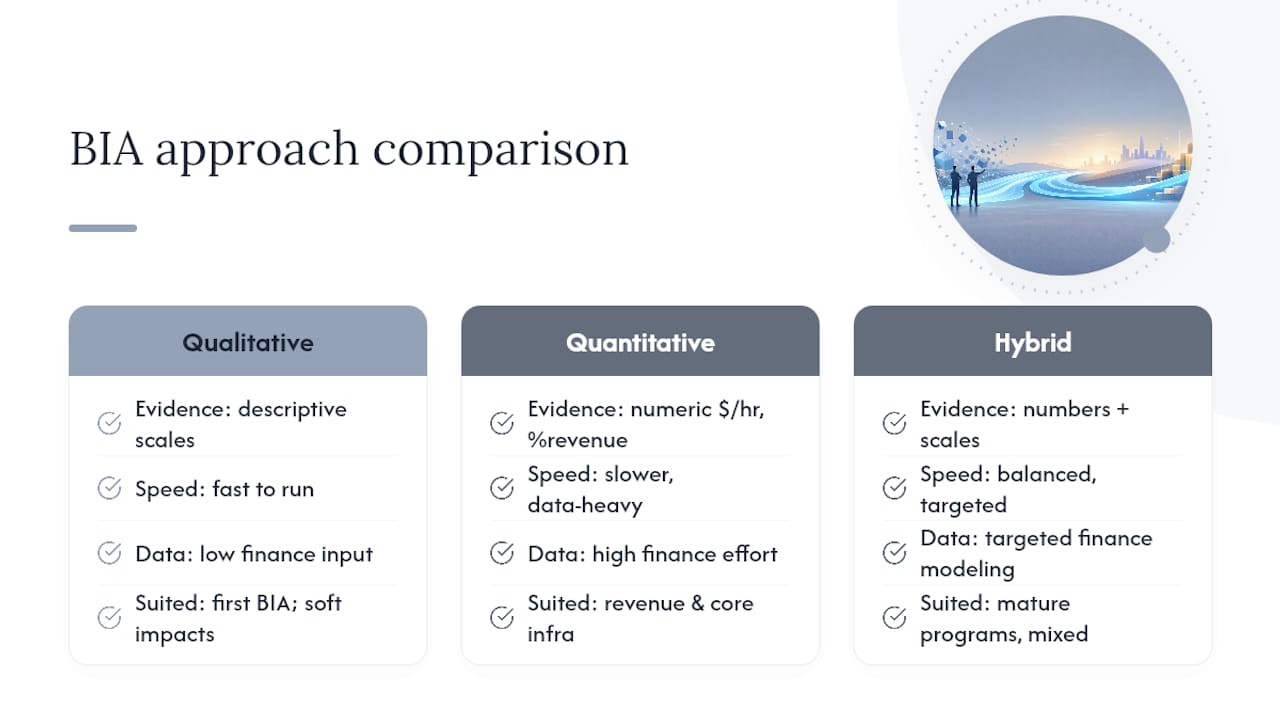
The mistake to avoid is treating one approach as universally superior. A fully quantitative BIA across every process in the organization takes months finance may not have, while a purely qualitative BIA on your revenue-critical systems will leave leadership without the numbers they need to choose between a $50,000 fix and a $500,000 one.
What tools actually help you collect and analyse BIA data?
Spreadsheets remain the honest starting point for most organizations running their first BIA, and there's no shame in that. A well-structured template, the kind Asana's BIA guide describes, gives you a repeatable structure for capturing process criticality, dependencies, and recovery objectives without buying software you don't yet know how to use.
Once you're running BIAs regularly or across multiple business units, dedicated business continuity management software earns its cost. These platforms typically offer built-in questionnaire distribution, automated dependency mapping, and reporting that pulls directly into a business continuity plan document, cutting out the manual reassembly work that eats weeks in a spreadsheet-based process.
The right tool choice depends on three factors: how many processes you're assessing, how often you need to re-run the analysis, and whether you need to link BIA output directly to a live continuity plan or an incident response system. A single-department BIA for a 40-person company doesn't need enterprise continuity software. A multinational running BIAs across a dozen business units, with regulatory audit requirements attached, almost certainly does.
Whatever you pick, the tool should make three things easier: distributing and tracking questionnaire responses, visualizing dependencies between processes and systems, and generating the executive summary format leadership actually reads. If a tool doesn't shorten the path from raw data to a decision-ready report, it's adding overhead, not removing it.
Does your industry change how you run a BIA?
Regulatory context reshapes what a BIA has to prove, not just what it measures. A healthcare organization running a BIA has to weigh HIPAA breach notification timelines against clinical system downtime, where a delayed recovery doesn't just cost revenue, it can affect patient safety directly. A financial services firm faces a different pressure: regulators increasingly expect documented, testable recovery objectives as part of operational resilience requirements, not just an internal planning exercise.
ISO 22301 and ISO/TS 22317 provide the international reference points most auditors and regulators expect a mature BIA process to align with, particularly for organizations that need to demonstrate business continuity maturity to customers, insurers, or regulators. Compliance frameworks like SOC 2, PCI-DSS, or ISO 27001 don't mandate a specific BIA methodology, but auditors reviewing those certifications will ask to see one, along with evidence it's been updated and tested.
The practical takeaway: don't build a generic BIA template and hope it satisfies every regulator you answer to. A healthcare organization needs recovery objectives that map to patient safety and HIPAA timelines. A payment processor needs objectives that map to PCI-DSS cardholder data availability. A publicly traded company needs financial impact figures that hold up under audit scrutiny. The BIA framework stays the same across industries, but what counts as "critical" and how rigorously you have to document it changes considerably.
What does a BIA actually change in a real decision?
Consider a mid-sized logistics company running its first BIA. The exercise ranks order processing and route optimization as top-tier critical, both currently dependent on a single on-premises server with no failover. The BIA quantifies the impact: four hours of downtime costs roughly $18,000 in delayed shipments and triggers penalty clauses with two major retail clients.
That single number changes the conversation entirely. Before the BIA, the IT team's request for a cloud failover system had been deprioritized twice because it looked like a discretionary infrastructure upgrade. After the BIA quantified the exposure, leadership approved the migration within a budget cycle, because the report reframed it as risk reduction with a defined dollar value attached, not a technology nice-to-have.
A second, smaller example: a professional services firm's BIA revealed that its "critical" client billing process actually depended on one employee's personal spreadsheet macros, something no org chart or system diagram had ever flagged. That finding alone, surfaced in a validation workshop rather than the initial questionnaire, led to documenting the process and cross-training a second staff member, a fix costing almost nothing compared to the risk it closed.
Neither example required exotic tooling or a massive budget. Both required the discipline of actually finishing the analysis and putting a number, or at minimum a documented dependency, in front of the people who could act on it.
How do you know your BIA findings are actually right?
A BIA built entirely from questionnaire responses is a hypothesis, not a validated finding. The gap between what someone reports on a form and what actually happens during an outage is often significant, because process owners underestimate how many informal workarounds and undocumented dependencies keep their function running day to day.
Validation workshops close that gap. Bringing together the process owner, a technical lead, and someone from an adjacent department for a focused 60 to 90 minute session routinely surfaces dependencies nobody wrote down: a shared login, a manual export nobody flagged as "critical," a vendor relationship that only one person manages. NIST's guidance on BIA data quality points specifically to workshops as the mechanism that catches these gaps that survey-only collection tends to miss.
Tabletop exercises go a step further, testing whether your stated recovery objectives actually hold up under a simulated scenario. Walk through "the primary billing system is down for six hours" with the actual team that would respond, and you'll quickly find out whether that four-hour RTO on paper is achievable or aspirational. If the tabletop reveals the team needs eight hours to execute the documented manual workaround, that's not a communication problem, it's a sign the BIA's recovery objective needs to be revised or the investment case for faster recovery needs to be made.
The strongest validation combines both: workshops to confirm the dependency map is accurate, and a periodic tabletop or partial test to confirm the recovery objectives attached to it are realistic rather than optimistic guesses.

The gap between a BIA on paper and a BIA that changes anything
Most BIA guidance treats the analysis itself as the deliverable. That's backwards. The real measure of a good BIA is whether it changed a budget decision within the next two quarters, not whether it produced a thorough document.
The conventional advice, "interview every department, document every process," produces exhaustive BIAs that take so long to complete that half the findings are outdated before the report is finished. A tighter, top down scope focused on your genuinely mission-critical processes gets you a usable, current answer faster, and faster answers are what actually get funded.
If you take one thing from this, prioritize the validation workshop over the perfect questionnaire. Surveys tell you what people think is true. Workshops tell you what's actually true, including the workaround nobody documented that turns out to be your most fragile dependency. Get that step right, and the recovery objectives you present to leadership will hold up when they're tested for real, not just when they're read on a slide.
— Nick - Sr. Executive
Put your BIA findings to work with Nexus
AccountNext-Nexus is the alternative to juggling separate vendors for continuity planning, backup validation, and cloud recovery design: one provider, one accountable team, and integrated 24/7 threat detection built around the recovery objectives your BIA actually produces. Instead of handing your RTO and RPO targets to an IT team that has to coordinate across three other vendors to act on them, Specialists design the backup strategy, disaster recovery architecture, and incident response runbooks directly from your BIA report.

Whether you need managed continuity support, tested incident runbooks, or a cloud recovery design across AWS, Azure, or Google Cloud, AccountNext-Nexus works from the recovery objectives you've already defined, rather than starting from scratch. Services span cybersecurity, cloud solutions, network infrastructure, managed IT, compliance and risk, and data protection, all under one flat-rate contract with no hidden fees. If your BIA has already flagged which processes need a faster recovery path, start a scoping conversation with Nexus about what it takes to actually build one.
Sources
Save these for audits and regulatory cross-walks:
- Using Business Impact Analysis to Inform Risk Prioritization and Response | NIST
- Ready
- Business impact analysis (BIA): How to do it + template | Asana
FAQ
What is the difference between a BCP and a BIA?
A business impact analysis identifies and quantifies what a disruption costs and what recovery targets are needed; a business continuity plan (BCP) is the operational document that describes how the organization will actually respond to keep those critical functions running. The BIA comes first and supplies the recovery objectives the BCP is built around, as outlined in Ready.gov's continuity planning guidance.
What are the three (or five) stages of a BIA?
Most practitioner frameworks describe a BIA as five stages: planning and scoping, data gathering, analysis, reporting, and ongoing maintenance. Some simplified versions collapse this into three broad phases, plan, execute, report, but the underlying step-by-step methodology covers the same ground either way.
How long does a BIA typically take to complete?
A focused BIA scoped to an organization's top mission-critical processes can usually be completed in a few weeks using a questionnaire plus workshop hybrid approach. Attempting to document every process across every department stretches that timeline into months and risks the findings going stale before the report is finished.
Can AccountNext-Nexus help run a BIA or just implement the findings afterward?
AccountNext-Nexus supports both ends of the process: helping structure the scoping and analysis, and then translating the resulting RTO and RPO targets into tested recovery architecture, backup validation, and incident runbooks. Current service details and how to start a conversation are listed on the Nexus services page.
Is a BIA a one-time project or an ongoing process?
A BIA needs regular updates, ideally triggered by material changes like a cloud migration, acquisition, or major system replacement, rather than a single one-time exercise. Treating it as "done" after the first report is one of the most common reasons BIAs go stale and stop reflecting how the business actually operates.