
A disaster recovery plan exists to restore critical IT systems, applications, and data fast enough to meet the recovery time and recovery point targets your business actually needs. Skip the paperwork instinct. Start this week by inventorying critical systems and running a business impact analysis. Everything else in disaster recovery planning follows from those two steps.
TL;DR:
- Conduct a thorough inventory of critical hardware, applications, and data, and identify dependencies to ensure recovery efforts target essential systems first.
- Set realistic RTO and RPO targets based on business impact analysis, aligning backup and recovery strategies with these measurable recovery objectives.
- Implement tiered recovery architectures, such as hot or warm sites for mission-critical systems and slower, cost-effective options for less urgent data or applications.
- Regularly test recovery plans through tabletop exercises, partial restores, and failover simulations, and update documentation based on test results and infrastructure changes.
- Map third-party vendor dependencies and ensure their recovery commitments meet your business needs to prevent blind spots in your disaster plan.
Table of Contents
- What is disaster recovery planning and how does it differ from business continuity?
- How do you run a business impact analysis that actually drives priorities?
- What are RTO and RPO, and how do you set them?
- What backup strategy actually meets your RPO targets?
- Cold, warm, hot, or active-active: which recovery architecture fits?
- How do you turn a DR plan into runbooks people can follow under pressure?
- How often should you test your disaster recovery plan?
- How do you keep a disaster recovery plan current and audit-ready?
- What should you do this week to start disaster recovery planning?
- What risks and threats should a disaster recovery plan actually cover?
- What regulatory and compliance factors shape a disaster recovery plan?
- How much should disaster recovery planning actually cost?
- How do you manage third-party and vendor dependencies in a DR plan?
- How do you keep a disaster recovery plan improving over time?
- Why most disaster recovery plans fail before they're ever needed
- How Nexus turns a disaster recovery plan into a tested recovery
- Where to verify the details in this plan
- Sources
- FAQ
What is disaster recovery planning and how does it differ from business continuity?
Disaster recovery planning is the process of documenting how your organization restores IT systems, applications, and data after an outage, whether that outage comes from ransomware, a failed data centre, or a fibre cut three blocks away. It's narrower than most people assume. A DR plan doesn't cover how your receptionist answers phones during a power outage or how sales keeps quoting customers by hand. That's business continuity planning's job.
The two disciplines share one binding document: the business impact analysis. Skip that shared foundation and you get a common failure pattern, where the DR plan restores a server nobody in operations actually needs back first, while the business continuity plan assumes IT will be back online in an hour it never promised. Fortiv's analysis of business continuity versus disaster recovery points to exactly this gap as the reason so many recovery efforts stall mid crisis.
Before writing a single recovery procedure, build these foundational artefacts:
- A complete inventory of hardware, servers, applications, and data stores
- A dependency map showing which systems rely on which others to function
- A list of vendors and cloud services that sit underneath your critical applications
- Documented data owners for every system on the inventory
Get business continuity planning moving in parallel, using the same BIA, and both plans stay realistic instead of contradictory.
How do you run a business impact analysis that actually drives priorities?
A business impact analysis (BIA) answers one question for every process in your organization: what happens if this stops working, and for how long can it stop before the damage becomes serious? Skip this step and your disaster recovery strategy ends up ranking systems by gut feeling instead of dollars and regulatory exposure.
Run the BIA in this order:
- List every business process, not every system. Payroll, order fulfillment, patient scheduling, whatever actually drives revenue or obligations.
- Interview process owners, not just IT. The warehouse manager knows the real cost of an order system outage better than anyone in the server room.
- Quantify impact over time. What does one hour of downtime cost? One day? Where does the damage become irreversible, contractually or financially?
- Identify the systems and data each process depends on, working backward from the process to the infrastructure.
- Assign a maximum tolerable period of disruption (MTPD) to each process, and map that to specific systems.
The output is a tiered list: critical processes with their supporting systems, their MTPD, and a named owner accountable for that process's recovery. That tiering becomes your recovery time objective baseline in the next stage.
In week one, focus on data collection rather than polish. A simple spreadsheet listing process name, owner, hourly cost of downtime, and dependent systems beats a polished document that takes six weeks to produce. Ready frames this inventory and impact work as the starting point for any credible IT disaster recovery plan, and it's worth using their checklist as a sanity check against your own list.
Pro Tip: Ask each process owner "what's the first phone call you'd get" rather than "how important is this system." People underestimate abstract importance and overestimate concrete pain. The phone call question gets you real numbers.
What are RTO and RPO, and how do you set them?
Recovery time objective (RTO) is how long a system can be down before the business impact becomes unacceptable. Recovery point objective (RPO) is how much data loss, measured in time, the business can tolerate. Get these two numbers wrong and every backup and architecture decision downstream gets built on a false premise.
Both figures come directly from your BIA, not from a vendor's default settings or last year's plan. If the BIA shows that an outage of the order system costs $40,000 per hour and becomes reputationally damaging past four hours, your RTO for that system is four hours, full stop. If a payment processor's compliance window requires transaction logs no older than 15 minutes at any point, that sets your RPO regardless of what your backup software makes convenient. NIST SP 800-34 frames RTO and RPO as the quantitative backbone of the entire recovery strategy, derived directly from business impact analysis outputs rather than set independently by IT.
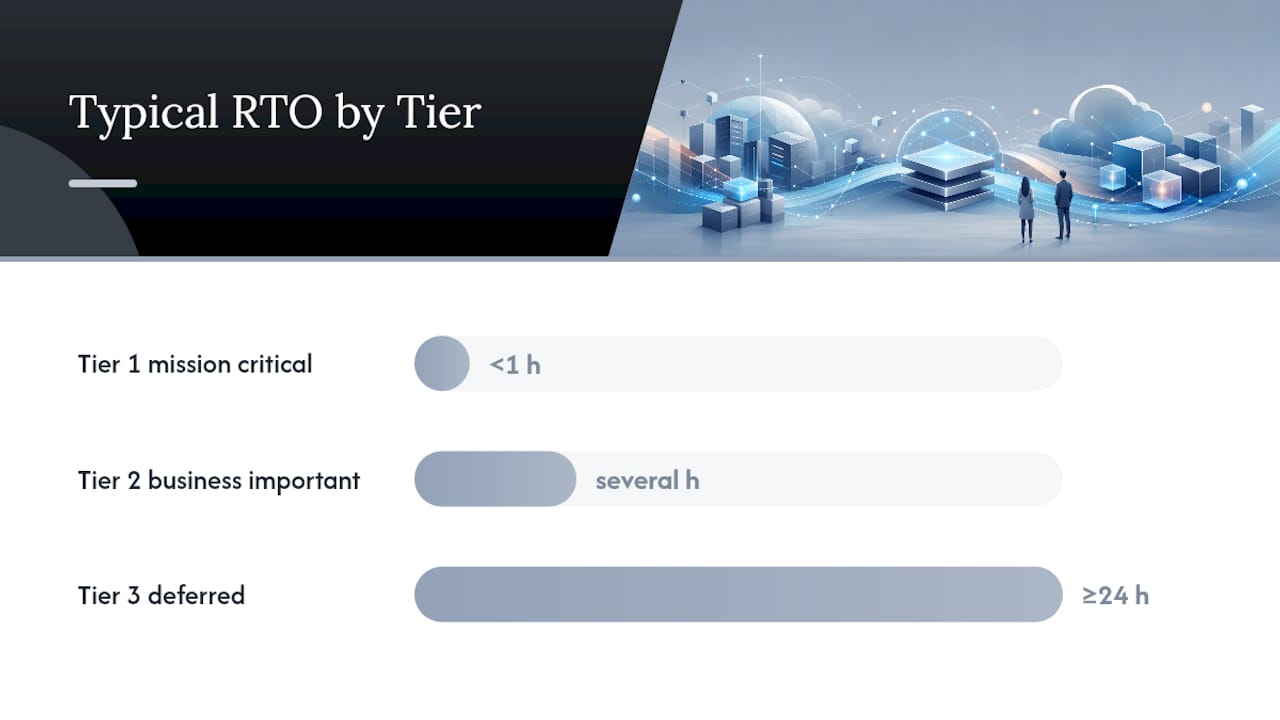
Once you have real numbers, tier your systems. A typical structure looks like this:
- Tier 1 (mission critical): typical RTO and RPO targets are very low, measured in under an hour and minutes respectively. Payment processing, patient records, core order systems.
- Tier 2 (business important): mid-range RTO and RPO targets, spanning several hours, fit internal reporting tools and secondary applications.
- Tier 3 (deferred): longest RTO and RPO targets, typically measured in a day or more, apply to archival systems, internal wikis, and low use tools.
Right-sizing this way stops you from over-engineering recovery for systems nobody urgently needs back, a point Google Cloud's disaster recovery planning guide makes directly: tiering by business impact protects the systems that matter without burning budget on the ones that don't.
What backup strategy actually meets your RPO targets?
Your backup strategy exists to serve your RPO, not the other way around. If your RPO is 15 minutes and your backups run nightly, the strategy has already failed on paper, regardless of how reliable those nightly jobs are.
Start with the 3-2-1 rule as your floor, not your ceiling: three copies of data, on two different media types, with one copy off-site. For Tier 1 systems with aggressive RPOs, extend that with continuous or near-continuous replication to a secondary region, plus immutable snapshots that ransomware can't encrypt or delete. Cloud replication handles the off-site requirement automatically for many workloads, but confirm the replication lag actually meets your RPO. A three-hour replication lag on a system with a 15-minute RPO is a gap waiting to surface during an actual incident.
Build your backup approach around these layers:
- Encrypted backups at rest and in transit, with keys managed separately from the backup environment itself
- Immutable or write-once snapshots for systems at elevated ransomware risk
- Retention windows long enough to satisfy your compliance obligations, not just your storage budget
- Geographic separation between primary and backup locations sufficient to survive a regional event
None of this matters without verification. Vanta's guidance on building an effective disaster recovery plan is blunt about this: an untested backup isn't a recovery option, it's an assumption. Schedule restore tests on a cadence tied to each tier's RPO, monthly for Tier 1, quarterly for Tier 2, and log the actual time each restore took against the target. Healthcare organizations juggling HIPAA obligations on top of this have a narrower margin for error; proving restore integrity for compliance has to be documented, not assumed.
Cold, warm, hot, or active-active: which recovery architecture fits?
The right recovery architecture depends entirely on how much downtime and cost your tiering can absorb, and the four common patterns sit on a clear cost-versus-speed curve. Cold sites cost the least and recover the slowest. Active-active costs the most and recovers almost instantly.
- Cold site: Infrastructure exists but sits powered down or unprovisioned until needed. Cheapest option, but recovery can take days. Fits Tier 3 systems only.
- Warm site: A partially running secondary environment, often scaled down, that needs configuration and data sync before taking over. Recovery in hours. Reasonable fit for Tier 2 workloads.
- Hot site: A fully provisioned, continuously updated secondary environment ready to take traffic with minimal delay. Higher ongoing cost, recovery in minutes. Standard choice for Tier 1 systems.
- Active-active: Two or more environments running live traffic simultaneously, with failover that's nearly invisible to users. Highest cost and design complexity, but effectively eliminates downtime.
Google Cloud's architecture guidance lays out these trade-offs clearly and makes an important point that catches a lot of IT leaders off guard: active-active isn't just expensive to run, it's expensive to design correctly, because data consistency across simultaneously active environments introduces its own failure modes.
Reserve active-active for services where even a five-minute outage carries serious revenue or safety consequences, payment gateways and life-safety systems being the obvious examples. For most Tier 2 and Tier 3 workloads, a well-tested warm or cold site costs a fraction as much and still meets the RTO your BIA actually set.
How do you turn a DR plan into runbooks people can follow under pressure?
A disaster recovery plan that lives as prose in a policy document fails the moment someone needs it at 2 a.m. during an actual outage. What works instead is a runbook: a sequence of specific, executable steps with no room for interpretation.
Structure every runbook around three things:
- Preconditions. What has to be confirmed true before this runbook even starts, like "primary database confirmed unreachable for 10+ minutes."
- Exact commands or script references, not descriptions. "Run failover-db.sh with the production config flag" beats "initiate database failover" every time someone is stressed and reading fast.
- Verification steps confirming the recovery action actually worked before declaring the incident resolved.
Microsoft's Azure Well-Architected guidance on disaster recovery makes this point directly: the plans that hold up under real pressure are structured runbooks with clear escalation paths, not abstract policy documents. Google Cloud's own guidance echoes it, recommending every DR task be written as a concrete, testable command rather than a general instruction.
Assign named roles with alternates for each: a DR director who makes the call to activate, a coordinator who runs the runbook sequence, and a recovery team executing specific technical steps. List contact priorities, who gets called first, second, and third, because phone trees fail when the first name on the list is on a flight.

Write your failure declaration criteria and communication templates before an incident, not during one. A pre-written stakeholder update ("We have identified an outage affecting [system]. Recovery is underway. Next update in 30 minutes.") saves precious minutes when someone would otherwise be drafting language from scratch.
Pro Tip: Print your top three runbooks and keep physical copies off the network they describe. If the incident takes down the wiki hosting your own recovery documentation, digital-only runbooks become useless exactly when you need them most.
How often should you test your disaster recovery plan?
Untested disaster recovery strategies fail in ways nobody predicted, and testing is the only way to find those gaps before a real incident does. Three test types cover most of what you need, each escalating in realism and disruption.
- Tabletop exercises. A walkthrough where the team talks through a scenario step by step without touching production. Cheap, fast, good for validating roles and communication flow. Run these quarterly at minimum.
- Partial restore tests. Actually restoring a system or dataset from backup to confirm it works and measuring how long it took against your RPO. Run monthly for Tier 1 systems.
- Full failover tests. Actually cutting over to your secondary environment for a defined window, then failing back. The only test type that validates your actual RTO under real conditions. Run at least annually for Tier 1 workloads, more often if regulatory obligations demand it.
| Test type | Frequency | Primary metric captured |
|---|---|---|
| Tabletop exercise | Quarterly | Role clarity, communication timing |
| Partial restore | Monthly (Tier 1) | Actual restore time vs. RPO |
| Full failover | Annually (Tier 1) | Actual recovery time vs. RTO |
Capture the actual elapsed time for every test and compare it against the objective it's supposed to validate. A restore that takes three hours against a one-hour RTO isn't a passing test with a note, it's a finding that needs to change your architecture or your objective. Feed every gap discovered back into the plan immediately rather than waiting for the next scheduled review. Teams looking to build out a structured exercise can adapt an existing tabletop exercise framework built around ransomware scenarios, since the exercise mechanics transfer to most disaster types.
How do you keep a disaster recovery plan current and audit-ready?
A disaster recovery plan that hasn't changed in two years is describing an infrastructure that no longer exists. Governance is what keeps the document tied to reality.
Set specific triggers that force a plan review, rather than relying on a calendar alone:
- Any new production system or application goes live
- A vendor or cloud provider changes their infrastructure or contract terms
- Staff turnover affects anyone named in the runbook's role list
- A test reveals an actual time that misses its RTO or RPO target
Put every DR artifact, runbooks, contact lists, architecture diagrams, under version control with a named approver for each revision. A plan that anyone can edit without sign off drifts out of sync with what the infrastructure team actually built.
Keep restore logs and test evidence as permanent records, not just internal notes. Auditors reviewing SOC 2 or HIPAA compliance obligations will ask for proof that testing actually happened, with dates, results, and remediation actions, not just a policy stating that testing occurs. Store this evidence somewhere separate from the systems it documents, for the same reason you keep runbooks off the network they describe.
What should you do this week to start disaster recovery planning?
Momentum matters more than perfection in week one. A rough inventory and a scheduled tabletop beat a beautifully formatted plan that sits unfinished for three months.
- Compile a first-pass inventory of critical hardware, applications, and data stores
- Kick off BIA interviews with process owners in your two or three most revenue-critical departments
- Pull your most recent backup logs and confirm at least one Tier 1 system actually restores successfully
- Book a tabletop exercise date on the calendar for four to six weeks out, even before the plan is finished
- Pull a copy of Ready.gov's business emergency response plan template to structure your documentation from a proven format
If resources are tight, prioritize in this order: BIA first, backup validation second, runbook writing third. A validated backup with no formal runbook still saves you in a crisis. A polished runbook pointing at an untested backup does not.
What risks and threats should a disaster recovery plan actually cover?
Disaster recovery planning has to account for the full range of events that could take critical systems offline, not just the dramatic ones that make headlines. Ransomware and cyberattacks dominate discussion, but hardware failure, human error, power outages, and regional events like floods or wildfires cause a comparable share of real-world recovery activations.
Build your threat list around three categories: technical failures (hardware, software, network), human factors (accidental deletion, misconfiguration, insider action), and environmental or external events (natural disasters, utility outages, vendor failures). For each threat, estimate likelihood and potential impact using your BIA's dollar figures as the yardstick, so a low-probability, high-impact event like a regional power grid failure gets weighed against its actual cost rather than dismissed because it seems unlikely.
Cross-reference this risk assessment against your system tiering. A Tier 1 payment system facing a plausible ransomware threat needs immutable backups and rapid failover regardless of how unlikely the event feels; a Tier 3 archive facing the same threat can tolerate a slower, cheaper response. Threat identification isn't a one-time exercise either. New attack techniques, new vendor dependencies, and infrastructure changes all shift the risk picture, which is part of why risk assessment needs to feed back into your governance review triggers rather than sitting in a document written once and forgotten.
Document your assumptions alongside your risk list. If you assumed your cloud provider's regional redundancy covers a certain failure mode, write that assumption down so it gets tested rather than taken on faith during an actual incident.
What regulatory and compliance factors shape a disaster recovery plan?
Regulatory obligations often set your RPO and RTO before your BIA even gets a vote, and ignoring that reality creates a plan that looks fine internally but fails an audit. Healthcare organizations handling protected health information under HIPAA need documented, testable backup and recovery procedures with evidence retained for inspection. Organizations processing payment card data under PCI-DSS face specific requirements around data retention, encryption, and incident response timing. SOC 2 audits expect documented, tested business continuity and disaster recovery procedures as part of the availability and security trust criteria, and ISO 27001 certification requires a formal business continuity capability tied to information security risk management.
The practical implication is that your DR plan needs a compliance-mapping step where you list every regulatory framework your organization operates under and note the specific recovery, retention, or reporting obligation each one imposes. A payment processor might discover their PCI obligations demand a shorter RPO than their internal BIA would have set on its own. A healthcare provider might find HIPAA's expectations around access logging during recovery require runbook steps that a generic template never mentions.
Document compliance mapping separately from your core DR plan but reference it explicitly, so auditors can trace a straight line from regulatory requirement to specific recovery procedure to tested evidence. This mapping work also needs to survive personnel changes. When the compliance director who understood these obligations leaves, the next person shouldn't have to reconstruct the reasoning behind why a particular system has a 30-minute RPO instead of the standard four hours.
How much should disaster recovery planning actually cost?
Disaster recovery budgets should scale with the tiering your BIA produced, not with a fixed percentage of IT spend pulled from an industry benchmark. Spending hot-site money on a Tier 3 archival system wastes budget that Tier 1 systems actually need, and it's a more common mistake than underspending on critical systems.
Build your budget around four cost categories: infrastructure (secondary sites, replication, cloud standby capacity), tooling (backup software, monitoring, orchestration for failover), testing (the staff time and any environment costs tied to tabletop and failover exercises), and personnel (whether that means training internal staff or contracting external expertise for specialized recovery work). Infrastructure costs typically dominate for Tier 1 systems requiring hot or active-active architectures, while testing and personnel costs matter more once the infrastructure is in place and the ongoing discipline of keeping the plan current becomes the real work.
Present the budget request to leadership in terms of avoided cost, not abstract risk. If your BIA already quantified that an hour of downtime on the order system costs $40,000, a hot-site investment that cuts recovery time from six hours to 45 minutes has a clear payback calculation leadership can evaluate against the investment. That framing tends to get budget approved faster than a general appeal to resilience.
Revisit the budget annually alongside your governance review, since new systems, new regulatory obligations, and infrastructure changes all shift where the money needs to go.
How do you manage third-party and vendor dependencies in a DR plan?
Modern IT infrastructure depends on external vendors for everything from cloud hosting to payment processing to identity management, and every one of those dependencies is a point of failure your disaster recovery plan has to account for. A DR plan that only covers systems your team directly controls has a blind spot the size of your vendor list.
Start by mapping which critical processes depend on which third parties, using the dependency work from your original inventory as the foundation. For each vendor supporting a Tier 1 or Tier 2 system, find out what recovery commitments they actually make. Does their SLA guarantee an RTO that matches what your business needs, or does it just promise "best effort"? A cloud provider's own disaster recovery capability is only useful to you if your architecture actually uses the redundant regions or failover features they offer, which requires deliberate configuration rather than an assumption that redundancy happens automatically.
Build vendor contact information and escalation procedures directly into your runbooks, the same way you'd document an internal team's contact priority. Know who to call at your cloud provider, your payment processor, and your critical software vendors during an incident, and confirm those contacts are current at least as often as you review the rest of the plan.
Where a single vendor supports a Tier 1 process with no fallback option, that concentration itself is a risk worth escalating to leadership. Sometimes the fix is a secondary vendor relationship; sometimes it's simply documenting the exposure so it's a known risk rather than a surprise during an actual outage.
How do you keep a disaster recovery plan improving over time?
A disaster recovery plan is never finished, and treating it as a document to file away after the first draft is one of the most common ways these plans quietly go stale. Continuous improvement means every test, every real incident, and every infrastructure change generates a specific action that updates the plan.
After every tabletop exercise or restore test, run a short debrief that captures what worked, what took longer than expected, and what assumption turned out to be wrong. Assign an owner and a deadline to each finding, the same way you'd track any other operational issue, rather than letting lessons learned live only in someone's memory. A restore that took three hours against a one hour RTO should generate a ticket, not just a note in a meeting.
Real incidents, even small ones, deserve the same treatment as formal tests. If a minor outage revealed that a runbook step referenced a server that had been decommissioned months earlier, that's a direct signal the change management process isn't feeding updates into the DR plan. Close that loop by making DR plan review a required step whenever infrastructure changes go through your standard change approval process, not a separate activity someone has to remember to do.
Track a small set of metrics over time. Are your actual restore and failover times trending toward your RTO/RPO targets or away from them? Is the gap between test frequency and infrastructure change frequency growing? Those trends tell you whether the plan is keeping pace with the environment it's supposed to protect, which matters more than whether the document itself looks complete.
Why most disaster recovery plans fail before they're ever needed
The gaps I see most often aren't technical. They're structural: a backup that's never been restored, a runbook that names someone who left the company eighteen months ago, an RTO that IT invented independently of what the business actually needs. Every one of those failures is invisible right up until the moment they're catastrophic.
What actually shortens recovery time isn't better technology, it's fewer handoffs. When threat detection, infrastructure management, backup validation, and incident response all sit with different vendors, every recovery decision waits on a phone call to someone else's on-call rotation. Consolidating those functions cuts that coordination lag directly, which is often the real difference between a four-hour outage and a fourteen-hour one.
If your plan hasn't had a full tabletop exercise this year, put a date on the calendar this quarter. Not next year's roadmap. This quarter.
— Nick - Sr. Executive
How Nexus turns a disaster recovery plan into a tested recovery
One alternative to piecing together disaster recovery across multiple vendors is a single team that facilitates the BIA, builds the runbooks, validates restores, and runs the failover, reducing coordination gaps during incidents.

An initial engagement typically starts with a workshop to map critical systems and set RTO/RPO targets against your actual business impact data, not generic defaults. From there, AccountNext-Nexus builds runbooks specific to your infrastructure, schedules restore validation on a cadence matched to your RPO, and documents the evidence auditors expect for SOC 2, HIPAA, or PCI-DSS reviews. For organizations that need hands-on execution during an actual event, managed failover support means a recovery team is already familiar with your environment before anything goes wrong. If your current plan exists mostly on paper, the fastest way to know where it stands is a straightforward gap assessment. Review Nexus's IT and cybersecurity services to see how a consolidated recovery engagement fits your infrastructure.
Where to verify the details in this plan
Government and vendor guidance offers free templates and technical detail worth checking against your own plan as you build it out.
- Ready for inventory, backup, and testing fundamentals
- Ready for structuring documentation
- NIST SP 800-34 for the federal standard on RTO/RPO and contingency planning
- Microsoft Azure's disaster recovery design guidance and Google Cloud's DR planning guide for cloud recovery architecture
Sources
- Ready
- Develop a disaster recovery plan for multi-region deployments - Microsoft Learn
- NIST SP 800-34 Rev.1 (errata)
- Disaster recovery planning guide | Cloud Architecture Center | Google Cloud Documentation
FAQ
What are the 5 steps of disaster recovery planning?
Most frameworks follow risk assessment, business impact analysis, setting RTO/RPO and recovery strategy, developing runbooks with defined roles, and ongoing testing with plan maintenance. The exact naming varies by source, but the BIA and testing steps are consistent across nearly every credible framework.
What should a disaster recovery plan include?
A complete plan includes a systems and dependency inventory, a business impact analysis, defined RTO/RPO targets by tier, a backup and replication strategy, runbooks with named roles and escalation contacts, a communication plan, and a documented testing schedule. AccountNext-Nexus builds each of these components during a facilitated DR engagement rather than leaving them as separate, disconnected documents.
What are the 4 C's of disaster recovery?
There's no single standardized "4 C's" framework across the industry, and definitions vary by source. If you've encountered this term from a specific vendor or consultant, treat it as that source's own model rather than an established universal standard.
What are the 4 phases of disaster recovery?
The commonly cited phases are mitigation (reducing risk before an event), preparedness (building the plan and running tests), response (executing runbooks during an actual incident), and recovery (restoring normal operations and capturing lessons learned). Each phase feeds the next, and skipping preparedness is the most common reason response phases run longer than planned.
How is disaster recovery different from business continuity planning?
Disaster recovery focuses specifically on restoring IT systems, applications, and data, while business continuity planning covers how the entire organization keeps operating, including people, facilities, and manual workarounds. Both should draw from the same business impact analysis so their recovery timelines actually align.