
HIPAA compliance for backups comes down to one thing: a retrievable, exact copy of ePHI that you can prove works. Encryption and access controls matter, but the Security Rule cares most about recoverability. The immediate action for any healthcare IT team is to confirm signed BAAs with every backup vendor, map ePHI locations to backup jobs, then run a restore test and file the evidence before an auditor asks for it.
TL;DR:
- Ensuring backup restore testing with documented results is more critical for HIPAA compliance than encryption alone, as auditors focus on recoverability evidence.
- Signed Business Associate Agreements must cover all backup vendors, including subcontractors, and allow data export without penalty to avoid disqualification from handling ePHI.
- A robust backup strategy requires immutable copies, offline storage, and periodic integrity checks of restored files, not just checksum validation.
- Backup and restore procedures should be specific, regularly tested, and include detailed runbooks with clear validation steps to meet contingency plan requirements.
- Consolidating threat detection, backup orchestration, and compliance reporting under one managed service minimizes gaps and ensures timely, auditable recovery proof.
Table of Contents
- What HIPAA requires for backups and contingency planning
- What technical controls make a backup defensible in an audit?
- How do you build an RTO/RPO plan and restore runbook that hold up?
- How do you evaluate a HIPAA compliant backup provider?
- How does a managed service close the gaps most healthcare IT teams miss?
- What the conventional advice on HIPAA backups gets wrong
- How Nexus helps you get audit ready
- Primary sources and references
- Sources
What HIPAA requires for backups and contingency planning
The requirement itself is short. 45 CFR §164.308(a)(7) says covered entities and business associates must establish and implement policies and procedures for responding to an emergency or other occurrence that damages systems containing ePHI. That single standard breaks into five implementation specifications, and auditors work through them in order.
A data backup plan comes first: procedures to create and maintain retrievable, exact copies of ePHI. Next is the disaster recovery plan, which covers restoring lost data. Emergency mode operation plan follows, addressing how critical business processes keep protecting ePHI while systems are down. Testing and revision procedures require periodic testing of the contingency plans, and application and data criticality analysis asks you to rank which systems matter most and in what order they come back online.
HHS guidance on cloud computing and HIPAA treats these five components as inseparable from the availability requirement baked into the Security Rule. A cloud provider storing your ePHI doesn't relieve you of contingency planning. It shifts some technical work to the vendor while leaving the compliance obligation with you.
Responsibility splits matter here. A covered entity (a hospital, clinic, or health plan) owns the ultimate compliance obligation. A business associate, including any cloud backup vendor or managed service provider touching ePHI, is contractually bound through a Business Associate Agreement to protect that data to the same standard. If your backup vendor won't sign a BAA, that vendor is disqualified from touching ePHI, no matter how good the technology looks.
Auditors and OCR investigators tend to ask for the same handful of documents. If you can't produce these quickly, treat that as a compliance gap:
- A written data backup and disaster recovery policy naming systems, frequency, and retention.
- A current system inventory mapping which applications and databases hold ePHI.
- Signed BAAs covering every backup and cloud storage vendor in the chain, including subcontractors.
- Documented restore procedures, not just backup procedures.
- Test records showing when a restore was last attempted, what was verified, and who signed off.
HHS breach notification guidance points to a recurring pattern in enforcement actions: organizations had backups running, but no evidence they'd ever tested a restore. That gap, not a missing encryption checkbox, is what turns a routine audit into a finding.
What technical controls make a backup defensible in an audit?
Encryption is table stakes, not the finish line. Data at rest should use AES-256, and FIPS 140-validated modules where your infrastructure supports it. Data in transit needs TLS 1.2 or higher, no exceptions for internal network segments carrying ePHI. Client-side encryption, where your organization holds the keys before data ever leaves your network, adds a layer that survives even a compromised storage provider. Our own breakdown of patient data encryption best practices covers key rotation schedules and audit artefacts in more depth.
Key management decides how defensible that encryption actually is. Bring-your-own-key (BYOK) arrangements give you control independent of the cloud provider, which matters if you ever need to prove the provider couldn't unilaterally access plaintext ePHI. A properly separated key management system, whether a cloud KMS or a dedicated hardware security module, should enforce separation of duties so no single administrator can both access data and manage the keys protecting it. Build in key escrow for disaster scenarios: losing your only copy of an encryption key turns a recoverable backup into a permanently lost one.

Immutability has become the practical standard for ransomware resilience, even though HIPAA's text never uses that word. Immutable object locks prevent a backup from being altered or deleted for a defined retention window, which stops ransomware that has already compromised admin credentials from also destroying your recovery point. Pair that with at least one offline or air-gapped copy. Industry practice increasingly recommends a 3-2-1 backup strategy: three copies of the data, on two different media types, with one copy offsite and isolated from the production network.
Pro Tip: Run a quarterly integrity check that actually opens and validates a sample restored file, not just a checksum comparison. A backup that passes checksum validation but contains corrupted patient records has failed the only test that matters.
Audit logging closes the loop. Auditors expect records of every create, modify, delete, and restore event touching a backup job, tied to a specific user identity. Role-based access control paired with multi-factor authentication should gate who can even initiate a restore or alter a retention policy. 45 CFR §164.312 requires audit controls and integrity mechanisms as technical safeguards, and backup systems fall squarely inside that scope. Logs need tamper protection, ideally write-once storage, and most compliance teams retain them for six years to align with HIPAA's documentation retention rule.
One figure worth internalizing: organizations that lack tested restore evidence are the ones OCR flags most often in contingency planning reviews, not organizations with weak encryption. Auditors assume encryption exists. They ask you to prove restoration works.
How do you build an RTO/RPO plan and restore runbook that hold up?
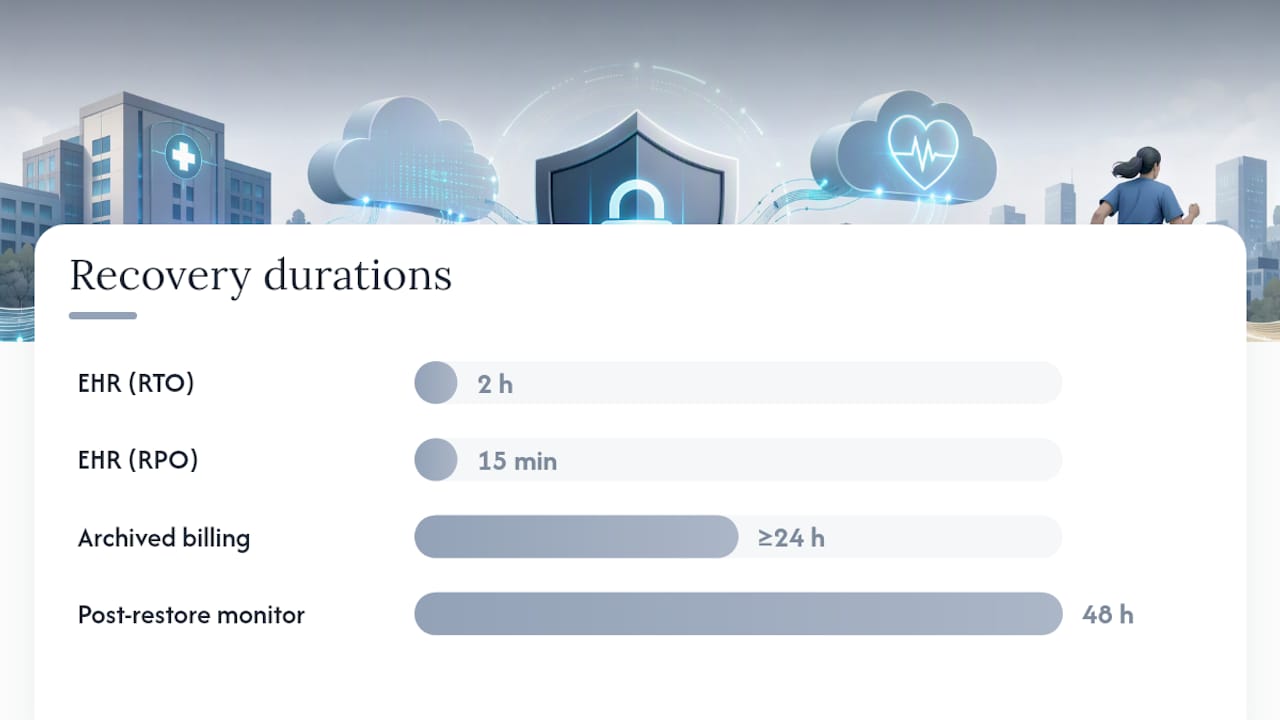
Recovery Time Objective (how long you can tolerate a system being down) and Recovery Point Objective (how much data loss is acceptable, measured in time) should come out of a real business impact analysis, not a guess. Rank every system by whether it touches ePHI and how patient care depends on it. An electronic health record system might carry an RTO of two hours and an RPO of fifteen minutes. An archived billing system from three years ago can tolerate a day or more of either.
Setting those numbers is only step one. Getting there requires a runbook.
- Define the trigger conditions that activate the runbook, such as a ransomware detection alert or a storage failure notification.
- Assign named roles, not job titles alone, for who initiates the restore, who validates data integrity, and who communicates status to leadership.
- List prerequisites: credentials needed, isolated recovery environment availability, and confirmation that the backup source itself hasn't been compromised.
- Write the restore actions as literal, ordered steps, specific enough that someone unfamiliar with the system could follow them under pressure.
- Build in validation checks, comparing record counts, spot-checking patient records, and confirming application functionality before declaring the restore complete.
- Schedule post-restore monitoring for at least 48 hours to catch latent corruption or incomplete data transfer.
Testing cadence needs to match system criticality. Common practice includes file-level restore tests and periodic full system restores and disaster recovery tests, with frequency adjusted based on criticality.
Every test needs a record: date, systems tested, RTO/RPO achieved versus target, and sign-off from whoever validated the restore. Our ransomware tabletop exercise guide walks through how to structure these tests so staff readiness, not just technology, gets evaluated. Change control matters just as much as testing: every infrastructure change, from a new database schema to a shifted network segment, should trigger a review of whether backup jobs still capture everything they're supposed to. Backup drift, where configuration changes silently break a backup job, is one of the most common causes of a failed restore discovered only during a real incident.
How do you evaluate a HIPAA compliant backup provider?
Start with contract language, not architecture diagrams. Ask whether the vendor will sign a BAA covering the specific backup service, whether that BAA discloses any subcontractors handling your data, and whether you retain the right to export your data on demand without penalty or delay. A vendor that hedges on export rights is signalling lock-in risk, which becomes a business continuity problem the moment the relationship ends.
Architecture questions come next. Who holds the encryption keys, you or the provider? Does the backup capture application-consistent snapshots, meaning a database backup that reflects a coherent transaction state rather than a mid-write snapshot that won't restore cleanly? Does the platform support immutable retention windows, and does it replicate geographically in case an entire region goes offline?
- Confirm the vendor's documented restore SLA in writing, not marketing language.
- Request a history of actual test results, not just uptime statistics.
- Verify access control granularity down to the individual backup job, not just account-level permissions.
- Ask for independent attestations such as SOC 2 or ISO 27001 reports covering the backup infrastructure specifically.
Pro Tip: Ask a prospective vendor to walk you through their own last documented restore test. If they can't produce one immediately, that tells you more than any brochure will.
Major cloud platforms document backup capabilities that can support a HIPAA program. Microsoft's compliance documentation for HIPAA/HITECH and comparable material from other cloud providers describe HIPAA-eligible services, but configuration and contracting remain entirely your responsibility. Native cloud backup tools work well for organizations with dedicated engineering capacity to manage keys, test schedules, and evidence collection in-house. A managed service tends to fit better once the compliance documentation burden outgrows what an internal team can sustain alongside daily operations, which is often sooner than IT leadership expects. Our guide to cloud security in healthcare covers the configuration gap in more detail.
How does a managed service close the gaps most healthcare IT teams miss?
Backup orchestration, threat detection, and compliance documentation usually live in three different tools, managed by three different teams, none of whom talk to each other until an audit forces the conversation. That fragmentation is exactly where restore gaps hide: a backup job silently fails, nobody notices because the monitoring system watching for ransomware doesn't watch backup job status, and the compliance officer finds out during a records request rather than a Tuesday morning alert.
Consolidating those functions under one provider closes that gap by design. Real-time threat detection that also watches backup job health means a stalled backup gets flagged the same way a suspicious login would. Compliance reporting that draws directly from the same platform running the backups produces evidence that matches operational reality instead of a document written months after the fact.
For healthcare organizations working with a managed service provider, that consolidation translates into concrete deliverables:
- Documented restore runbooks specific to each ePHI-holding system, not a generic template.
- Restore test evidence collected on a defined schedule and stored for audit retrieval.
- Business Associate Agreements covering backup orchestration and any subcontracted storage.
- Key management support, including guidance on BYOK arrangements and rotation policy.
- Periodic compliance reports summarizing test results, RTO/RPO performance, and any configuration drift identified.
The goal isn't a different backup product. It's a single accountable relationship where the same team that detects a threat is also the team that can prove your last restore worked.
What the conventional advice on HIPAA backups gets wrong
Most guidance on this topic still leads with encryption standards, as if picking AES-256 over some weaker cipher were the decision that keeps an organization out of trouble. It isn't. The research here points somewhere else entirely: contingency plan failures, specifically the absence of tested restore evidence, show up repeatedly in enforcement patterns. Encryption is necessary and almost universally already in place by the time an auditor shows up. It's rarely the finding.
What gets underestimated is how much of this is a documentation problem dressed up as a technical one. A team can have flawless immutable backups running on schedule and still fail an audit because nobody wrote down when the last restore test happened or who signed off on it. That's not a technology gap, it's a discipline gap, and it's the one most IT teams defer because it doesn't feel urgent until an auditor asks for it directly.
If you take one thing from this guide, make it this: schedule your next restore test before you finish reading, and write down the result. Everything else, key management, immutability, vendor selection, matters, but none of it substitutes for proof that recovery actually works.
— Nick - Sr. Executive
How Nexus helps you get audit ready
Building and maintaining every piece covered here, BAAs, key management, tested runbooks, quarterly evidence reports, takes sustained attention most healthcare IT teams can't spare on top of daily operations. AccountNext-Nexus is built to carry that load directly rather than hand you another dashboard to babysit.

Engaging a managed backup and compliance support service gets you managed backup orchestration built around your specific ePHI systems, a signed BAA covering the full backup chain, key management support including BYOK guidance, and a scheduled restore testing program with documented results. On engagement, you receive the runbooks specific to your environment, a record of every test performed, and quarterly compliance reports you can hand directly to an auditor without rewriting them first.
If your last restore test is more than a quarter old, or you can't say with certainty when it happened, that's the gap worth closing now. Request a compliance readiness assessment through Nexus's IT and cybersecurity services and find out exactly where your current backup posture stands before an auditor does.
Primary sources and references
This guide draws on the HHS cloud computing and HIPAA guidance, the regulatory text at 45 CFR §164.308 and 45 CFR §164.312, and HHS breach notification guidance. Practical implementation detail comes from AccountableHQ's audit-ready checklist and Daydream's disaster recovery implementation guide. For questions about your organization's specific backup architecture, visit AccountNext-Nexus.
This article is general information, not a substitute for advice from a qualified lawyer. Consult a qualified legal professional about your own circumstances before acting on anything here.
Sources
- HHS cloud computing and HIPAA guidance
- eCFR — 45 CFR §164.308 contingency planning
- HIPAA Disaster Recovery Plan: Implementation Guide | Daydream
- HIPAA backup compliance practical guide | AccountableHQ