
Phishing-resistant MFA uses cryptographic, origin-bound authenticators like FIDO2 security keys and passkeys instead of codes or push approvals that attackers can intercept or trick users into handing over. For privileged accounts, finance teams, and production access, deploy FIDO2 or device-bound passkeys as the default. Treat TOTP as a temporary fallback and drop SMS entirely. NIST and CISA both back this approach for any account that matters.
TL;DR:
- Phishing-resistant MFA relies on cryptographic authenticators like FIDO2 and passkeys that bind login attempts to specific domains, preventing interception and replay attacks.
- Globally recognized standards like NIST and CISA strongly recommend migrating to phishing-resistant methods, especially for high-risk accounts such as admins, finance, and production access.
- Deployments should prioritize privileged accounts first, then move to finance and high-exposure workers, before gradually covering the entire workforce over several months.
- Interim measures like TOTP and number matching improve security during migration but should be phased out as full phishing-resistant MFA is implemented.
- Operational vulnerabilities, including help-desk resets and poor recovery procedures, pose significant risks that require strict process controls and leadership sponsorship for effective mitigation.
Table of Contents
- What is phishing-resistant MFA and why it matters
- What do NIST and CISA say about phishing resistance?
- Which phishing-resistant methods should you deploy?
- How should you prioritize a phishing-resistant MFA rollout?
- What does a practical deployment checklist look like?
- Which interim mitigations work while you migrate?
- What are the biggest operational pitfalls?
- How Nexus approaches phishing-resistant MFA rollouts
- Why leadership sponsorship decides whether this actually sticks
- Get help planning your rollout
- Sources
- FAQ
What is phishing-resistant MFA and why it matters
Phishing-resistant MFA works because the authenticator, not the human, decides whether a login attempt is legitimate. A FIDO2 or WebAuthn credential performs a public-key challenge and response tied to the exact origin (the domain) that requested it. If an attacker sets up a lookalike login page at a slightly different domain, the browser and the authenticator refuse to complete the handshake. No password, code, or shared secret ever travels across the wire, so there's nothing for a phishing kit to capture and replay.
That single design choice closes off a whole category of attacks that have made a mess of traditional MFA over the past few years:
- Phishing proxy kits (like Evilginx-style tooling) that sit between a victim and a real login page, harvesting session tokens in real time — these fail against origin-bound credentials because the proxy domain doesn't match.
- Man-in-the-middle relay attacks that forward one-time codes to attackers within the code's short validity window.
- Push bombing, where attackers spam a victim with approval requests until one gets tapped by accident or fatigue.
- SIM-swap attacks that hijack SMS-based codes by porting a victim's phone number to attacker-controlled hardware.
None of that means phishing-resistant MFA makes an account untouchable. A compromised endpoint (malware with session-hijacking capability, or a device an attacker already controls) can still bypass the authentication layer entirely, so endpoint detection and response remains a separate, necessary control.
Pro Tip: Don't sell phishing-resistant MFA internally as "unhackable." Sell it as closing the single largest attack vector, credential phishing, while endpoint and identity monitoring cover what's left.
The business case tracks the technical one closely. CISA's implementing guidance calls FIDO and WebAuthn the only widely available phishing-resistant standard and urges organizations to prioritize migration wherever feasible. Cyber insurers and auditors increasingly ask about MFA type, not just MFA presence, when assessing account takeover risk. If your compliance questionnaire still lists "MFA enabled: yes/no" as a single checkbox, that checkbox is about to get more specific."
What do NIST and CISA say about phishing resistance?
NIST and CISA don't just recommend phishing-resistant MFA as a best practice. They've built it into formal assurance-level requirements that increasingly shape procurement, audits, and federal contracting expectations, even for organizations that aren't directly regulated.
NIST SP 800-63-4 defines three Authenticator Assurance Levels, and the requirements tighten as risk goes up:
- AAL1: any single-factor or basic MFA is acceptable for low-risk transactions.
- AAL2: verifiers are expected to offer phishing-resistant options, even if they're not yet mandatory, alongside other multi-factor methods.
- AAL3: phishing-resistant authentication is required outright, with authenticators built on non-exportable private keys, replay resistance, and verified authentication intent (a physical action like a tap or biometric check, not just a background approval).
CISA's guidance translates that standard into a practical mandate: prioritize FIDO/WebAuthn migration everywhere it's achievable, and treat it as the reference point against which weaker methods get judged. The phrase CISA uses, the "gold standard" of MFA, has become shorthand across the industry for exactly this category of authenticator.
Translating that into policy is mostly a mapping exercise. Line up your account inventory against assurance level: domain admins, cloud tenant admins, and code-signing credentials sit at AAL3 territory regardless of company size. Finance approvers, DevOps engineers with production push access, and anyone who can modify payroll or wire instructions belong in the same bracket. Everyone else can often run at AAL2 with a phishing-resistant option available and encouraged, even while broader workforce migration continues.
Which phishing-resistant methods should you deploy?
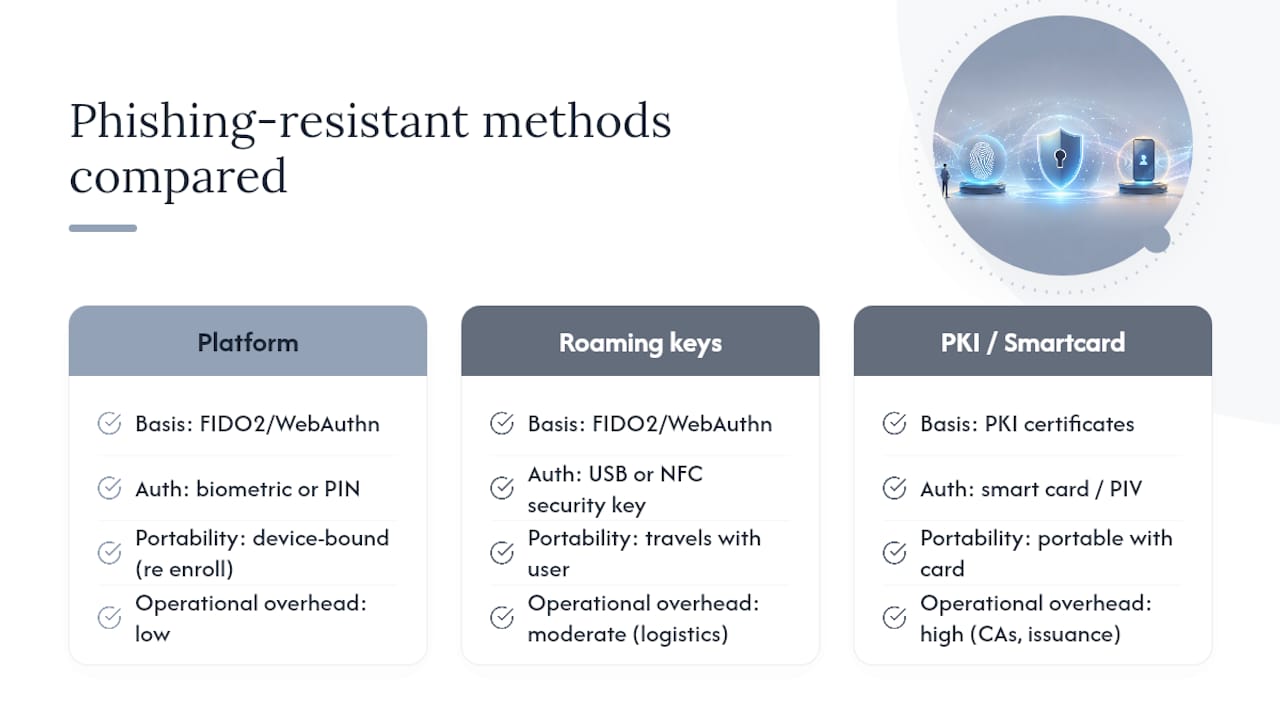
Three technical approaches dominate real-world deployments, and they're not interchangeable in terms of user experience or operational overhead.
FIDO2/WebAuthn is the foundation of nearly everything else on this list. During registration, the authenticator generates a public/private key pair. The private key never leaves the device, isn't exportable, and never gets transmitted or stored anywhere else. During login, the relying party sends a challenge; the authenticator signs it with the private key, binding the signature to the requesting origin. Because the standard is published by W3C and promoted across the industry by the FIDO Alliance, support now spans essentially every major browser and operating system.
Platform authenticators (Windows Hello for Business with a hardware TPM, Apple's Secure Enclave, Android's StrongBox) live inside the device itself. Users authenticate with a fingerprint, face scan, or PIN, and the private key stays locked to that specific machine. Microsoft's guidance confirms that Windows Hello for Business paired with hardware TPMs meets its phishing-resistant bar. The upside is convenience: no extra hardware to hand out or lose. The downside is portability. A user who switches devices has to re-enroll.
Roaming hardware tokens (USB or NFC security keys) solve the portability problem at the cost of logistics. They travel with the user across devices, work for shared workstations, and hold up well for high-turnover environments like call centres or shift-based operations. They also introduce a real supply chain: procurement, inventory tracking, and a spares process for the inevitable lost key.
PKI and smart cards remain the right answer in specific contexts, government agencies with existing PIV infrastructure, defence contractors, and organizations with mature certificate lifecycle management. PKI demands significant operational maturity: certificate authorities, revocation infrastructure, and card-issuance workflows that most mid-sized businesses have no appetite to build from scratch. Unless you already run that infrastructure, FIDO2 gets you similar cryptographic guarantees with dramatically less overhead.
Pro Tip: Don't default every user to a hardware key just because it feels "more secure." Platform authenticators cover the majority of a typical workforce fine; save roaming keys for shared devices, high-turnover roles, and privileged accounts that need to move between machines.
How should you prioritize a phishing-resistant MFA rollout?
Rolling out phishing-resistant MFA to everyone on day one is how projects stall for a year. A tiered approach gets protection to the accounts that matter most within weeks, not quarters.
- Tier 1, privileged administrators. Domain admins, cloud tenant owners, and identity provider administrators. These accounts can do the most damage if compromised and should move to FIDO2 or hardware-backed passkeys first, full stop.
- Tier 2, finance and DevOps. Anyone who can move money, approve wire transfers, or push code to production. Practitioner guidance on choosing between authenticator types consistently puts this group right behind admins for a reason: it's the second most common target for business email compromise and social engineering.
- Tier 3, high-exposure workforce. Executives, HR staff with access to personal data, and anyone whose email address shows up in public filings or press releases (a favourite target list for attackers running spear-phishing campaigns).
- Tier 4, broad workforce. Everyone else, migrated over the following months as hardware and training catch up.
For pilots, keep the cohort small enough to support closely but large enough to surface real friction: 25 to 50 users from Tier 1 and 2 combined works well for most mid-sized organizations. Track enrollment completion rate, help-desk ticket volume per user, and time from enrollment to first successful login. A pilot that generates one help-desk call per five users is healthy; one call per user means your enrollment flow needs work before it scales.
Pro Tip: Phase the technical rollout SSO-first. If your identity provider sits in front of most applications, enforcing phishing-resistant MFA at the SSO layer covers the majority of your app footprint in one move, rather than reconfiguring authentication app by app.
Once SSO is covered, work through the remaining applications by usage volume, highest-traffic apps first, and treat anything that can't support modern authentication as a legacy exception requiring its own compensating control.
What does a practical deployment checklist look like?
Getting from pilot to full deployment comes down to a short list of decisions made correctly the first time, because retrofitting recovery processes after a rollout is painful.
Identity provider configuration:
- Enforce FIDO2 or passkey registration as a required (not optional) authentication method for targeted tiers, using conditional access or equivalent step-up policies.
- Build step-up rules that demand phishing-resistant authentication specifically for sensitive actions, admin console access, payroll changes, code deployment, even if the initial login used a weaker method.
- Confirm your identity provider's authenticator mapping lines up with NIST's assurance categories. Microsoft's own mapping documentation is a useful template for translating standard language into actual product settings.
Secure enrollment and recovery, arguably the part most rollouts underestimate:
- Use a Temporary Access Pass (TAP) for initial enrollment rather than a permanent fallback credential; a TAP expires and can only be used to register a new authenticator, not to log in indefinitely.
- Stage key registration in batches tied to your risk tiers rather than opening self-service enrollment to everyone at once.
- Stock spare hardware keys for high-turnover teams and privileged users; a locked-out admin during an incident is the worst possible timing for a two-day shipping delay.
- Require a phishing-resistant method, or a strict in-person identity check, for any account recovery process. A weak recovery flow undermines a strong authenticator just as effectively as skipping the authenticator altogether, as NIST's own guidance on syncable credentials points out in the context of cloud-backed passkey recovery.
Legacy application handling: some line-of-business applications simply don't support modern authentication protocols. For those, route access through an identity-aware proxy or reverse proxy that can enforce phishing-resistant MFA at the network edge, rework service accounts to use certificate-based authentication where interactive login isn't the actual use case, and document any fallback policy with recovery checks stricter than the standard workforce process, not looser.
Which interim mitigations work while you migrate?
Full phishing-resistant MFA rarely lands everywhere on day one. Legacy applications, contractor devices, and vendor constraints all create gaps that need a tactical answer, not a shrug.
- Number matching for push-based authenticator apps closes the push-bombing gap specifically: instead of tapping "approve," the user enters a number displayed on the login screen into their app. It doesn't add cryptographic origin binding, but it kills the "spam approvals until someone taps by accident" attack outright, and CISA lists it as a recommended interim mitigation where immediate FIDO2 migration isn't yet practical.
- TOTP (time-based one-time codes) remains an acceptable transitional fallback for lower-risk accounts, but it should come with tighter recovery controls and closer monitoring than a phishing-resistant credential needs, precisely because TOTP codes can still be phished in real time by a relay attack.
- SMS and voice codes should not appear anywhere near a high-value account. Microsoft's mapping guidance explicitly recommends against SMS and PSTN-based authentication for secure access, and SIM-swap attacks have made this the weakest link in nearly every MFA method still in wide use.
Treat interim mitigations as a bridge with a deadline, not a permanent architecture. A gap that "temporarily" runs on TOTP for two years is a gap that never got prioritized.
What are the biggest operational pitfalls?
Most phishing-resistant MFA failures aren't technical. They're process gaps that show up during an incident, exactly when you can least afford them.
- Help-desk takeover is the most common bypass route. If a help desk agent can reset MFA over the phone with just a name and employee ID, an attacker doesn't need to beat your cryptography at all, they just need to social-engineer the recovery process. Break-glass accounts and MFA reset procedures need the same phishing-resistant bar as the accounts they protect.
- Lost hardware keys stall people fast. Maintain a spares inventory, a documented rapid re-enrolment procedure, and a clear owner for hardware distribution, particularly for remote employees who can't just walk to IT.
- Monitoring has to look for the right signals. Watch for authentication attempts from unfamiliar origins, repeated failed WebAuthn challenges (a possible sign of proxy interception attempts), and unusual patterns in authentication telemetry feeding your detection stack. A spike in failed FIDO2 challenges from one IP range is worth an alert, not a shrug.
Pro Tip: Run a tabletop exercise where the "attacker" targets your help desk instead of your authentication technology. Most organizations discover their weakest link is a phone script, not a cryptographic protocol.
How Nexus approaches phishing-resistant MFA rollouts
Nexus built a 90-day framework for reducing business email compromise risk that treats phishing-resistant MFA as one lever among several, paired with phishing-simulation metrics and privileged access controls that reinforce each other rather than operating in isolation. The USDA's own FIDO deployment offers a useful real-world template: they integrated FIDO with centralized SSO and rolled out incrementally to cover staff who couldn't use existing PIV cards, rather than forcing a single authentication method on every user type at once.
Consolidating cybersecurity, identity, and compliance under one provider removes a lot of the friction that slows hardware key rollouts, procurement, help-desk training, and monitoring integration stop being three separate vendor conversations.
Why leadership sponsorship decides whether this actually sticks
Phishing-resistant MFA projects that stall almost always stall on budget and change management, not technology. Hardware procurement, help-desk retraining, and legacy application rework all need executive sponsorship to move at pace, not just a security team mandate.
Governance should mean a written policy mapping account tiers to assurance levels, a small set of metrics reported to leadership quarterly (enrollment completion, TOTP fallback usage trending down, help-desk reset volume), and recovery budgets sized to match the assurance level they protect. An organization that spends generously on hardware keys but leaves recovery on a five-minute phone call has built a strong front door with a weak back one.
— Nick - Sr. Executive
Get help planning your rollout
Standing up phishing-resistant MFA across privileged accounts, finance teams, and a broader workforce touches identity, endpoint, compliance, and help-desk process all at once, which is exactly the kind of multi-domain project that stalls when it's split across separate vendors. A provider that consolidates cybersecurity, identity, and compliance services under one point of accountability can help ensure hardware key rollout, conditional access policy, and monitoring integration are planned and executed as one coordinated project instead of three uncoordinated ones.

Nexus's cybersecurity and identity services cover the full path from risk-tier assessment through pilot design, enrollment support, and ongoing monitoring, backed by certified practitioners rather than generalists handling authentication as a side task. If your organization is weighing where to start, whether that's Tier 1 admin accounts, a stalled legacy app, or a help-desk recovery process that hasn't been stress-tested, book a consultation through Nexus's services page to scope a rollout plan built around your actual risk tiers.
Sources
- CISA: Implementing phishing-resistant MFA (fact sheet)
- NIST SP 800-63: Digital identity guidelines (authentication and authenticator)
- Microsoft: authentication passkeys and FIDO2
FAQ
Is Microsoft Authenticator phishing-resistant?
It depends on how it's used. Microsoft Authenticator supports passkeys and passwordless sign-in, which Microsoft classifies as phishing-resistant, but standard push notifications through the same app are not, since they lack origin binding and can be approved under push-bombing pressure.
How do you make MFA phishing-resistant?
You replace shared secrets and approval prompts with cryptographic, origin-bound authenticators like FIDO2 security keys or passkeys, where the private key never leaves the device and the login is cryptographically tied to the exact requesting domain. NIST SP 800-63-4 sets the technical requirements this authentication has to meet, including non-exportable keys and replay resistance.
What's the difference between passwordless MFA and phishing-resistant MFA?
Passwordless just means no password is typed, a push notification or SMS code is passwordless but not phishing-resistant. Phishing-resistant MFA specifically requires origin-bound public-key cryptography, which is why Microsoft's own criteria exclude OATH-TOTP and push notifications from that category even though both are passwordless-adjacent.
Does Microsoft 365 support phishing-resistant MFA?
Yes. Microsoft Entra ID supports FIDO2 security keys, passkeys in Microsoft Authenticator, and Windows Hello for Business with hardware TPMs as phishing-resistant options, all of which can be enforced through conditional access policies for specific user groups or sensitive actions.