
Privileged access management (PAM) is the discipline of controlling, monitoring, and time-limiting the accounts that can change your systems, not just view them. Its core value is simple: it shrinks the blast radius when a credential gets stolen, by enforcing least privilege, just-in-time elevation, and a full audit trail of every privileged session.
TL;DR:
- Privileged accounts include human, non-human, built-in, and emergency types, all of which can access critical systems and must be secured according to their risk level.
- A successful PAM program begins with comprehensive discovery, tiered prioritization, pilot testing, and phased rollout to avoid operational disruption and resistance.
- Core PAM principles focus on enforcing least privilege, implementing just-in-time access, securing non-human identities, and monitoring sessions for anomalies and compliance.
- The highest risks reside in Tier 0 accounts like domain controllers and cloud root access, which require immediate vaulting, monitoring, and JIT permissions.
- Overcoming admin resistance through seamless workflows and rapid credential injection is essential for effective adoption and ongoing PAM program success.
Table of Contents
- What is PAM security, and how is it different from IAM?
- How does a PAM platform actually work?
- What are the core pillars of privileged access management best practices?
- Which privileged accounts should you secure first?
- How do you roll out PAM without breaking IT operations?
- How does PAM fit into a Zero Trust architecture?
- What gets in the way of a successful PAM deployment?
- How AccountNext-Nexus approaches privileged access management for clients
- The overrated advice and the underrated first move
- Ready to close your privileged access gaps?
- Sources
What is PAM security, and how is it different from IAM?
Privileged access management, identity and access management, and privileged identity management get used almost interchangeably in vendor decks, and that sloppiness causes real implementation mistakes. They are related but distinct, and the difference matters when you're deciding which budget line pays for what.
Identity and access management (IAM) governs who you are and what you're generally allowed to do across an organization. It answers questions like "does this employee have an account?" and "can this person log into the CRM?" IAM is broad, covers every employee and often customers too, and typically deals with standing, everyday access.
Privileged access management narrows the focus to accounts that can do damage: root on a server, domain admin in Active Directory, the API key that deploys production code. PAM assumes that a small number of accounts carry outsized risk, and it wraps those accounts in extra controls: vaulting, session recording, approval workflows, and rotation.
Privileged identity management (PIM) is a subset most people associate with Microsoft's Entra ID feature of the same name. PIM handles time-bound role activation inside a specific identity platform. Think of PIM as one implementation pattern within the larger PAM discipline, not a synonym for it.
Secrets management overlaps with PAM but has a narrower job: storing and rotating credentials used by applications, scripts, and pipelines rather than humans. A PAM platform often includes secrets management as one module among several.
Privileged identities aren't only human. A useful way to sort them:
- Human privileged accounts — domain admins, database administrators, cloud root users, help desk staff with elevated ticketing permissions.
- Non-human privileged identities — service accounts, API keys, CI/CD pipeline credentials, IoT device certificates, and the machine identities that outnumber human accounts in most modern environments.
- Built-in administrative accounts — the local admin account that ships with every Windows machine, the default root user on a Linux box, or a factory admin login on network gear.
- Emergency "break-glass" accounts — credentials held in reserve for outages when normal authentication systems are down.
PAM applies wherever one of these identities can reach something valuable: endpoints, on-premises servers, cloud consoles across AWS, Azure, or Google Cloud, network devices, and privileged SaaS admin panels. If it can change a configuration, delete data, or grant access to someone else, it belongs inside a PAM policy, not just an IAM directory entry.
How does a PAM platform actually work?
Underneath the marketing language, every credible PAM platform runs the same basic mechanics: find the privileged accounts, lock the credentials in a vault, broker every session through that vault, watch what happens, and automate the boring parts so humans don't cut corners.
1. Discovery and inventory. You can't protect an account you don't know exists. Discovery scans servers, directories, cloud tenants, and network devices for anything with elevated rights, including forgotten local admin accounts and orphaned service accounts left behind by a departed contractor. Palo Alto Networks points out that this scanning step routinely surfaces shadow accounts that function as backdoors if nobody catalogues them.
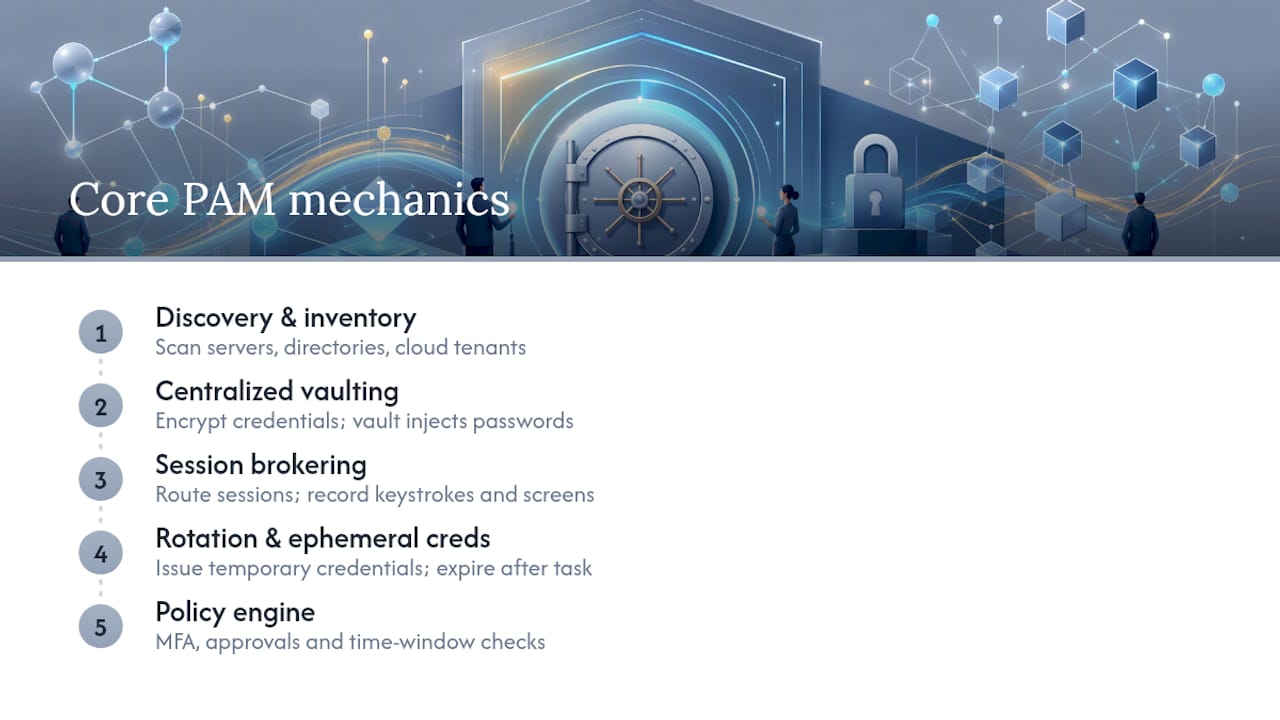
2. Centralized encrypted vaulting. Once accounts are found, their credentials move into an encrypted vault instead of living in spreadsheets, sticky notes, or a password manager nobody rotates. Users and applications never see the actual password. The vault injects it directly into the session, a pattern that also removes the temptation to write credentials into scripts.
3. Session brokering and monitoring. Every privileged connection routes through a broker that can record keystrokes, screen activity, or command-line input in real time. This isn't surveillance for its own sake. It's the mechanism that produces the audit trail auditors ask for and the forensic evidence investigators need after an incident.
4. Automated rotation and ephemeral credentials. Rather than a password that stays valid for 90 days, modern PAM issues temporary credentials that expire the moment the task ends. Microsoft frames this lifecycle, discovery, vaulting, monitoring, and automated provisioning and deprovisioning, as the backbone of meeting SOC 2, HIPAA, and PCI-DSS requirements, because auditors need proof that access was both temporary and logged.
A policy engine ties it together, checking multi-factor authentication, approval rules, and time windows before granting anything.
Pro Tip: Track three numbers monthly: sessions recorded, secrets rotated automatically versus manually, and the percentage reduction in standing (always-on) privileged accounts. Those three metrics tell you more about program health than any dashboard vendor demo.
Standing privilege, credentials that sit active around the clock whether anyone's using them or not, is the single biggest risk PAM programs are built to eliminate. Palo Alto Networks describes the industry shift toward just-in-time access and ephemeral credentials replacing static vaulted passwords, and that shift is now the default expectation in enterprise PAM rather than an advanced feature.
What are the core pillars of privileged access management best practices?
Tooling alone doesn't make a PAM program work. The underlying design principles do, and they're the same four ideas every mature program returns to.
Least privilege means every identity, human or machine, gets the minimum rights needed to do its job and nothing more. Attribute-based access control extends this by granting rights based on role, device posture, location, or time of day rather than a static group membership that never gets reviewed.
Just-in-time (JIT) and just-enough access (JEA) replace always-on admin rights with temporary elevation tied to a specific task. IBM describes the pattern as a clean loop: request, verify, provision, monitor, revoke. An engineer requests access to a production database, multi-factor authentication and policy checks confirm the request, the system grants a time-boxed credential, the session gets watched, and access disappears automatically when the window closes. That loop is also what generates a clean audit trail for compliance reviews.

Securing non-human identities is the piece most organizations get wrong first. CI/CD pipelines, containers, and automation scripts need credentials too, and hard-coded secrets in a repository are one of the most common paths to a breach. BeyondTrust's glossary treats pipeline secrets and API keys as privileged assets that require the same vaulting and rotation discipline as a human admin account, not an exception carved out for developer convenience.
Session isolation and anomaly detection act as your detective layer for the moments prevention fails. Isolating privileged sessions from the endpoint that initiated them limits malware's ability to hop from a compromised laptop into a production system. Behavioural monitoring flags a login at 3 a.m. from an unusual location, or a service account suddenly running interactive commands, patterns a static access control list would never catch.
Putting these together in practice usually means:
- Mapping every privileged role to the narrowest set of permissions that role actually uses.
- Replacing standing admin group membership with time-bound elevation requests.
- Treating every pipeline credential, API key, and service account as a vaulted secret, not a config file entry.
- Routing privileged sessions through an isolated broker with recording enabled by default.
A partner resource worth reading alongside this is Blue Team Academy's practical guide to Zero Trust, which walks through how these access patterns fit inside a broader Zero Trust rollout.
Which privileged accounts should you secure first?
Not every privileged account carries the same risk, and trying to lock everything down simultaneously is how PAM projects stall. A workable prioritisation model sorts accounts into tiers, borrowing loosely from Microsoft's tiered administration model.
Tier 0 (identity control plane) covers domain controllers, certificate authorities, and identity provider admin accounts. Compromise here means an attacker controls authentication for the entire environment. These accounts get vaulted, monitored, and JIT-enabled first, no exceptions.
Tier 1 (infrastructure) includes server admins, database administrators, hypervisor management, and cloud console root access across AWS, Azure, or Google Cloud. A breach here damages specific systems but doesn't automatically hand over the keys to everything else.
Tier 2 (applications) covers application admin panels, help desk elevated tickets, and business software configuration access. Lower blast radius, still worth controlling, but not where you start.
Watch specifically for these risk patterns during discovery:
- Local admin accounts left at default settings on hundreds of endpoints, often with the same shared password.
- Service and application accounts created years ago for a project that no longer exists, still holding active credentials.
- Emergency break-glass accounts stored insecurely because "we'll only use it in a crisis," which is exactly when scrutiny is lowest.
- Shadow accounts created by contractors or during a migration and never decommissioned, a textbook source of credential sprawl.
Credential reuse compounds all of this. TechStack Today's guide on why reusing passwords is risky is worth sharing with your admin team, because a shared or reused privileged password turns one compromised account into ten.
How do you roll out PAM without breaking IT operations?
A PAM rollout fails less often because of bad technology and more often because of bad sequencing. Trying to vault every account and enforce every policy in month one guarantees admin resistance and a flood of exception requests. A phased approach avoids that.
- Discover. Scan every environment, endpoints, servers, cloud tenants, network gear, for privileged accounts, including the ones nobody remembers creating.
- Prioritise. Apply the tiering model above. Tier 0 identity infrastructure moves first.
- Pilot. Vault and monitor a small, high-value account set, typically domain admins or cloud root accounts, and measure friction before expanding.
- Onboard and vault. Move credentials into centralized vaulting and turn on session recording for the piloted group.
- Enforce policies. Apply least privilege, JIT elevation, and approval workflows once the pilot proves the workflow doesn't slow admins down.
- Monitor and automate. Turn on rotation schedules, anomaly detection, and automated deprovisioning tied to HR offboarding.
- Iterate. Expand tier by tier, revisiting policies as new systems and non-human identities appear.
Success in the pilot phase should be measured, not assumed. Reasonable KPIs include the percentage of Tier 0 accounts fully vaulted, the reduction in standing admin group membership, and the number of privileged sessions recorded versus the number that occurred outside the broker entirely (a number you want approaching zero).
The operational side matters just as much as the technical checklist. NIST's guidance on privileged account management in financial services stresses that deployment without training and low-friction workflows leaves gaps, because administrators will find a workaround if the sanctioned path is slower than the old one. Building seamless credential injection so the vaulted workflow feels faster, not slower, than typing a password from memory is what actually drives adoption. Resilience planning matters too: if your vault or broker goes down, you need a documented, still-audited emergency access procedure rather than an ad hoc scramble.
| Rollout phase | Primary goal | Success signal |
|---|---|---|
| Discover | Full inventory of privileged assets | Percentage of environment scanned |
| Pilot | Validate workflow with low friction | Admin adoption without workaround requests |
| Onboard & vault | Centralize credentials | Percentage of Tier 0 accounts vaulted |
| Enforce | Apply least privilege and JIT | Reduction in standing admin accounts |
| Monitor & automate | Sustain visibility and rotation | Sessions recorded vs. total sessions |
Training remains part of the equation throughout, not a one-time kickoff event. AccountNext-Nexus's guide to cybersecurity training for HR leaders covers how to build that ongoing habit without turning it into a compliance chore nobody reads.
How does PAM fit into a Zero Trust architecture?
Zero Trust treats identity as the perimeter, not the network. Every request gets verified, every session gets scoped to the minimum needed, and nothing is trusted just because it's already inside the firewall. PAM is the mechanism that makes that principle enforceable for the accounts that matter most.
NIST's National Cybersecurity Center of Excellence frames PAM as foundational to Zero Trust precisely because restricting privileged access prevents compromised credentials from enabling environment-wide takeover. A stolen password for a standard user account is bad. A stolen domain admin credential is catastrophic, and it's the difference Zero Trust architecture is built to contain.
PAM doesn't operate in isolation. It feeds and receives signals from adjacent systems:
- IAM/IGA integration hands PAM the identity lifecycle context, when an employee joins, changes roles, or leaves, so privileged access gets provisioned or revoked automatically rather than through a manual ticket.
- CIEM (cloud infrastructure entitlement management) extends PAM's reach into the sprawling, often over-permissioned entitlements native to AWS, Azure, and Google Cloud consoles, where a misconfigured IAM policy can be as dangerous as a stolen password.
- SIEM correlation pulls privileged session telemetry into broader threat detection, turning a recorded session into a real-time alert rather than a log entry nobody reviews until after the fact. That integration is what turns session telemetry into timely detections and shortens the time it takes to remediate an incident.
Practical examples show up constantly: a third-party vendor requesting temporary access to a client environment, an engineer needing a two-hour window into a cloud console for a deployment, or a CI/CD pipeline pulling a short-lived credential instead of an API key that never expires. Each case follows the same request, verify, provision, monitor, revoke loop, whether the identity is a person or a script. Organizations weighing whether to build this integration layer in-house or buy a managed platform often find that decision covered well in AccountNext-Nexus's piece on cloud identity access management.
What gets in the way of a successful PAM deployment?
Admin resistance is the most common failure point, and it's almost always a workflow problem disguised as a culture problem. If the vaulted path takes three extra clicks and a support ticket, administrators will find the old password written down somewhere. The fix is designing for speed: seamless credential injection, single sign-on-style access requests, and approval flows measured in minutes, not days.
Legacy systems present a different challenge. Some decades-old applications simply can't support modern credential injection or session brokering. Compensating controls, network segmentation, enhanced logging, manual review cadences, buy time until a phased replacement is feasible.
Non-human identities scale faster than most security teams expect. A single Kubernetes cluster can spin up hundreds of short-lived service identities, and hard-coded credentials in a repository remain one of the most preventable breach vectors around.
Finally, plan for the vault itself becoming a single point of failure. Redundant, geographically distributed brokers with documented emergency procedures, including tightly controlled break-glass access, keep operations running without abandoning audit and rotation discipline during an outage.
How AccountNext-Nexus approaches privileged access management for clients
Most organizations run PAM alongside separate tools for threat detection, cloud management, and compliance reporting, and that fragmentation is exactly where gaps appear. AccountNext-Nexus consolidates privileged access controls with 24/7 real-time threat detection, cloud infrastructure management, and compliance assessment under one service umbrella, so a suspicious privileged session triggers the same incident response pipeline as any other alert, not a separate one nobody's watching.
Whether a managed engagement or an in-house build makes more sense depends on your team's bandwidth. If you have dedicated identity engineers and time to run a multi-quarter rollout, building in-house works. If you need Tier 0 accounts vaulted and monitored this quarter, a managed service closes that gap faster and keeps compliance evidence audit-ready from day one.
The overrated advice and the underrated first move
Most PAM guidance obsesses over tool selection, comparing vaulting features and session recording formats, while glossing over the sequencing question that actually determines success or failure. Buying the right platform is the easy part. Getting a resistant admin team to use it without workarounds is the hard part, and conventional advice barely acknowledges it.
If I had to pick the single highest leverage move for a team starting today, it wouldn't be picking a vendor. It would be running discovery first, ruthlessly, and accepting how ugly that inventory will look. Every organization I'd expect to find this useful has more shadow accounts and forgotten service credentials than they think, and Tier 0 identity infrastructure, domain controllers, identity provider admin roles, deserves vaulting before anything else gets attention.
The conventional wisdom that PAM is primarily a technology purchase undersells the workflow design problem. A vault nobody wants to use is worse than no vault at all, because it creates a false sense of coverage. Start with the accounts that can take down your entire identity layer, make the sanctioned path the fastest path, and let a managed partner absorb the operational grind if your team doesn't have the bandwidth to run that grind well.
— Nick - Sr. Executive
Ready to close your privileged access gaps?
AccountNext-Nexus is the alternative to stitching together five separate vendors for vaulting, monitoring, and compliance reporting: one contract, one SLA, and a security team that already sees your privileged session data alongside your threat detection and compliance evidence, instead of in a separate dashboard nobody checks.

A typical engagement starts with a discovery assessment across your endpoints, servers, and cloud consoles, identifying which Tier 0 and Tier 1 accounts are exposed right now. From there, AccountNext-Nexus builds a phased vaulting and monitoring pilot, backed by 24/7 real-time threat detection and audit-ready reporting mapped to SOC 2, HIPAA, and PCI-DSS. You get transparent pricing and direct access to experienced security professionals instead of a support queue.
If your organization is running privileged accounts without a vault, without session recording, or without a clear owner for compliance evidence, that's the gap worth closing next. Book a PAM assessment with AccountNext-Nexus and get a clear picture of where your privileged access risk actually sits before your next audit or incident forces the conversation.