
A complete employee cybersecurity training programme delivers measurable behaviour change and audit-ready evidence — and you can start building one this week with three actions: run a baseline phishing simulation, open a dedicated incident-reporting channel, and schedule annual security awareness training for every employee.
Those three steps are not arbitrary. NIST SP 800-50 Rev. 1 frames effective learning programmes around documented, repeatable training that shifts culture, not just knowledge scores. Breach cost data consistently shows human error as a leading factor in incidents, and the financial exposure dwarfs any realistic training budget. The three immediate actions:
- Run a baseline phishing simulation before any training launches — you need a real click rate, not a guess.
- Open a phishing-report button or dedicated inbox so employees have somewhere to send suspicious messages from day one.
- Schedule annual security awareness training for all staff, mapped to your compliance obligations (HIPAA, SOC 2, PCI-DSS, or NIST CSF depending on your sector).
The rest of this guide gives you the checklist, the module outlines, the step-by-step rollout, the KPIs, and the budget ranges to turn those three actions into a full programme.
Key takeaways
A complete employee cybersecurity training programme requires documented, role-based learning, continuous phishing simulations, automated remediation, and audit-ready evidence mapped to your compliance framework.
| Point | Details |
|---|---|
| Start with a baseline simulation | Run a phishing test before any training to establish your real click and report rates. |
| Role-based paths close the highest-risk gaps | Finance, HR, executives, and developers each need tailored modules beyond the general curriculum. |
| Behaviour metrics beat completion rates | Track phishing click rate, report rate, and time-to-report; completion alone satisfies no auditor. |
| Map evidence to each compliance framework | HIPAA, SOC 2, PCI-DSS, and NIST each require specific training records; organise evidence by framework. |
| AccountNext-Nexus consolidates delivery | Managed security, compliance reporting, and audit support under one agreement reduces programme administration significantly. |
Table of Contents
- What does a complete employee cybersecurity training programme include?
- What should employees actually learn? Core modules and role-based paths
- How to build the programme step by step
- Which delivery approaches and platforms matter most in 2026?
- How do you meet NIST, HIPAA, SOC 2, and other compliance requirements?
- How do you measure whether the training is actually working?
- Sample 90-day rollout and realistic budget ranges
- How do you keep employees engaged throughout training?
- How do you keep training content current as threats evolve?
- Why consolidation with a managed partner simplifies delivery
- AccountNext-Nexus removes the operational burden of running this programme
- Sources
What does a complete employee cybersecurity training programme include?
Use this checklist to audit an existing programme or design one from scratch. Share it with your security team, compliance lead, and any vendor you are evaluating.
| Category | Required element | Notes |
|---|---|---|
| Policy and governance | Acceptable use policy (AUP) | Signed at onboarding; reviewed annually |
| Incident reporting policy | Clear escalation path and reporting channel | |
| Role responsibilities matrix | Who owns training delivery, records, and remediation | |
| Training record retention | Minimum retention aligned to your compliance framework | |
| Learning components | Security onboarding module | Completed within first 30 days of employment |
| Role-based curriculum | Finance, HR, IT, executives, developers each have tailored paths | |
| Annual refresher training | Covers updated threats; completion tracked and logged | |
| Monthly phishing simulations | Covers email, and increasingly voice and video deepfakes | |
| Just-in-time coaching | Triggered automatically when an employee clicks a simulated phish | |
| Operational capabilities | Reporting dashboard | Completion rates, simulation results, remediation status |
| Automated remediation paths | Clickers auto-enrolled in targeted micro-module | |
| HRIS integration | Roster sync so new hires and departures update automatically | |
| SIEM integration | Training events feed into your security operations log | |
| Audit-ready export | Completion records, simulation logs, remediation history in exportable format |
Every cell in that table represents a gap that auditors will probe. Missing even one, particularly the audit export or the remediation log, can stall a SOC 2 or HIPAA review.
What should employees actually learn? Core modules and role-based paths
Core modules for all staff
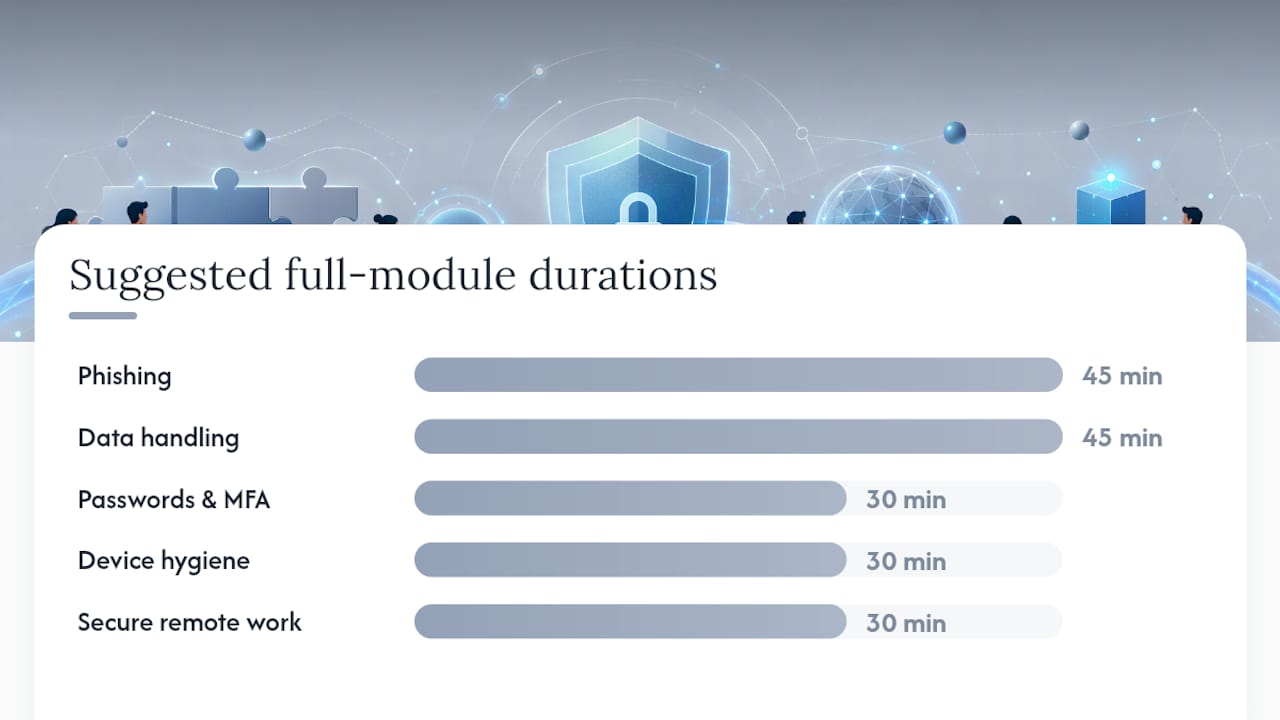
These six topics form the non-negotiable baseline. Microlearning formats (5–15 minutes) work well for busy teams; a fuller module (30–60 minutes) suits onboarding or annual refreshers. Curricula like Cybersecurity Awareness Essentials for Employees on Coursera cover most of these topics in short, self-paced segments.
| Module | Suggested duration | Core learning objectives |
|---|---|---|
| Phishing and social engineering | 10–15 min (micro) / 45 min (full) | Identify suspicious links, spoofed senders, pretexting calls, and AI-generated phishing messages |
| Passwords and MFA | 5–10 min (micro) / 30 min (full) | Create strong passphrases, use a password manager, enrol in MFA on all business accounts |
| Device hygiene | 5–10 min (micro) / 30 min (full) | Apply OS and app updates promptly, lock screens, report lost or stolen devices within one hour |
| Secure remote work | 10 min (micro) / 30 min (full) | Use VPN on public networks, avoid shadow IT, secure home router settings |
| Data handling and classification | 10–15 min (micro) / 45 min (full) | Classify data correctly, avoid unapproved cloud storage, handle PII per policy |
| Incident reporting | 5–15 min (micro) / 30–60 min (full) | Know the reporting channel, what to report, and the expected response timeline |
Pro Tip: Run the phishing module first, before any other training. Employees who receive a simulated phish before learning about phishing are far more receptive to the lesson that follows.
Role-based extensions
General training sets the floor. Role-based paths raise it where the risk is highest. NIST NICE resources provide job-task mappings that help you build these paths without starting from scratch.
- Finance teams: wire-fraud and business email compromise (BEC) scenarios; dual-approval workflows for large transfers; vendor impersonation red flags.
- HR teams: protecting employee PII; recognising recruitment-themed phishing; secure handling of benefits and payroll data.
- Executives: spear-phishing and whaling awareness; deepfake voice and video call verification; personal device hygiene for travel.
- IT and security staff: privileged access hygiene; recognising insider threat indicators; common employee cybersecurity vulnerabilities and how to remediate them.
- Developers: secure coding basics; dependency and supply-chain risk; secrets management and credential hygiene in CI/CD pipelines.
How to build the programme step by step
Phase 1: Assess (weeks 1–4)
- Map your compliance obligations. List every framework that applies — HIPAA, SOC 2, PCI-DSS, NIST CSF, NIS2 — and note the specific training evidence each requires. A NIST CSF assessment is a practical starting point if you have not done one recently.
- Build your role inventory. Pull a list of every role from your HRIS. Group roles by risk level: privileged access, data-handling, customer-facing, general staff.
- Run a baseline phishing test. Send a simulated phish to all staff before any training. Record the click rate, the report rate, and the time-to-report. These are your before numbers.
- Administer a knowledge check. A short quiz (10–15 questions) covering the six core topics gives you a baseline knowledge score per department. The FTC's small-business cybersecurity resources include a short awareness quiz you can adapt.
- Identify gaps. Compare baseline results against compliance requirements and risk profile. Prioritise the modules and roles with the widest gaps.
Phase 2: Pilot (weeks 5–8)
- Select a pilot cohort. Choose one or two departments that represent different risk levels — for example, finance and general operations. Aim for 50–150 participants.
- Define success criteria before you start. Typical pilot targets include high completion within 30 days, a noticeable drop in phishing click rate from baseline, and positive participant feedback.
- Run the pilot and collect feedback. Weekly check-ins with department managers catch friction early. A short post-module survey (three questions maximum) keeps feedback actionable.
- Tune remediation workflows. When a pilot participant clicks a simulated phish, the automated remediation path should trigger within 24 hours. Confirm that path works end-to-end before full rollout.
Phase 3: Scale and sustain (weeks 9–12 and ongoing)
- Roll out to all staff using the refined content and workflows from the pilot. Stagger by department to avoid overwhelming IT support.
- Establish a training calendar. Annual refresher, monthly simulations, quarterly role-based updates, and just-in-time nudges for high-risk events (e.g., a major phishing campaign in the news).
- Assign governance roles. One programme owner (usually HR or security), one IT owner for integrations, and a named executive sponsor who receives the quarterly dashboard.
- Automate low-value admin. Roster sync from HRIS, automatic enrolment of new hires, auto-escalation of non-completions to managers — these tasks should not require manual effort.
Pro Tip: Executive sponsorship is the single biggest predictor of completion rates. A brief message from the CEO or CISO at launch, and a quarterly update to the leadership team, signals that training is not optional.
Which delivery approaches and platforms matter most in 2026?
Once-a-year compliance training is no longer sufficient. Industry guidance on AI-era threats points clearly toward continuous, simulation-heavy programmes that adapt to each employee's behaviour. Here is how the main delivery models compare, and what to prioritise when evaluating platforms.
Delivery model comparison
- Continuous microlearning: Short modules (3–10 minutes) delivered weekly or bi-weekly. Keeps security top of mind without training fatigue. Best for general staff and high-volume workforces.
- Simulation-first: Phishing, vishing (voice), and video deepfake simulations run before or alongside training. Behaviour data from simulations drives personalised remediation. Best for organisations with measurable phishing risk or a recent incident.
- Just-in-time coaching: A nudge or micro-module triggered by a risky action (clicking a simulated phish, visiting a flagged site). Highly effective because the learning arrives at the moment of failure, not weeks later.
- Instructor-led training (ILT): Live sessions, virtual or in-person. High engagement for complex topics (incident response, executive briefings) but expensive to scale and hard to track consistently.
Most mature programmes combine continuous microlearning with monthly simulations and just-in-time coaching. ILT is reserved for role-specific deep dives.
Platform capabilities to prioritise
When evaluating platforms such as KnowBe4, Proofpoint Security Awareness Training, HoxHunt, or Adaptive Security, look for these capabilities in roughly this order of importance:
- Simulation realism across channels. Email phishing is table stakes. In 2026, voice deepfake and video deepfake simulations are the differentiator. Platforms that simulate only email miss the fastest-growing attack vectors.
- AI personalisation. The platform should adjust module difficulty, simulation frequency, and content type based on each employee's behaviour history, not just their job title.
- Automated remediation. A click on a simulated phish should trigger an immediate, targeted micro-module without any manual intervention from HR or IT.
- Compliance exports and audit logs. You need completion records, simulation results, and remediation history in a format your auditors will accept — typically CSV, PDF, or direct API export to your GRC tool.
- HRIS and SIEM integration. Roster sync keeps training current as staff join and leave. SIEM integration means training events appear alongside security alerts in your security operations dashboard.
Pro Tip: Ask every vendor for a sample audit export before you sign. If they cannot produce a clean, timestamped completion log in under 10 minutes, that is a red flag for audit season.
How do you meet NIST, HIPAA, SOC 2, and other compliance requirements?
Training evidence is what turns a good programme into an auditable one. NIST SP 800-50 Rev. 1 is explicit: programmes must be documented, repeatable, and aligned with compliance needs. CIS Controls reinforce this, specifying that behaviour metrics, not just completion records, belong in your evidence package.
Standards mapping
| Framework | Relevant control or requirement | Training evidence required |
|---|---|---|
| NIST SP 800-50 | Awareness and training programme documentation | Completion records, curriculum documentation, culture metrics |
| NIST CSF (Govern/Protect) | PR.AT — Awareness and Training | Role-based training logs, simulation results |
| HIPAA Security Rule | HIPAA — Security awareness and training | Annual training completion records per employee |
| SOC 2 compliance requirements | Communication and risk mitigation | Training logs, phishing simulation results, remediation records |
| PCI-DSS compliance requirements | Security awareness programme | Annual training completion, phishing simulation evidence |
| NIS2 (EU) | NIS2 directive — Governance and training | Board and staff training records, documented programme |
For ISO 27001 documented information requirements, training records fall under Annex A control A.6.3 and must be retained according to your documented retention schedule, typically a minimum of three years.
Operational evidence checklist
Keep these records in a format you can produce within 48 hours of an audit request:
- Completion records with employee name, role, module title, date, and pass/fail score
- Phishing simulation logs: campaign date, template used, click rate, report rate, time-to-report
- Remediation history: who was enrolled in remedial training, when, and whether they completed it
- Manager attestation records for high-risk roles
- Curriculum version history showing when content was last updated and why
- Policy acknowledgement records (AUP signatures, annual re-attestation)
When presenting evidence to auditors, organise by framework first, then by date. A single folder per framework with a one-page index dramatically reduces audit time. Cloud security audit guidance covers how to structure evidence packages for cloud-hosted training platforms specifically.
How do you measure whether the training is actually working?
CIS guidance is direct: completion rates alone tell you almost nothing. The metrics that matter track behaviour, not attendance.
Core KPI set
- Completion rate: Aim for high completion rates within a month of assignment. Below 80% signals an engagement or communication problem.
- Phishing click rate: Your primary behaviour metric. Track monthly. A well-run programme typically sees click rates fall significantly within the first 90 days of continuous simulation.
- Phishing report rate: The ratio of employees who report a simulated phish versus those who click. A rising report rate is a stronger signal of culture change than a falling click rate alone.
- Time-to-report: How quickly employees flag a suspicious message. Faster reporting limits attacker dwell time.
- Knowledge assessment scores: Pre- and post-training scores per module and per department. Gaps by department guide where to invest next.
- Repeat clicker rate: Employees who click simulated phishes more than once per quarter need targeted intervention, not just another module.
- Incident report volume: A rising volume of employee-reported real incidents is a positive sign, not a problem — it means the culture is working.
Reporting cadence
- Weekly (automated): Simulation results and completion status to the programme owner.
- Monthly: Phishing click and report rates to the security team; non-completion escalations to department managers.
- Quarterly: Full KPI dashboard to the executive sponsor and CISO, including trend lines and remediation outcomes.
- Annually: Compliance evidence package to the audit team, including year-over-year behaviour metrics.
Remediation thresholds
When metrics lag, act on thresholds rather than waiting for the next scheduled review. An elevated phishing click rate in any department should trigger targeted remedial training for that group and a manager notification promptly. A repeat clicker (two or more clicks in a quarter) should receive a one-on-one conversation with their manager, not just an automated module. CISA workforce hygiene resources include practical exercises you can use as remedial content for high-risk individuals.

Sample 90-day rollout and realistic budget ranges
90-day timeline
| Week | Deliverables | Owner |
|---|---|---|
| 1–2 | Compliance mapping, role inventory, baseline phishing test | HR + IT |
| 3–4 | Knowledge check, gap analysis, vendor/platform selection | HR + Security + Procurement |
| 5 | Pilot cohort selected, content configured, HRIS integration tested | IT + Vendor |
| 7–8 | Pilot launched, feedback collected, remediation workflows validated | HR + IT |
| 9–10 | Full rollout begins (staggered by department), executive comms sent | HR + Executive Sponsor |
| 11 | First full simulation post-training, dashboard live, audit log verified | Security + HR |
Budget guidance
Costs vary considerably by organisation size and delivery model. These are realistic ranges, not guarantees.
- SMB (under 100 employees), in-house delivery using a SaaS platform: Expect platform licensing in the range of $15–$30 per user per year for a basic awareness and simulation tool, plus internal HR and IT time for configuration and management.
- Mid-market (100–1,000 employees), managed delivery: Full managed programmes, including content, simulations, reporting, and compliance support, typically run $30–$80 per user per year depending on feature depth and simulation realism.
- Enterprise (1,000+ employees), custom or integrated delivery: Costs vary widely based on integration complexity, custom content, and compliance reporting requirements. Procurement should request per-user pricing with volume tiers.
The financial case is straightforward: breach cost data shows average incident costs that far exceed any realistic per-user training spend. Even a modest reduction in successful phishing attacks pays for the programme many times over.
Role responsibilities
- Programme owner (HR or Security): Curriculum decisions, completion tracking, compliance evidence, executive reporting.
- IT owner: Platform integration, HRIS sync, SIEM connection, access provisioning.
- Department managers: Completion escalations, one-on-one conversations with repeat clickers, attestation sign-off.
- Vendor or managed partner: Content updates, simulation campaigns, audit exports, technical support.
How do you keep employees engaged throughout training?
The biggest engagement killer is irrelevance. Employees disengage when training feels generic, repetitive, or disconnected from their actual work. A few approaches consistently outperform the standard compliance-video model.
Make it real. Use scenarios drawn from your industry and role. A finance team responding to a simulated wire-fraud email is far more engaged than one watching a generic phishing video. Platforms like KnowBe4 and HoxHunt offer industry-specific simulation templates; Proofpoint and Adaptive Security layer in AI-generated content that mimics current attack styles.
Gamification works, within limits. Leaderboards, points, and completion badges raise initial participation. The risk is that employees optimise for the game rather than the learning. Use gamification to drive early adoption, then shift emphasis to behaviour metrics to sustain it.

Keep modules short. Five to ten minutes is the ceiling for a microlearning module. Anything longer sees completion rates drop and retention suffer. Annual refreshers can run longer (30–45 minutes) when broken into clearly labelled chapters employees can pause and resume.
Communicate the "why" at every touchpoint. Employees who understand that a phishing click can expose customer data, trigger regulatory fines, or cost colleagues their jobs take training more seriously than those who see it as an IT checkbox. A brief message from the executive sponsor at launch, and a follow-up after the first simulation results are in, makes the stakes concrete.
Recognise good behaviour publicly. Acknowledging departments or individuals with high report rates in a team meeting or internal newsletter costs nothing and reinforces the culture you are building.
How do you keep training content current as threats evolve?
A programme built in 2023 and left unchanged is a liability in 2026. AI-generated phishing, voice deepfakes, and QR-code lures are now common attack vectors that most legacy content does not address. Verizon's research on cyber culture underscores that human behaviour remains a dominant factor in breaches, and the threats driving that behaviour shift faster than annual update cycles can track.
A practical content maintenance model has three layers:
Scheduled reviews (quarterly): Assign one person (programme owner or vendor) to review simulation templates and module content against recent threat intelligence. Update at least one simulation template per quarter to reflect current lure styles.
Event-triggered updates: When a major attack campaign hits the news (a widespread BEC wave, a new deepfake scam), push a short just-in-time module or a targeted simulation within two weeks. Employees are most receptive when the threat feels current and real.
Annual curriculum overhaul: Every 12 months, revisit the full curriculum against your compliance mapping, your KPI trends, and your incident log. Retire modules that no longer address active threats. Add new modules for emerging vectors — in 2026, that means AI-assisted spear-phishing, QR-code phishing (quishing), and voice deepfake verification.
Platforms that use AI to generate novel simulation content automatically (rather than relying on a static template library) have a structural advantage here. The simulation stays fresh without manual effort from your team. FedVTE public courses offer supplementary incident-response content you can use to fill gaps while your vendor updates its library.
Why consolidation with a managed partner simplifies delivery
The case for running training entirely in-house is weaker than it looks on paper. Most HR teams can manage enrolment and completion tracking. What they cannot easily do is keep simulation content current against live threat intelligence, maintain SIEM integrations as platforms update, produce audit-ready exports in the format a specific auditor requires, and do all of that while managing the rest of the HR function.
The consolidation argument is not about capability. It is about where your team's attention is most valuable. When a managed partner handles simulation campaigns, content updates, compliance exports, and HRIS sync, your programme owner shifts from administrator to strategist. They spend time on engagement, culture, and executive communication rather than on chasing completion reports.
The decision criteria are straightforward. If your organisation has fewer than 200 employees, no dedicated security team, and at least one active compliance obligation (HIPAA, SOC 2, PCI-DSS), a managed delivery model almost always delivers better outcomes at lower total cost than a DIY platform plus internal labour. Above 500 employees with an in-house security team, the calculus shifts: a well-integrated platform with strong API support may give you more control. Between those bands, the right answer depends on your regulatory pressure and your executive risk appetite.
One point that often gets missed: consolidated managed services also simplify third-party cybersecurity risk management. When your training provider, your monitoring service, and your compliance reporting all sit under one vendor relationship, the audit trail is cleaner and the contractual accountability is clearer.
AccountNext-Nexus removes the operational burden of running this programme
Running a complete security awareness programme alongside your existing IT and compliance workload is genuinely difficult without the right infrastructure behind it. AccountNext-Nexus consolidates managed security, compliance support, and integrated reporting under a single service agreement, so your team is not stitching together three separate vendor relationships to cover what one managed partner can handle.

The services most relevant to HR leaders building this programme: 24/7 threat monitoring that feeds real incident data back into your training priorities, compliance assessments mapped to SOC 2, HIPAA, PCI-DSS, and ISO 27001, and audit-ready reporting your team can hand directly to an external auditor. No manual export wrangling, no chasing vendors for logs.
If you are at the assessment or pilot stage and want a compliance-mapping review before committing to a platform, AccountNext-Nexus managed security and compliance services is the right starting point. Book a consultation and bring your compliance framework list — the team will map your training evidence gaps against your specific obligations and recommend a programme structure that fits your size and risk profile.
Sources
These sources are worth bookmarking for deeper detail and to support audit responses: