
Security orchestration is the coordination layer inside a SOAR (Security Orchestration, Automation and Response) platform that connects disparate security tools, codifies response decisions into playbooks, and ensures every incident is handled through a repeatable, auditable workflow. It does not execute tasks directly — it directs which tools act, in what sequence, and under what conditions, passing context between systems so no analyst has to copy-paste an IP address from a SIEM alert into a threat-intel lookup by hand.
The core mechanisms that make orchestration function:
- Connectors and APIs — bidirectional integrations that let the SOAR platform read from and write to SIEMs, EDR/XDR tools, identity providers, firewalls, and ITSM systems.
- Event router / orchestration bus — the internal message-passing layer that receives alerts, normalises fields, and routes events to the correct playbook.
- Playbook engine — the workflow execution layer that evaluates conditions, branches logic, and sequences actions.
- Human-in-the-loop controls — approval gates that pause automated execution and require analyst sign-off before high-impact actions fire.
- Logging and forensics — tamper-evident audit trails that record every action, decision, and state change for compliance and post-incident review.
A concrete example: an account-compromise alert fires in your SIEM. The SOAR platform ingests it, enriches the suspicious IP against threat-intel feeds, correlates sign-in telemetry from your identity provider, presents a risk score to an analyst for approval, then — on approval — disables the account, isolates the endpoint, creates a ticket in your ITSM system, and documents the entire chain. That sequence, from detection to containment, is security orchestration in operation. NIST's incident response lifecycle (preparation, identification, containment, eradication, recovery, lessons learned) maps directly to those steps, and MITRE ATT&CK technique identifiers can be embedded in playbook metadata to track which adversary techniques each workflow addresses.
Table of Contents
- What are the core components inside a SOAR orchestration platform?
- How does an orchestration workflow actually process an incident?
- Orchestration versus automation: what is actually different?
- How does orchestration connect your SIEM, XDR, endpoints, and ITSM?
- What use cases and benefits does security orchestration deliver for SOCs?
- What should you look for when evaluating SOAR orchestration capability?
- How should you implement orchestration without creating new operational risk?
- Should you build orchestration in-house or use a managed service?
- Key takeaways
- The governance gap nobody talks about
- AccountNext-Nexus brings orchestration to your SOC without the multi-year build
- Useful sources and further reading
What are the core components inside a SOAR orchestration platform?
Understanding how security orchestration works at a component level is what separates a team that deploys SOAR successfully from one that ends up with an expensive ticketing wrapper. Each component has a distinct function, and they interact in a defined sequence.
Core components:
- Connectors and integrations — pre-built or custom API adapters that authenticate to external tools and translate their data models into the SOAR's canonical schema. REST, GraphQL, syslog, and agent-based connectors all serve different source types.
- Orchestration bus / event router — receives normalised events, applies routing rules (severity thresholds, source type, indicator scoring), and dispatches them to the appropriate playbook. This is the traffic controller.
- Playbook / runbook editor — the authoring environment where analysts define workflow logic. SOAR playbooks document the when and how of incident response; runbooks implement those steps as executable automation inside the platform. Keep playbooks as manual fallbacks when automation fails.
- Automation engine — executes discrete tasks (API calls, script runs, data lookups) inside a playbook step. This is where the actual tool interactions happen.
- Case and incident management — the system of record for each incident: timeline, evidence, analyst notes, approvals, and closure data. It must be the authoritative source of playbook state so analysts always have a single view.
- Telemetry enrichment module — queries threat-intel feeds (e.g., VirusTotal, MISP, commercial TI platforms), geolocation databases, and asset inventories to add context to raw indicators before a decision is made.
- Audit logging and analytics — produces forensic-grade, tamper-evident records of every action and state change. This is where compliance evidence lives.
Data flow in plain terms: A SIEM fires an alert → the SOAR ingestion layer normalises it and assigns a correlation ID → the event router matches it to a playbook → the enrichment module queries external sources → the decision engine evaluates conditions → actuator connectors push actions to endpoint, identity, and network controls → the ITSM connector creates or updates a ticket → the audit log records the full chain.
Pro Tip: During a proof-of-concept, map each existing tool in your stack (SIEM, EDR, ITSM) to a specific SOAR component. If a tool cannot be mapped to at least one component, it either needs a custom connector or it should be out of scope for the pilot. This exercise surfaces integration gaps before you commit to a platform.

Forensic-grade audit trails are produced at two points: the case management layer (which records analyst decisions and approvals) and the automation engine (which logs every API call, response code, and payload). Place additional logging at connector boundaries — specifically at the point where SOAR sends an action to an external system — so you can reconstruct exactly what the platform instructed each tool to do, and when.
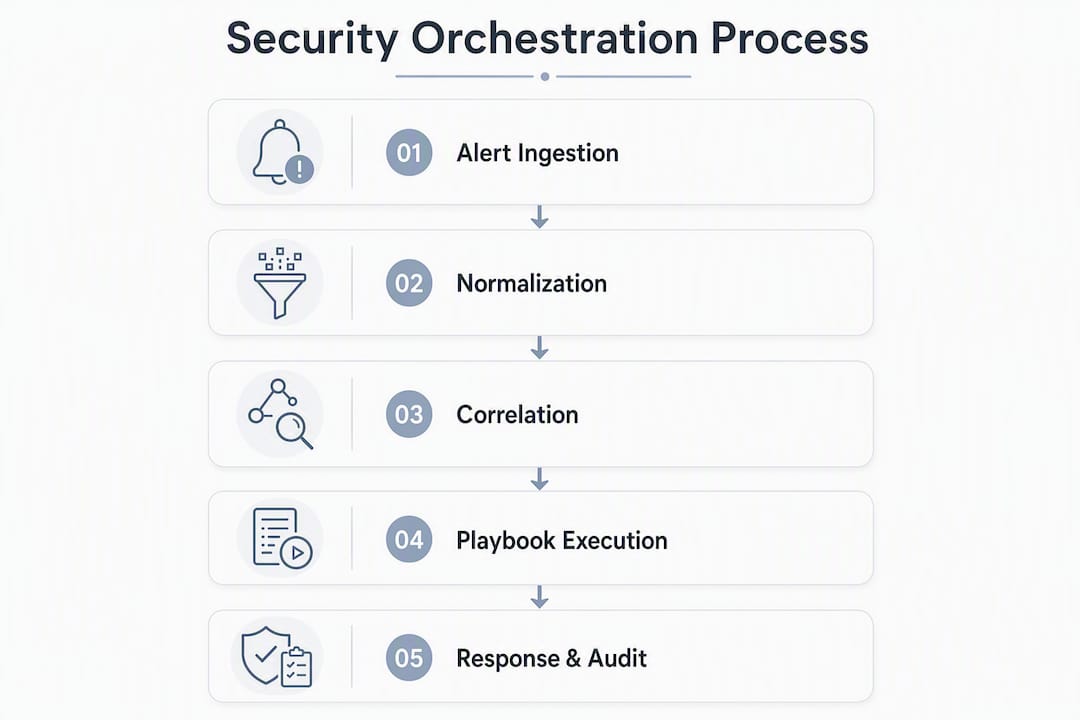
How does an orchestration workflow actually process an incident?
The best way to understand security orchestration explained in practice is to walk a real incident type through the full workflow. The example below uses a phishing triage scenario, which is one of the highest-volume use cases in most SOCs.
-
Event ingest — A user reports a suspicious email. The email security gateway fires an alert to the SIEM, which correlates it with a mail-flow log and forwards a normalised event to the SOAR via API. The SOAR assigns a unique correlation ID and timestamps the case.
-
Alert enrichment — The playbook engine triggers the enrichment module. It queries threat-intel feeds for the sender domain and embedded URLs, checks the sending IP against blocklists, and pulls the recipient's asset profile from the CMDB. All results are attached to the case record.
-
Correlation and triage — The orchestration engine evaluates enrichment results against threshold rules: if the URL matches a known phishing kit or the domain was registered in the last 30 days, the risk score escalates. The engine also checks whether other users received the same message (lateral spread indicator).
-
Playbook selection — Based on the risk score and indicator profile, the engine selects the high-confidence phishing playbook versus the low-confidence review playbook. Each has a different action set and approval gate configuration.
-
Human-in-the-loop gate — For the high-confidence path, the playbook pauses and presents the analyst with enriched context, a recommended action (quarantine email, isolate endpoint if clicked), and a 15-minute SLA for approval. The analyst approves, declines, or escalates. This gate is non-negotiable for containment actions that affect production systems.
-
Automated actions — On approval, the automation engine executes in sequence: quarantine the email across all mailboxes, pull endpoint telemetry from the EDR for the recipient's device, check for process execution or file drops, update the domain and URL blocklists on the web proxy and DNS filter, and create an ITSM ticket with full case context.
-
Containment and remediation — If the endpoint shows execution evidence, a second human-approval gate fires before the host isolation command is sent to the EDR. Rate limits on the isolation action prevent accidental mass-isolation if the playbook is triggered simultaneously for multiple alerts.
-
Closure and lessons learned — The analyst closes the case, records the final disposition (true positive, false positive, or benign), and the platform logs the full timeline. Closure data feeds back into the enrichment module to improve future indicator scoring.
Rollback paths matter. Every containment action should have a documented reversal procedure in the runbook. If a host is isolated incorrectly, the analyst needs a one-click reversal that is also logged. Missing rollback paths are one of the most common gaps in first-generation SOAR deployments.
Triggers and correlation mechanisms deserve a specific note. Orchestration triggers can be threshold-based (alert count exceeds N in a time window), indicator-score-based (enrichment returns a score above a defined cutoff), or enrichment-driven (a pivot from one indicator reveals a related indicator that meets a separate threshold). Combining all three in a single playbook gives you layered detection fidelity without requiring the SIEM to do all the correlation work.
Orchestration versus automation: what is actually different?
The confusion between these two terms causes real implementation problems. Teams that treat them as synonyms tend to either under-automate (because they think orchestration handles everything) or over-automate (because they think automation is the goal).
Orchestration focuses on the big-picture workflow: coordinating tools, teams, and decision points across a multi-step response. Automation executes specific, repeatable tasks inside that workflow without human intervention. Orchestration without automation is a well-organised manual process. Automation without orchestration is a collection of scripts with no coherent state management.
Tasks best suited to automation (low risk, high volume, well-defined):
- IOC enrichment against threat-intel APIs
- Sandboxing file attachments
- Adding indicators to blocklists
- Creating and routing ITSM tickets
- Pulling asset inventory records
- Sending analyst notifications
Tasks that require orchestration (multi-step, cross-tool, or approval-gated):
- Multi-stage phishing investigations that span email, endpoint, and identity
- Cross-domain containment decisions that require analyst sign-off
- Threat hunting workflows that pivot across multiple data sources
- Coordinating external notification (e.g., reporting to the Canadian Centre for Cyber Security)
- Post-incident evidence packaging for compliance or legal review
Automation-only microtask example: When a new alert arrives, the SOAR automatically queries VirusTotal for the associated hash and appends the result to the alert record. No human involvement, no branching logic, no cross-tool coordination. Done in seconds.
Fully orchestrated cross-domain response example: A lateral movement alert triggers a workflow that enriches the source and destination hosts, correlates authentication logs from the identity provider, checks network flow data from the firewall, presents a consolidated risk view to a senior analyst, and — on approval — simultaneously isolates both hosts via the EDR, blocks the source IP at the perimeter, resets the compromised credential, and opens a P1 incident ticket with a pre-populated timeline.
Pro Tip: Test automation components in a staging environment that mirrors production connectors but uses sandboxed tool instances. Run the automation against synthetic alerts before promoting it to production. This catches API version mismatches and rate-limit issues before they affect live response.
How does orchestration connect your SIEM, XDR, endpoints, and ITSM?

Integration quality is where most SOAR deployments succeed or fail. The orchestration layer integrates with SIEM and XDR to triage alerts, enrich events, and trigger playbooks that act across endpoint and network controls. Getting those integrations right requires choosing the correct connection method for each source.
Integration method selection:
- REST API (bidirectional) — preferred for SIEM, ITSM, identity providers, and threat-intel platforms where you need to both read and write. Supports rich data payloads and authentication via OAuth or API keys.
- Native connectors — vendor-built adapters for common platforms (e.g., Microsoft Sentinel, CrowdStrike Falcon, ServiceNow). Faster to deploy, but may lag behind API changes.
- Syslog / CEF — appropriate for network devices and legacy systems that cannot expose an API. Unidirectional (read-only from the SOAR's perspective) and requires a normalisation step.
- Agent-based — used for endpoint telemetry where direct API access is not available. Adds a dependency on agent health.
SIEM↔SOAR↔ITSM flow mapping: The SIEM produces normalised alerts with a correlation ID. The SOAR ingests those alerts, enriches them, and executes playbook actions. When a ticket is created in the ITSM system, the SOAR passes the correlation ID so that every update — analyst notes, action results, closure data — flows back and keeps the ITSM record current. Bidirectional ticket synchronisation means the ITSM is never stale, and the SOAR case record is never missing context that an analyst added in the ticketing system.
For teams building out their enterprise threat detection integration, preserving correlation IDs across every message passed between systems is the single most important architectural decision. It is what makes forensic reconstruction possible after an incident.
Brittle integration patterns to avoid:
- Hard-coded API endpoints with no version pinning — breaks silently when a vendor updates their API.
- Unauthenticated syslog ingestion — creates an injection risk and produces unreliable data.
- Fragile Python scripts as connectors with no error handling — fails without alerting the orchestration engine.
- Missing fallback caching — if a threat-intel API is unavailable, the playbook should cache the last known result rather than failing the enrichment step entirely.
Telemetry normalisation is the unglamorous prerequisite for all of this. Every source needs to map its fields to a canonical schema (source IP, destination IP, user, timestamp, event type) before the orchestration engine can apply consistent logic. Without it, playbook conditions that reference src_ip will miss events where the field is named sourceAddress.
What use cases and benefits does security orchestration deliver for SOCs?
SOAR platforms centralise investigation and remediation by using playbooks to automate workflows and reduce manual work. The benefits are real, but they are not uniform — they depend heavily on which use cases you prioritise and how well your integrations are built.
High-value use cases:
- Phishing triage — automate header analysis, URL detonation, sender reputation checks, and mailbox quarantine. Highest ROI for most SOCs because of alert volume.
- Endpoint compromise containment — correlate EDR telemetry, isolate hosts, and reset credentials through a single orchestrated workflow.
- Vulnerability triage — ingest scanner output, enrich with asset criticality and exploit availability, and route findings to the correct remediation team via ITSM.
- Automated enrichment — add threat-intel context to every alert before an analyst sees it, reducing time spent on manual lookups.
- Threat hunting orchestration — coordinate multi-source pivots across SIEM, EDR, and network data, with results aggregated into a single case record.
- External notification and sharing — automate reporting to the Canadian Centre for Cyber Security (CCCS) or sector-specific ISACs when a confirmed incident meets reporting thresholds.
KPI targets for orchestration programmes:
| Metric | What it measures | Typical target improvement |
|---|---|---|
| Mean Time to Respond (MTTR) | End-to-end time from alert to containment | significant reduction after full playbook deployment |
| Analyst time per alert | Manual effort per investigated alert | substantial reduction for automated enrichment use cases |
| False positive rate | Proportion of alerts that are not genuine threats | notable reduction through enrichment-driven triage |
| Playbook coverage | Percentage of alert types with an active playbook | Target most high-volume alert types within a typical deployment period |
| Audit completeness | Percentage of incidents with full documented timelines | High percentage for playbook-handled incidents |
Pro Tip: Set KPI baselines before you deploy. Run a two-week manual measurement period to capture current MTTR and analyst time per alert. Without a baseline, you cannot demonstrate improvement to leadership, and you cannot identify which playbooks are delivering value.
Orchestration also directly supports compliance and auditability. Because every playbook-handled incident produces a tamper-evident log of actions, approvals, and outcomes, you have consistent, machine-generated evidence for SOC 2, PCI-DSS, and ISO 27001 audits. The consistency is the point: a human analyst handling the same incident type twice may document it differently; a playbook never does.
What should you look for when evaluating SOAR orchestration capability?
Selecting a SOAR platform is not a features checklist exercise. The platforms that look identical on paper often diverge sharply in connector reliability, playbook maintainability, and operational overhead at scale. SOAR standardises SOC processes, enabling analysts to focus on higher-value work — but only if the platform is well-matched to your environment.
Evaluation checklist:
- Connector breadth and quality — count the number of pre-built connectors, but also test connector reliability. A connector that breaks on every API version update is worse than no connector.
- Playbook editor — low-code visual editors lower the barrier for analysts; code-based editors give engineers more control. The best platforms offer both. Evaluate how complex branching logic is expressed and maintained.
- Human-in-the-loop controls — can you configure approval gates with SLA timers, escalation paths, and audit logging? This is non-negotiable for high-impact actions.
- Logging and forensics — does the platform produce tamper-evident logs at the action level? Can you export logs to an external SIEM or log management system for long-term retention?
- Scalability — how does the platform perform under high alert volumes? Test with realistic event rates, not vendor-supplied benchmarks.
- SLA and multi-tenant support — relevant for MSSPs and organisations managing multiple business units or subsidiaries.
- Cloud vs. on-premises deployment — cloud-native platforms offer faster updates; on-premises or hybrid options matter for organisations with strict data-residency requirements.
- Data residency controls — for Canadian organisations, this is a hard requirement. You need to know where playbook execution logs, case data, and enrichment results are stored. Canadian federal institutions and regulated industries (healthcare, financial services) may be subject to requirements under PIPEDA, provincial privacy legislation, or sector-specific frameworks. Demand contractual guarantees on log storage geography and evidence retention periods.
Scoring rubric (suggested weighting for a mid-market Canadian enterprise SOC):
- Must-have: connector breadth for your existing stack, human-in-the-loop controls, forensic logging, Canadian data residency options.
- Nice-to-have: low-code playbook editor, native SIEM integration, multi-tenant support.
- Optional: ML-assisted playbook recommendations, built-in threat-intel subscriptions.
A mid-market Canadian enterprise SOC with a team of 5–10 analysts should prioritise connector reliability and playbook maintainability over feature breadth. A platform with 500 connectors that require constant maintenance will consume more analyst time than it saves.
How should you implement orchestration without creating new operational risk?
Implementation is where orchestration projects most often go wrong. The failure mode is almost always the same: teams try to automate too much too fast, create brittle dependencies, and end up with a platform that analysts distrust and route around.
-
Pilot phase (weeks 1–6) — Select one or two high-volume, well-understood alert types (phishing and automated enrichment are ideal). Build playbooks for those types only. Instrument every step with logging. Define your baseline KPIs before go-live. Keep all containment actions behind human-approval gates during this phase.
-
Pilot expansion (months 2–3) — Add two to four additional playbooks based on alert volume and analyst feedback. Begin testing automated containment actions in a staging environment. Introduce playbook versioning and a change-control process. Review false positive rates and adjust enrichment thresholds.
-
Enterprise scale (months 4–12) — Expand playbook coverage to 80% of high-volume alert types. Enable automated containment for proven, low-risk action types. Implement role-based access controls on playbook editing and approval gates. Conduct quarterly playbook reviews and retire or update stale workflows.
Governance checklist:
- Playbook versioning with a change log and rollback capability.
- Change-control process requiring peer review before a playbook is promoted to production.
- Approval gates with defined SLAs and escalation paths.
- Role-based access: who can author, who can approve, who can execute.
- Audit log retention policy aligned with your compliance obligations (minimum 12 months for most Canadian regulated industries).
- Incident post-mortems that feed back into playbook updates.
Common pitfalls:
- Over-automation — enabling automated containment before the playbook has been validated against real incidents. Mitigate by requiring a minimum number of human-approved runs before enabling full automation.
- Brittle dependencies — connectors that break silently when an upstream API changes. Mitigate with connector health monitoring and alerting.
- Lack of observability — no visibility into playbook execution failures. Mitigate with a dedicated orchestration health dashboard.
- Missing rollback paths — containment actions with no documented reversal. Mitigate by requiring a rollback step in every playbook that touches production systems.
- Insufficient testing — playbooks promoted to production without synthetic alert testing. Mitigate with automated test harnesses.
Pro Tip: Design playbooks as modular tasks and compose runbooks from those modules so you can reuse tested actions across incident types. Maintain a playbook library in version control with automated test suites that run on every commit. This is the difference between a playbook library that grows sustainably and one that becomes unmaintainable within 18 months.
For teams building out their incident response checklist, the playbook governance model above maps directly to the preparation and identification phases of the NIST lifecycle.
Should you build orchestration in-house or use a managed service?
Not every SOC has the headcount, tooling expertise, or time to build and maintain a SOAR orchestration capability from scratch. The build-versus-manage decision is worth making explicitly rather than defaulting to one path because it feels familiar.
Build in-house vs. managed orchestration:
- Resourcing — in-house requires dedicated SOAR engineers and playbook authors; managed services provide those skills as part of the contract.
- Speed to value — a managed provider can deploy pre-built connector libraries and playbook templates in 30–90 days; in-house builds typically take 6–12 months to reach meaningful coverage.
- Control and customisation — in-house gives full control over playbook logic and data handling; managed services offer customisation within a governed framework.
- Compliance and data residency — a managed provider operating in Canada must contractually commit to Canadian data residency and evidence retention; verify this before signing.
- Cost model — in-house has high upfront tooling and staffing costs; managed services convert those to a predictable monthly fee.
Decision checklist — managed vs. build:
- Do you have fewer than three dedicated security engineers available for SOAR operations? Lean managed.
- Is your regulatory environment (healthcare, financial services, federal) demanding audit-ready logs within 90 days? Lean managed for speed.
- Do you need full control over playbook logic and data handling for sovereignty reasons? Lean in-house or co-managed.
- Is your alert volume high enough to justify a full SOAR platform licence? If not, a managed service may include the platform cost.
Example managed onboarding timeline (30–90 days):
- Days 1–15: connector deployment and API authentication for your existing stack (SIEM, EDR, ITSM, identity provider).
- Days 16–30: playbook migration or build for your top three alert types; synthetic alert testing.
- Days 31–60: live pilot with human-approval gates on all containment actions; KPI baselining.
- Days 61–90: SOC handover, analyst training, and playbook library documentation.
AccountNext-Nexus operates as a fully managed or co-managed orchestration partner, depending on how much internal control your team wants to retain. For teams that want to move from fragmented point tools to a centralised security monitoring model without a multi-year build programme, the managed pathway is worth evaluating seriously.
Key takeaways
Security orchestration works by acting as the coordination layer that connects tools, codifies decisions into playbooks, and produces auditable records across every phase of incident response.
| Point | Details |
|---|---|
| Orchestration vs. automation | Orchestration coordinates multi-step workflows across tools and teams; automation executes discrete, repeatable tasks inside those workflows. |
| Core components | Connectors, event router, playbook engine, automation engine, case management, enrichment module, and audit logging all must function together. |
| Phased implementation | Start with a 6-week pilot on one or two high-volume alert types before expanding; keep containment actions behind human-approval gates until playbooks are validated. |
| KPI expectations | Realistic targets include significant MTTR reduction and notable reduction in analyst time per alert after full playbook deployment. |
| Canadian data residency | Demand contractual guarantees on log storage geography and evidence retention before selecting a SOAR platform or managed provider. |
| AccountNext-Nexus option | AccountNext-Nexus provides managed or co-managed orchestration with a 30–90 day onboarding timeline for teams that prefer not to build in-house. |
The governance gap nobody talks about
Most orchestration articles focus on the technology: which connectors to build, which playbooks to write, how to reduce MTTR. That is the right starting point. But the teams that get the most out of orchestration over a two-to-three year horizon are the ones that treat governance as a first-class engineering concern from day one, not something they retrofit after the first production incident caused by a runaway playbook.
The specific failure I see repeatedly: a team builds excellent playbooks, proves value in the pilot, gets executive buy-in, and then scales without putting change control in place. Six months later, a well-intentioned analyst modifies a containment playbook to handle a new edge case, introduces a logic error, and the platform isolates 40 endpoints during a routine phishing wave. The technology worked exactly as designed. The governance did not.
For Canadian organisations specifically, this matters beyond operational risk. Privacy legislation and sector regulators increasingly expect organisations to demonstrate that automated decisions affecting systems or data are governed, auditable, and reversible. A playbook that takes a containment action without a documented approval chain is not just an operational liability — it is a compliance exposure. The CCCS has been clear that incident response capability includes the governance of automated response tools, not just the tools themselves.
My practical recommendation: before you write your first production playbook, define your change-control process, your approval gate SLA policy, and your audit log retention standard. Those three decisions will shape every playbook you build afterward. Start there, not with the feature list.
AccountNext-Nexus brings orchestration to your SOC without the multi-year build
Fragmented security tools are the root cause of slow incident response. AccountNext-Nexus consolidates orchestration, monitoring, and compliance into a single managed service, so your SOC gets the coordination layer it needs without hiring a dedicated SOAR engineering team.

AccountNext-Nexus's managed orchestration service covers:
- 24/7 real-time monitoring with alert ingestion from your existing SIEM, EDR, and identity stack.
- Connector deployment and maintenance across your full tool set, with API health monitoring and fallback handling.
- Playbook design and governance aligned to your incident types, with version control and change-control processes built in.
- Compliance-aligned logging with Canadian data residency options and evidence retention policies for SOC 2, HIPAA, PCI-DSS, and ISO 27001.
- Co-managed or fully managed delivery, depending on how much internal control your team wants to retain.
Onboarding runs 30–90 days. The first 30 days cover connector deployment and playbook build for your top alert types. By day 90, your SOC has live playbooks, validated KPI baselines, and a documented playbook library. To see how AccountNext-Nexus fits your environment, review the full managed cybersecurity services offering or contact the team directly at accountnext-nexus.com.
Useful sources and further reading
For teams implementing orchestration or evaluating SOAR platforms in a Canadian operational context, these sources provide authoritative depth:
- NIST SP 800-61 (Computer Security Incident Handling Guide) — the foundational incident response lifecycle framework that orchestration playbooks should map to. Required reading for any SOC designing playbook logic.
- MITRE ATT&CK Framework — technique and tactic taxonomy used to tag playbook coverage and measure detection gaps. Embed ATT&CK technique IDs in playbook metadata for structured threat tracking.
- Canadian Centre for Cyber Security (CCCS) — Canada's national authority on cybersecurity guidance, including incident reporting obligations and baseline security controls for federal and regulated organisations.
- IBM: What is SOAR? — a thorough vendor-neutral explainer covering SOAR architecture, use cases, and integration patterns. Useful for teams building a business case.
- Swimlane: Security orchestration explained — practitioner-focused breakdown of orchestration concepts, including the distinction between orchestration and automation.
- Workflow automation in security operations — an external perspective on automation platform selection and workflow design principles applicable to security orchestration programmes.
- AccountNext-Nexus: Security operations guide — a comprehensive primer on SOC processes, incident response lifecycles, and metrics; a natural companion to this article for teams building or maturing their operations.
- AccountNext-Nexus: Enterprise cloud security governance — governance models and data-residency considerations that directly inform orchestration logging and evidence retention decisions for Canadian organisations.