
The highest-impact moves for IT operations efficiency are, in priority order: automate by ROI (start with password resets, patching, and user provisioning), build centralised visibility through a maintained CMDB, establish a KPI programme anchored to MTTR and SLA compliance, embed security into daily workflows rather than treating it as a separate track, align to a governance framework scaled to your organisation's size, consolidate tooling to reduce context-switching, and execute a 90-day roadmap with measurable milestones.
Quick wins (0–30 days):
- Automate password resets and account provisioning — these are the two highest-frequency tasks and the first automation candidates for rapid ROI.
- Baseline your top 5 KPIs (MTTR, availability, tickets per FTE, FCR, cloud spend) — expected outcome: a measurement foundation for every improvement that follows
- Audit and tag all cloud resources — expected outcome: immediate FinOps visibility and elimination of orphaned spend
Strategic moves (30–90 days):
- Deploy or clean up your CMDB and connect it to your monitoring and ticketing tools — expected outcome: faster incident diagnosis and safer change management
- Automate patch management and certificate renewals — patching ranks alongside password resets and user provisioning as a top automation priority due to its frequency and security impact.
- Define SLOs for your top three critical applications — expected outcome: business-aligned reliability targets and a clear error budget
Foundational programmes (90–365 days):
- Adopt a governance framework such as ITIL for service management and NIST CSF for security posture — expected outcome: repeatable processes and audit-ready documentation
- Integrate vulnerability scanning into your ticketing workflow — expected outcome: security defects treated as operational work, not a separate queue
Key takeaways
Automation, centralised visibility, and security-integrated workflows are the three levers that produce the fastest, most durable gains in IT operational efficiency.
| Point | Details |
|---|---|
| Automate by ROI score | Use frequency × time saved × risk weight to rank candidates; password resets and patching deliver the fastest returns. |
| CMDB is a living asset | Assign an owner and run automated reconciliation weekly; stale data undermines every downstream process that depends on it. |
| Measure before you improve | Baseline MTTR, availability, FCR, and cloud spend in the first 30 days so every subsequent change has a measurable impact. |
| Security belongs in the workflow | Embed vulnerability scanning, automated patching, and identity controls into daily operations rather than running them as separate programmes. |
| AccountNext-Nexus | Provides a unified managed IT and cybersecurity service stack that maps directly to the 90-day roadmap outlined above. |
Table of Contents
- Why does IT operational efficiency matter for Canadian organisations right now?
- What are the core IT operations best practices across every domain?
- How do you decide what to automate first?
- How do you build centralised visibility across assets and infrastructure?
- Which KPIs and SLOs should you track to drive improvement?
- How do you choose a governance framework that fits your organisation?
- How do you embed security into everyday IT workflows?
- What tooling and architecture choices reduce operational friction?
- How do you implement changes without disrupting operations?
- What does a practical 90-day IT efficiency plan look like?
- What practitioners actually see: patterns that work and mistakes that repeat
- AccountNext-Nexus gives IT leaders a faster path to operational efficiency
- Sources
Why does IT operational efficiency matter for Canadian organisations right now?
IT efficiency drives uptime, employee productivity, cost control, and regulatory readiness simultaneously. When those four outcomes move together, the business case for investing in IT operations practically writes itself.
The cost argument is concrete. Reactive incident work costs organisations far more than prevention. An unplanned outage carries direct costs (staff overtime, vendor escalation fees) and indirect ones (lost revenue, reputational damage, regulatory scrutiny). Prevention through automation and standardised processes consistently delivers better unit economics. Operational excellence in IT is not a technology problem — it is a governance, process, and measurement problem that technology then accelerates.
For Canadian organisations specifically, the regulatory context adds urgency. PIPEDA and provincial privacy laws create compliance obligations that reward well-documented, auditable IT processes. Bodies such as NIST, CISA, and ISO publish frameworks that translate directly into operational controls. ISO/IEC 20000 (IT service management) and ISO 27001 (information security management) are widely regarded standards for enterprises seeking formal capability recognition. NIST's Cybersecurity Framework is widely adopted as a practical risk-management baseline, even outside regulated industries.
Cloud waste is the most visible cost category right now. Untagged resources, idle VMs, and over-provisioned storage accumulate silently until someone runs a cost report. Labour costs follow: a team spending 40% of its time on repetitive tickets is a team not working on reliability improvements or strategic projects. Incident costs round out the picture — the average cost of a major IT incident runs well into the tens of thousands of dollars when staff time, customer impact, and remediation effort are combined. Prevention is cheaper every time.
What are the core IT operations best practices across every domain?
Avasant's research groups IT management practices into five major categories: governance, financial, operational, security, and application development. That structure is a useful lens for benchmarking maturity and deciding where to invest first.
Automation and AIOps. Automate repetitive, high-frequency tasks before anything else. Quick win: start with password resets, user provisioning, and patch management — all three are high-volume, immediately measurable, and directly impact security and efficiency.
Centralised visibility and CMDB. A single source of truth for assets and their relationships. Quick win: tag all cloud resources this week; it costs nothing and pays off immediately in cost reporting.
ITSM process standardisation. Consistent incident, change, and request workflows reduce errors and enable measurement. Quick win: define a standard incident severity matrix if you do not already have one.
Measurement and SLOs. You cannot improve what you do not measure. Quick win: pull your current MTTR from your ticketing system and set a realistic improvement target for the next quarter.
Governance and compliance. Frameworks like ITIL, NIST CSF, and ISO 27001 provide structure without requiring you to adopt everything at once. Quick win: identify which framework best matches your compliance obligations and pick three priority processes to formalise.
Security-ops integration. Security controls embedded in daily workflows cost less and catch more than periodic audits. Quick win: add a vulnerability scan to your standard change approval checklist.
Tooling and vendor management. Fewer, better-integrated tools beat a sprawling point-tool estate. Quick win: audit your current tool subscriptions and identify one redundant tool to consolidate.
Continuous improvement culture. Blameless post-mortems, retrospectives, and Lean/DevOps practices sustain gains over time. Quick win: schedule a 30-minute retrospective after your next major incident.
For lean teams, the domains that yield the fastest ROI are identity and access management (IAM), password resets, user provisioning, and patching. These areas are high-frequency, well-understood, and carry both efficiency and security payoffs.
How do you decide what to automate first?
Prioritise automation by three factors: frequency (how often the task occurs), time saved per occurrence, and risk reduction value. The formula is straightforward: Automation ROI Score = Frequency × Time Saved × Risk Weight. A task that happens 200 times a month, takes 15 minutes each time, and carries a security risk gets a far higher score than a complex task that happens twice a year.
TechTarget identifies user provisioning, password resets, and patch management as the highest-priority automations because of their frequency and direct security impact. Here are the top candidates, ranked by typical ROI:
- Password resets — highest frequency, zero security value when done manually, trivially automatable via self-service portals or identity platforms
- User provisioning and deprovisioning — high security risk if delayed; automating offboarding eliminates orphaned accounts
- Patch management — high frequency, direct vulnerability reduction, well-supported by tooling
- Software deployment and configuration — reduces human error and accelerates delivery
- Ticket triage and routing — reduces queue time and misrouted tickets
- VM lifecycle management — prevents cloud waste from forgotten instances
- Certificate renewals — low frequency but catastrophic when missed; perfect automation candidate
- Compliance report generation — time-consuming manually, easily templated
Example calculation: Password reset automation. Your service desk handles 300 password reset tickets per month. Each takes 8 minutes to resolve. Risk weight: 1.5 (security exposure from delayed resets). Score: 300 × 8 × 1.5 = 3,600. Compare that to automating a quarterly access review (12 × 60 × 1.2 = 864). Password resets win by a factor of four.
Pro Tip: Always document and standardise a workflow before you automate it. Automating a broken or undocumented process scales the inefficiency. Map the current state, fix the obvious gaps, then build the automation on the clean version.
On GenAI: TechTarget's coverage of AIOps and GenAI describes a shift from static rule-based automation to adaptive, proactive remediation — correlating logs across systems, recommending runbooks, and in some cases executing them. The governance requirement is non-negotiable: define human-in-the-loop decision points before deploying any autonomous remediation agent, particularly in environments subject to SOC 2, HIPAA, or PCI-DSS requirements.
How do you build centralised visibility across assets and infrastructure?
Centralised visibility reduces diagnosis time and makes automation safer. Without it, incident responders are guessing at dependencies, change managers are approving changes blind, and your automation scripts are operating on stale data.
A well-maintained CMDB should include: all hardware (servers, network devices, endpoints), software (licences, versions, patch state), cloud resources (VMs, storage, databases, containers), application dependencies, configuration item owners, and lifecycle state. The dependency mapping is the part most organisations skip — and it is exactly what you need during a P1 incident at 2 AM.

Infraon's practitioner examples show that centralising visibility and standardising incident workflows produced a 60% MTTR reduction in a mid-sized logistics case. The mechanism is simple: when responders can see what depends on what, they stop spending the first 20 minutes of an incident just figuring out the blast radius.
Integration checklist for your CMDB:
- CMDB ↔ monitoring and observability platform (so alerts carry asset context automatically)
- CMDB ↔ ITSM/ticketing (so incidents and changes are linked to the affected CIs)
- CMDB ↔ vulnerability management tooling (so scan findings map to owners and patch state)
- CMDB ↔ identity platform (so deprovisioning triggers are asset-aware)
For cloud resources, tagging is the foundation of everything else: cost allocation, security policy enforcement, and FinOps reporting all depend on consistent tags. Define a mandatory tag schema (owner, environment, cost centre, application, data classification) and enforce it at provisioning time, not retroactively.
Discovery tools (such as network scanners, cloud-native inventory APIs, and agent-based collectors) are more reliable than manual imports for keeping the CMDB current. The real maintenance challenge is not initial population — it is keeping the data fresh as infrastructure changes. Assign a CMDB owner, run automated reconciliation weekly, and treat stale records as a service quality issue.
Which KPIs and SLOs should you track to drive improvement?
Track five categories: responsiveness (MTTR), reliability (availability/MTBF), efficiency (tickets per FTE, backlog age), quality (metrics such as first contact resolution), and cost (cost per incident, cloud spend). Together they give you a complete picture of operational health.
| Metric | Definition | Target baseline | Reporting cadence |
|---|---|---|---|
| MTTR | Mean time from incident detection to resolution | Reduce steadily over time | Weekly |
| Availability | Uptime percentage for critical services | ≥99.9% for Tier 1 apps | Daily |
| Tickets per FTE | Total tickets resolved ÷ FTE headcount | Benchmark against prior quarter | Monthly |
| First Contact Resolution (FCR) | % of tickets resolved without escalation | High Level 1 resolution rate | Weekly |
| Backlog age | % of open tickets older than SLA threshold | Low percentage breaching SLA | Daily |
| Cost per incident | Total incident cost ÷ incident count | Track trend, not absolute | Monthly |
| Cloud spend variance | Actual vs. budgeted cloud spend | Within 5% of forecast | Weekly |
Dashboard split: Your executive dashboard should show availability, MTTR trend, SLA compliance rate, and cloud spend variance — four numbers a CIO can read in 30 seconds. Your operational runbook dashboard needs the full set above, plus alert volume, open P1/P2 count, and patch compliance percentage.
SLO example: For a critical ERP application, an appropriate SLO might read: "The application will be available 99.9% of the time during business hours (Monday–Friday, 7 AM–7 PM ET), measured monthly. The error budget is 43.8 minutes of downtime per month. Any consumption above 50% of the error budget triggers a reliability review." That framing connects IT reliability directly to business operations and gives the team a concrete threshold to act on.
TechTarget's ITOM guidance highlights continuous monitoring and tested emergency response plans as core operational practices — both of which depend on having these metrics instrumented before an incident occurs, not during one.
How do you choose a governance framework that fits your organisation?
Pick a framework aligned to your business size, risk profile, and compliance obligations — then adopt it in phases rather than all at once. Over-engineering governance for a 50-person IT team is as damaging as having none.
The practical selection logic: use ITIL 4 practices for service management (incident, change, problem, asset, and request fulfilment); use NIST CSF for security posture and risk management; adopt ISO/IEC 20000 when you need formal certification for service management capability; adopt ISO 27001 when customers, regulators, or contracts require it. For Canadian organisations in regulated sectors (healthcare, financial services, federal government suppliers), the NIST CSF assessment is a practical starting point because it maps well to both PIPEDA obligations and common audit requirements.
Level as governance plus standardised processes plus measurement — not technology. That ordering matters. Buying a new ITSM platform before you have defined your incident process is a common and expensive mistake.
Phased adoption approach:
Start with four priority processes: incident management, change management, asset management, and access review. These four cover the highest-risk operational activities and produce the most immediate audit value. Document them simply — a one-page process map and a checklist are enough to start. Automate the repetitive steps within each process once the manual version is stable.
Executive sponsorship is not optional. Governance initiatives that lack a named executive owner consistently stall at the "pilot" stage. The sponsor's role is to connect governance outcomes to budget decisions and SLA commitments — making the business case visible to the rest of the organisation.
How do you embed security into everyday IT workflows?
Security and compliance must live inside operational workflows, not alongside them. When security is a separate track, it becomes a bottleneck — every change request waits for a security review, every vulnerability sits in a separate queue, and the two teams develop competing priorities. CISA's cybersecurity best practices provide a practical baseline for operations teams, covering preventative controls, assessment toolkits, and malware analysis resources applicable to Canadian organisations.
Security-in-ops checklist:
- Automated vulnerability scanning runs on a defined schedule and creates tickets automatically in your ITSM platform
- Patch management workflow includes a verification step and produces an audit trail
- Configuration drift detection runs continuously and alerts on deviations from approved baselines
- Certificate renewals are automated with a 30-day advance alert and an escalation path
- Privileged access reviews run quarterly and are tracked as operational work items, not ad-hoc tasks
- Offboarding checklist includes automated account deprovisioning triggered by HR system events
- Alert triage for security events follows a documented runbook with defined escalation thresholds
Identity-first controls are the highest-leverage security investment for most IT teams. Single sign-on (SSO) reduces password sprawl and simplifies offboarding. Role-based access control (RBAC) limits blast radius when credentials are compromised. Privileged access management (PAM) for admin accounts is non-negotiable in any environment handling sensitive data. Automated provisioning and deprovisioning, tied to your HR system, closes the orphaned-account gap that manual processes consistently leave open.
For employee-facing vulnerabilities, phishing simulation and security awareness training should be treated as operational programmes with measurable outcomes, not annual checkbox exercises. Track click rates on simulated phishing campaigns and set a target reduction over time.
Where human review remains essential: any automated remediation that modifies production configurations, disables user accounts, or executes firewall rule changes needs a human approval step. The efficiency gain from automation does not justify removing accountability from high-impact actions.
What tooling and architecture choices reduce operational friction?
Choose tools that reduce silos. A single well-integrated platform connecting ITSM, CMDB, observability, and security consistently outperforms a collection of best-of-breed point tools that do not talk to each other. Startly's analysis of integrated ITSM platforms makes the case directly: combining ticketing, asset management, workflow automation, and analytics in one platform reduces operational friction and improves accountability.
Core capability requirements for your tooling stack:
- Automation and orchestration engine (runbook execution, event-driven triggers)
- Asset discovery and CMDB (automated reconciliation, dependency mapping)
- ITSM/ticketing (incident, change, request, problem management)
- Observability (metrics, logs, traces — ideally correlated in a single pane)
- Vulnerability management integration (scan results flow into tickets automatically)
- Role-based access controls across all platforms
- FinOps reporting (cloud cost allocation by tag, anomaly detection)
On AIOps and GenAI: the capability is real and accelerating. Correlating logs across a distributed environment, recommending the most likely root cause, and suggesting a remediation runbook are all tasks where AI assistance reduces mean time to diagnosis. The governance requirement is equally real: define explainability standards (can the system show why it recommended an action?), establish data controls (what data is the model trained on or accessing?), and set clear human-in-the-loop decision points before any autonomous action executes.
Architecture priorities worth enforcing: API-first integrations over point-to-point connectors, a service catalogue as the single entry point for IT requests, and dedicated service accounts for automation with scoped permissions and rotation schedules. For Canadian organisations with data residency requirements, confirm that your tooling vendors offer Canadian or Canadian-compliant data hosting before signing contracts.
Vendor selection checklist: integration depth (does it connect to your existing stack via documented APIs?), auditability (does it produce logs suitable for compliance review?), Canadian regulatory fit (data residency, privacy policy, breach notification commitments), and total cost of ownership including professional services for implementation.
For third-party and vendor risk, include SLA review and security assessment as standard steps in any new vendor onboarding process.
How do you implement changes without disrupting operations?
An effective rollout balances quick wins in the first 30 days, scalable automation in days 30–90, and foundational programmes from day 90 onward. Trying to do everything at once is the most reliable way to do nothing well.
Core roles for the rollout:
- Executive sponsor — owns the business case, removes blockers, connects IT outcomes to budget
- IT ops lead — day-to-day programme ownership, sequencing, and stakeholder communication
- SRE/DevOps lead — automation design, runbook development, observability configuration
- Security lead — security-in-ops integration, vulnerability workflow, access review programme
- Service owner — accountable for SLO definition and business alignment for their application
- Vendor manager — contract review, SLA enforcement, third-party risk assessments
Timeline sequence: Discovery and baseline (weeks 1–2), pilot on two or three high-ROI automations (weeks 3–6), measure and adjust (weeks 7–8), scale to additional domains (weeks 9–12), governance checkpoint and retrospective (end of week 12).
Cost categories to budget: tooling subscriptions (ITSM, observability, vulnerability management, automation platform), internal staff time for configuration and testing, professional services for integration work and CMDB population, and change management (communication, training, documentation). For most mid-sized Canadian IT teams, the largest cost is internal staff time, not tooling.
Change management practices that actually reduce disruption: communicate the "why" before the "what" — teams that understand the business rationale for a change adopt it faster. Run pilot cohorts with volunteers before broad rollout. Hold blameless post-mortems after every significant incident or failed change, and publish the findings. Maintain documented rollback plans for every automation before it goes live. The enterprise incident response checklist is a useful template for formalising your emergency response procedures.
What does a practical 90-day IT efficiency plan look like?
A focused 90-day plan produces three measurable outcomes: reduced ticket volume, lower MTTR, and visible cloud cost savings. Here is the structure:
Days 1–30: Discover and baseline
- Audit and document your current asset inventory; identify gaps in CMDB coverage
- Pull baseline KPIs from your ticketing system (MTTR, ticket volume by category, FCR, SLA breach rate)
- Tag all cloud resources using a defined schema; generate a first cost allocation report
- Identify your top three automation candidates using the ROI scoring formula above
- Document the workflow for each automation candidate before writing a single line of code or configuration
Days 31–60: Automate and integrate
- Deploy automation for password resets and one additional high-ROI task (user provisioning or patching)
- Connect your CMDB to your monitoring platform and ticketing system
- Define SLOs for your top two critical applications and instrument the measurement
- Run a vulnerability scan and route findings into your ticketing workflow
- Deliver a security awareness session for IT staff covering phishing and credential hygiene; foundational security practices for smaller teams are a useful reference
Days 61–90: Measure, adjust, and plan
- Compare KPIs against baseline; calculate ROI on deployed automations
- Identify the next three automation candidates based on updated scoring
- Conduct a blameless retrospective on any incidents from the period
- Present findings and a 90-day forward plan to the executive sponsor
- Schedule a governance checkpoint: which framework processes are now documented and which need attention in the next quarter?
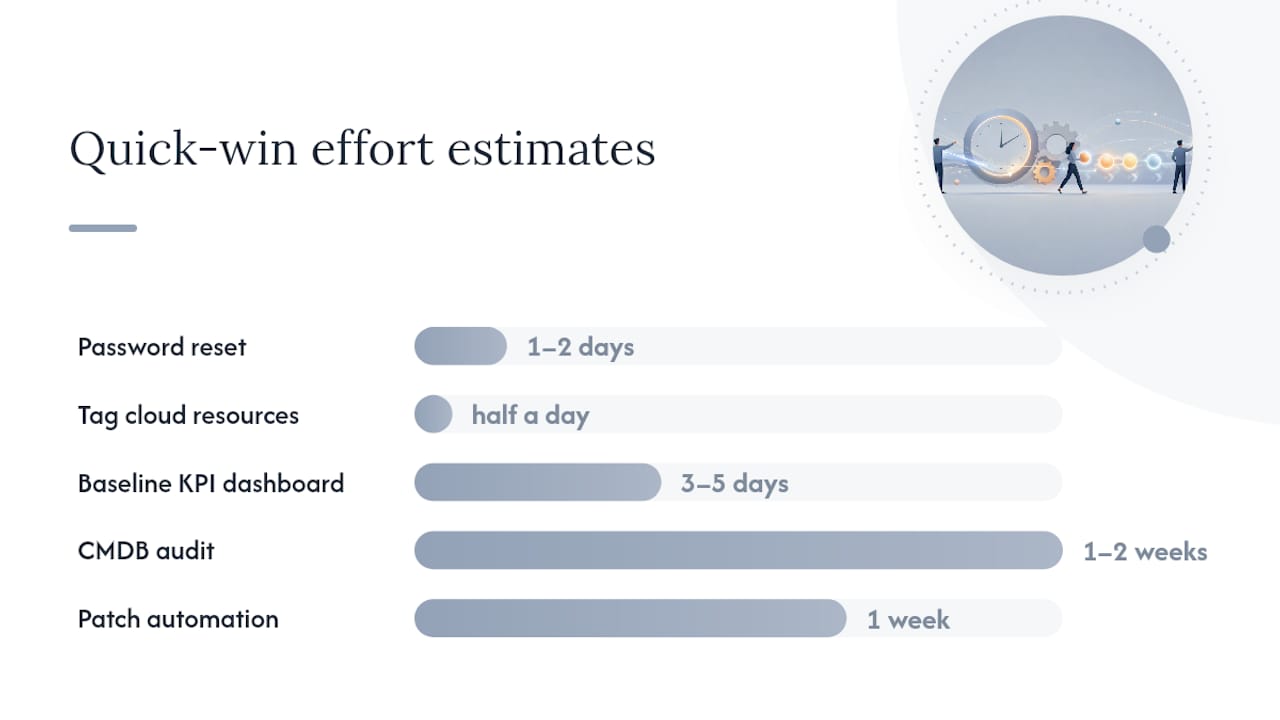
Quick wins with effort/impact estimates:
- Automate password reset flow — effort: low (1–2 days); impact: high (30–40% Level 1 ticket reduction)
- Tag cloud resources — effort: low (half a day); impact: high (immediate cost visibility)
- Baseline KPI dashboard — effort: medium (3–5 days); impact: high (measurement foundation for all future work)
- CMDB audit and gap fill — effort: medium (1–2 weeks); impact: high (faster incident diagnosis)
- Patch automation pilot — effort: medium (1 week); impact: high (vulnerability exposure reduction)
ROI estimate method: for each automation, calculate monthly time saved (frequency × minutes per task ÷ 60 × hourly fully-loaded staff cost). Divide the implementation cost by the monthly saving to get your payback period. A password reset automation that saves 40 hours per month at $80/hour fully loaded saves $3,200/month. If implementation costs $4,800 in staff time, payback is 1.5 months.
What practitioners actually see: patterns that work and mistakes that repeat
Automation combined with security integration and a unified SLA is the combination that most reliably reduces operational friction for IT teams. That is not a theoretical position — it is what the evidence from standardised implementations consistently shows.
The most common mistake is automating undocumented processes. A team that has been resolving a particular ticket type through tribal knowledge for three years will often try to automate that process before writing it down. The automation then faithfully reproduces every inconsistency and exception that was previously handled by institutional memory. The result is a faster, more consistent way to do the wrong thing.
The second most common mistake is treating the CMDB as a one-time project. Teams invest significant effort in the initial population, declare success, and then watch the data degrade over six months as infrastructure changes accumulate without being recorded. A CMDB without an owner and a reconciliation schedule is a liability, not an asset.
The repeatable success patterns are less glamorous: standardised runbooks that any team member can execute, executive sponsorship that connects IT outcomes to business metrics, and a measurement cadence that makes progress visible. Organisations that achieve sustained efficiency gains tend to have one thing in common — they treat operational improvement as ongoing work, not a project with an end date.
For Canadian IT leaders building the business case internally, the role of IT in enterprise resilience is a useful framing: efficiency and resilience are the same investment, not competing priorities.
AccountNext-Nexus gives IT leaders a faster path to operational efficiency
Fragmented IT and security tools are the single biggest drag on operational efficiency for mid-sized Canadian organisations. AccountNext-Nexus consolidates managed IT, 24/7 threat monitoring, vulnerability management, cloud infrastructure management, and compliance assessments under one unified SLA — so your team stops managing vendor relationships and starts managing outcomes.

Where most organisations spend months integrating point tools, AccountNext-Nexus delivers a pre-integrated service stack covering ITSM-aligned incident response, automated vulnerability scanning with ticketing integration, cloud management across AWS, Azure, and Google Cloud, and compliance readiness for SOC 2, HIPAA, PCI-DSS, and ISO 27001. Transparent, fixed-fee pricing means no surprise invoices when an incident escalates.
If the 90-day roadmap above describes where you want to go, AccountNext-Nexus is the direct route. Explore managed IT and cybersecurity services to see how the service stack maps to your priorities, or visit AccountNext-Nexus for a broader overview. Book a consultation and get a gap assessment against your current operational baseline within the first engagement.
Sources
- Cybersecurity best practices — CISA
- 21 tasks to automate today to streamline IT operations | TechTarget
- IT Operations Best Practices (2026 Guide) | Improve Efficiency & Uptime
- What is operational excellence in IT — Level
- IT Management Best Practices — Avasant