
Reliable IT support is the professional service that keeps your computers, networks, and software running so your team can actually do their jobs. For Canadian small and medium-sized businesses, that means more than calling someone when a laptop dies. It means having certified technicians who handle hardware troubleshooting, software issues, new employee onboarding, and preventative maintenance before problems cascade into outages. The difference between a 20-minute fix and a half-day shutdown often comes down to who you have on call and what your agreement with them actually guarantees.
Key elements Canadian SMBs should expect from a technical support partner:
- 24/7 availability with both remote and on-site response options
- Certified technicians holding credentials such as CompTIA A+
- A written service level agreement (SLA) with defined response times
- Managed IT services covering network monitoring, security, and cloud
- Fixed-rate monthly pricing for predictable budgeting
- Data backup and disaster recovery planning built into the service
Table of Contents
- What IT support services do Canadian SMBs typically receive?
- What response times and SLAs should you actually demand?
- How do you choose the right IT support provider for your SMB?
- How Nexus IT & Cybersecurity raises the bar for Canadian SMBs
- AccountNext-Nexus: one provider, no gaps
- Key takeaways
What IT support services do Canadian SMBs typically receive?
The scope of managed IT services has expanded considerably. Providers now bundle far more than basic helpdesk tickets into their monthly plans, and understanding what is standard helps you spot a thin offering quickly.
- Managed network monitoring and maintenance: Continuous oversight of your infrastructure to catch performance issues before users notice them.
- Cybersecurity measures: Threat detection, firewall management, patch deployment, and endpoint protection.
- Cloud services and data backup: Migration support, cloud storage management, and scheduled backups with tested recovery procedures.
- IT help desk support: Remote and on-site troubleshooting for day-to-day software and hardware problems.
- Software and hardware installation: Device setup, operating system configuration, and upgrade management across your fleet.
- Device and user account management: Provisioning new employees, managing permissions, and decommissioning departing staff accounts securely.
Canadian providers typically bundle these into flat-rate monthly pricing so you know exactly what you are spending, regardless of how many tickets your team generates in a given month. Learn more about managed IT service pricing and plans to understand cost structures relevant to SMBs.
What response times and SLAs should you actually demand?
An SLA is a written commitment that defines how fast your provider must respond and resolve issues at different severity levels. Without one, "we'll get to it soon" is the only guarantee you have.
Managed IT clients in Canada typically see critical issues addressed in under 30 minutes, while pay-per-incident arrangements average 1–2 hours during business hours. That gap matters more than it sounds. Canadian SMBs frequently face technology disruptions that cause productivity losses lasting several hours each time. These productivity losses add up across teams, making slow IT support costly over time.
Statistic to know: Canadian SMBs experience an average of 2.7 technology disruptions monthly, costing roughly 3 hours of productivity each time. This can lead to significant lost work hours annually from IT issues alone, before accounting for compounding effects on client delivery.
Best practices for IT support delivery standards:
- Require a tiered SLA: critical issues under 30 minutes, high-priority under 4 hours, standard under one business day
- Confirm 24/7 coverage, not just business-hours response
- Ask for monthly reporting on ticket volumes, resolution times, and recurring issues
- Verify that managed plans include proactive monitoring, not just reactive fixes
- Get SLA penalties in writing so there are real consequences for missed targets
How do you choose the right IT support provider for your SMB?
The wrong provider costs you twice: once in fees, and again every time they are slow or out of their depth. These questions cut through the sales pitch quickly.
Ask potential providers:
- What are your guaranteed response times for critical versus standard issues?
- Which certifications do your technicians hold, and how do you keep them current?
- Do you offer fixed-rate pricing, or will my bill vary with ticket volume?
- How do you handle compliance requirements relevant to my industry?
- Can you provide references from Canadian SMBs of similar size?
Red flags worth walking away from:
- Vague SLAs with no defined response windows
- No mention of cybersecurity as part of the managed service
- Technicians without verifiable certifications
- No clear onboarding or transition process
- Pricing that scales unpredictably with usage
Aligning your IT support with business goals also means thinking about managed security services and compliance. If your business handles personal data, financial records, or health information, your provider needs to understand PIPEDA obligations and sector-specific requirements, not just keep the Wi-Fi running.
Transitioning to a new provider goes smoother when you document your current environment first: hardware inventory, software licences, network diagrams, and any existing vendor contracts. Hand that package to your new provider on day one and you cut the onboarding period significantly.

Pro Tip: Prioritise providers who assign a dedicated account manager rather than routing every call through a generic helpdesk queue. A single point of contact who knows your environment catches recurring issues faster and advocates for your priorities internally.
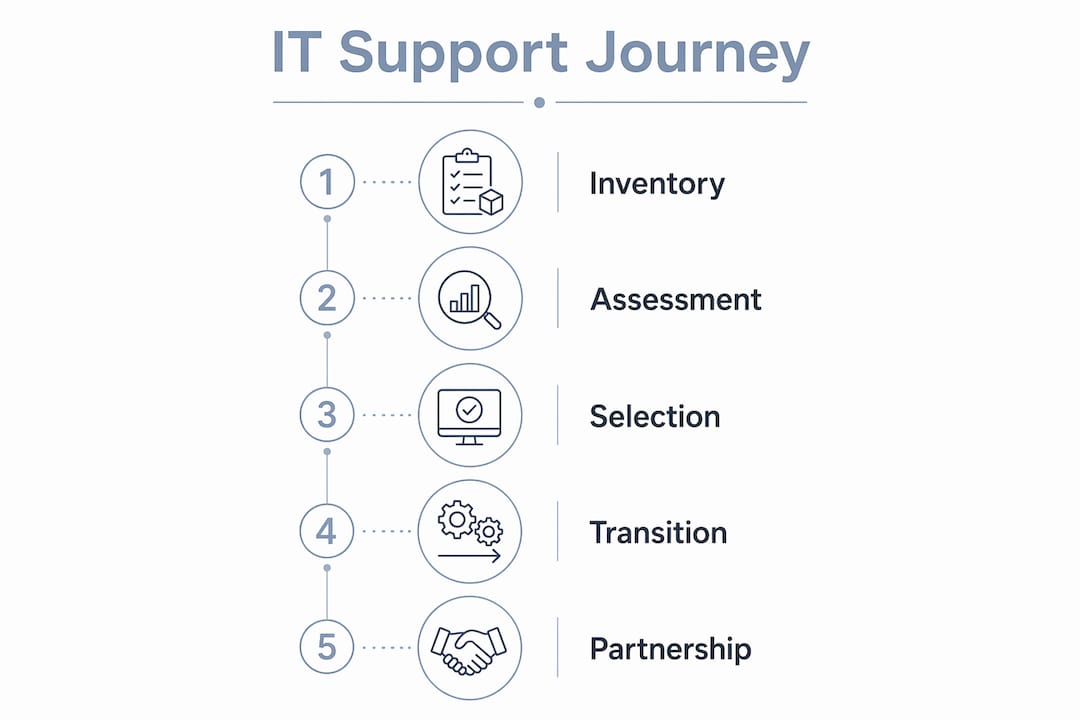
For a deeper look at evaluating Canadian providers, the 2026 Canadian business guide on managed IT services covers the full selection framework.
How Nexus IT & Cybersecurity raises the bar for Canadian SMBs
Most SMBs end up managing three or four separate vendors for IT, security, cloud, and backup. AccountNext-Nexus solves that by consolidating everything under one provider, which means faster incident response and no finger-pointing between suppliers when something breaks.

Nexus IT & Cybersecurity offers 24/7 monitoring, real-time threat detection, and customisable managed IT plans built specifically for Canadian SMBs. Their certified technicians deliver rapid incident response with detailed reporting, so you always know what happened and what was done about it. The partnership model means your account team learns your environment over time rather than treating every call as a cold start.
Key differentiators worth noting:
- Single-provider consolidation: IT management, cybersecurity, and cloud infrastructure under one agreement
- Round-the-clock monitoring: Threats and performance issues caught before they reach your users
- Certified, experienced technicians: Credentialled staff with the technical depth to handle complex environments
- Transparent fixed-rate pricing: No surprise invoices at month-end
- Client partnership approach: Ongoing relationship with dedicated support, not transactional ticket-closing
- Compliance-aware service delivery: Plans designed with Canadian regulatory requirements in mind
Only 12.2% of Canadian SMBs have fully integrated AI and automation into their workflows as of 2026, and businesses at higher digital maturity levels see 1.7 times greater returns on technology investments. A provider like AccountNext-Nexus positions your business to close that gap rather than fall further behind it.
For businesses thinking about enterprise resilience and long-term continuity, having a single accountable IT partner is one of the highest-leverage decisions you can make.
AccountNext-Nexus: one provider, no gaps
Fragmented IT coverage is expensive and slow. AccountNext-Nexus gives Canadian SMBs a single point of accountability for managed IT, cybersecurity, cloud infrastructure, and compliance, with certified technicians available around the clock and fixed monthly pricing that makes budgeting straightforward.

Where most providers hand you a helpdesk number and a ticket queue, AccountNext-Nexus builds an ongoing partnership. Your team gets faster resolutions, fewer repeat incidents, and a provider who already knows your environment when something urgent happens. If your current setup leaves you wondering whether your IT issues are being handled or just closed, it is worth seeing what a consolidated approach actually looks like. See what Nexus covers and get a clear picture of what your SMB should expect from a managed IT partner in 2026.
Key takeaways
Canadian SMBs that demand written SLAs, certified technicians, and fixed-rate managed IT plans resolve critical issues in under 30 minutes and avoid the productivity losses that reactive, per-incident support consistently produces.
| Point | Details |
|---|---|
| SLAs define real accountability | Require written response-time commitments: critical issues under 30 minutes, standard issues within one business day. |
| Managed IT beats pay-per-incident | Managed clients receive prioritised response versus 1–2 hour waits under per-incident models. |
| Productivity loss is measurable | Canadian SMBs experience an average of 2.7 technology disruptions monthly, costing roughly 3 hours of productivity each time, making proactive support a direct cost control. |
| Digital maturity pays off | SMBs at advanced digital adoption see 1.7 times greater returns on technology investments. |
| AccountNext-Nexus consolidates everything | Nexus delivers managed IT, cybersecurity, cloud, and compliance under one provider with certified technicians and transparent pricing. |