
Cloud secrets management is the practice of securely generating, storing, distributing, rotating, and revoking the programmatic credentials that automated systems use to authenticate: API keys, OAuth tokens, TLS certificates, SSH keys, database credentials, and encryption keys. The industry term is "secrets management," and the first thing any engineering team should do is run a full inventory to find and remove hardcoded secrets, then centralise whatever remains into a dedicated vault or platform.
Two foundational technologies underpin most implementations: a Key Management Service (KMS) for cryptographic key material and, for the highest assurance, a Hardware Security Module (HSM) for tamper-resistant key storage. The Canadian Centre for Cyber Security treats secrets control as a baseline cloud security control, and for good reason: a single exposed credential can hand an attacker the keys to your entire infrastructure.
- Inventory first. Scan repositories, container images, CI/CD configs, and environment variables before you touch any tooling.
- Centralise. Move secrets out of code, spreadsheets, and chat into a managed vault or cloud-native secret manager.
- Automate. Rotation, injection, and revocation should be handled by tooling, not by people copying credentials into config files.
Pro Tip: Run a secrets-scanning tool such as truffleHog or git-secrets against your full commit history before you migrate. You will almost certainly find credentials that were committed months or years ago and never rotated.
Table of Contents
- What actually counts as a "secret" in cloud environments?
- Why secrets management matters for cloud security and Canadian compliance
- How secrets management works: the eight-stage lifecycle
- Which deployment patterns fit your cloud architecture?
- Best practices checklist for cloud secrets management
- How to choose the right approach for a Canadian organisation
- Quick implementation starter: 30–90 days for engineers and SREs
- Key takeaways
- The governance gap nobody talks about
- How AccountNext-Nexus helps Canadian teams manage secrets at scale
- Useful sources for Canadian teams
What actually counts as a "secret" in cloud environments?
The distinction matters because programmatic secrets are fundamentally different from human passwords. A user password is typed by a person and managed in a password manager. A secret is consumed by code, a container, a CI/CD runner, or a cloud service, often thousands of times per minute, with no human in the loop.
Types of secrets you need to manage:
- API keys — used by services and applications to call third-party or internal APIs.
- OAuth tokens and service account keys — machine identities that authorise automated processes.
- TLS/SSL certificates — authenticate encrypted connections between services.
- SSH keys — grant shell access to servers and infrastructure.
- Database credentials — usernames and passwords for relational and NoSQL databases.
- Encryption keys — protect data at rest and in transit; often managed via KMS or HSM.
- Machine identities and ephemeral tokens — short-lived credentials issued to containers, pods, or serverless functions.
Where secrets tend to appear in the wild: hardcoded in source code, baked into container images, stored in plaintext .env files, passed as environment variables in CI/CD pipelines, or accidentally printed to application logs. Each of those locations is a potential exposure point. Password managers handle the human side of credential storage well, but they are not designed for the machine-to-machine authentication patterns that dominate cloud workloads.

Why secrets management matters for cloud security and Canadian compliance
A leaked credential is rarely just a leaked credential. Credential theft typically enables lateral movement across cloud accounts, data exfiltration, and in ransomware scenarios, privilege escalation to administrative roles. Secret sprawl — secrets scattered across source control, config files, and container images — dramatically widens the attack surface because any one of those locations can be accessed by a broad set of people and automated systems.
The most common failure modes are predictable:
- Hardcoded credentials in application code committed to version control, sometimes publicly.
- Long-lived tokens that are never rotated, giving attackers an indefinite window after a breach.
- Secrets in logs printed by verbose debug output or error handlers.
- Shared credentials across environments, so a dev-environment compromise reaches production.
For Canadian organisations, the compliance picture adds urgency. SOC 2 Type II requires evidence of access controls and monitoring for sensitive data. PCI-DSS mandates strict access control standards and audit trails for any system touching cardholder data. PIPEDA requires organisations to protect personal information with security safeguards appropriate to its sensitivity, which courts have interpreted to include access controls on systems that process or store that data. Immutable audit logs are the evidence that ties all three frameworks together: without them, you cannot demonstrate that only authorised systems accessed a credential, or that a rotation happened on schedule. Misconfigured cloud environments are a leading cause of breaches, and hardcoded or unrotated secrets are one of the most common misconfigurations auditors find.
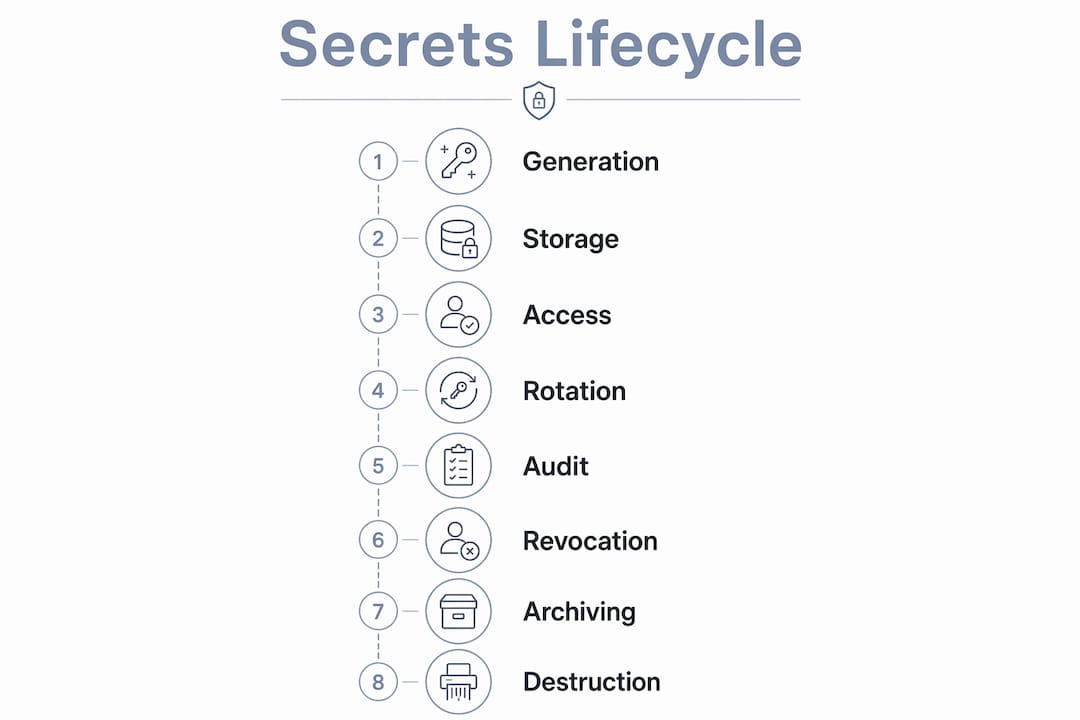
How secrets management works: the eight-stage lifecycle
A complete secrets management workflow covers eight stages from the moment a credential is created to the moment it is permanently destroyed. Most teams implement the first two stages reasonably well and then stall. The gaps in rotation, revocation, and destruction are where real incidents happen.
The eight stages:
- Generation — create credentials with sufficient entropy; use platform-generated keys rather than human-chosen passwords.
- Secure storage — encrypt secrets at rest using KMS or HSM-backed keys; never store plaintext.
- Distribution/injection — deliver secrets to workloads at runtime via API calls, sidecar agents, or CI/CD pipeline injection; never bake them into images.
- Access control/authorisation — enforce least privilege with IAM role bindings; restrict which services, environments, and users can read each secret.
- Rotation — replace credentials on a defined schedule or immediately after a suspected compromise.
- Revocation — invalidate credentials instantly when a service is decommissioned or a breach is detected.
- Monitoring/auditing — log every read, write, and rotation event; alert on anomalous access patterns.
- Destruction — permanently delete secrets and their history when no longer needed; confirm deletion in audit logs.
| Stage | Example controls | Verification metric |
|---|---|---|
| Generation | KMS-generated keys, entropy validation | Key length and algorithm audit |
| Secure storage | AES encryption at rest, HSM-backed | Encryption status report |
| Distribution | Sidecar injection, runtime API fetch | Zero secrets in image layers |
| Access control | IAM role bindings, short-lived tokens | Least-privilege access review |
| Rotation | Automated scheduler, dual-phase validation | Rotation success rate, age of oldest secret |
| Revocation | Immediate invalidation API, break-glass playbook | Time-to-revoke metric |
| Monitoring/auditing | Immutable audit logs, SIEM integration | Alert coverage, log completeness |
| Destruction | Soft-delete with TTL, hard-delete confirmation | Deletion audit trail |
Pro Tip: Use dual-phase rotation: deploy the new credential and validate that all consumers are successfully using it before revoking the old one. Skipping the validation step is the single most common cause of rotation-induced outages.
The role of audit logging in this lifecycle goes beyond compliance. Real-time alerting on unexpected secret reads is often the first signal that a workload has been compromised.
Which deployment patterns fit your cloud architecture?
There is no single architecture that fits every team. The right pattern depends on your cloud footprint, operational capacity, and how tightly you need to centralise governance.

Cloud-provider native managers (AWS Secrets Manager, Azure Key Vault, Google Cloud Secret Manager) are the natural starting point for single-cloud workloads. They integrate directly with platform IAM, handle server-side encryption and key management automatically, and offer built-in rotation hooks for common services. The trade-off is that each provider's tooling is optimised for its own ecosystem.
Platform-agnostic vaults (such as HashiCorp Vault, whether self-hosted or as a managed service) suit multi-cloud estates and teams that need a single control plane for rotation policies and governance across AWS, Azure, and Google Cloud. Multi-cloud governance is the primary reason teams choose a dedicated platform over native tools: it avoids policy silos and enables zero-knowledge architectures where the vault operator cannot read the secrets it stores.
Sidecar and agent injection patterns are common in Kubernetes environments. A sidecar container or a Vault agent fetches secrets from the vault at pod startup and injects them into the application's memory, so secrets never touch the filesystem or environment variables in a persistent way. This pattern pairs well with short-lived, dynamically generated credentials.
Dynamic secrets and just-in-time provisioning take this further: instead of storing a long-lived database password, the vault generates a unique credential for each workload on demand and automatically revokes it when the workload terminates. This is particularly effective for database access and cloud provider credentials.
HSM and KMS as root of trust sit beneath all of the above. The KMS holds the encryption keys that protect secrets at rest; an HSM provides tamper-resistant hardware storage for the most sensitive key material. Neither replaces a secrets manager, but both are necessary for a complete key hierarchy. Teams evaluating cloud-native security tooling will find that most modern platforms support KMS integration out of the box.
Best practices checklist for cloud secrets management
The OWASP Secrets Management Cheat Sheet is the most authoritative public reference for implementation guidance. The practices below distil its recommendations alongside operational experience.
- Centralise into a dedicated manager or vault. Ad-hoc storage in spreadsheets, plaintext files, Slack messages, or
.envfiles committed to repos is the root cause of most secret sprawl. - Enforce least privilege. Each service should be able to read only the secrets it needs, scoped to the environment it runs in. IAM role bindings and short-lived tokens make this enforceable.
- Automate rotation. Manual rotation is too slow and too error-prone. Automate it on a schedule and trigger it immediately on any suspected compromise.
- Inject at runtime, not build time. Secrets should never be baked into container images or build artefacts. Use CI/CD pipeline injection or sidecar agents so secrets are ephemeral.
- Maintain immutable audit logs. Every secret access event should be logged and tamper-proof. Integrate with a SIEM or centralised monitoring platform for anomaly detection.
- Build an emergency rotation playbook. When a credential is confirmed compromised, the team needs a documented, tested procedure to revoke and replace it in minutes, not hours.
- Run periodic secret inventory scans. Secrets accumulate. Schedule quarterly scans of repositories, images, and config stores to catch drift.
Pro Tip: Integrate a secrets scanner (truffleHog, Gitleaks, or a similar tool) directly into your pull-request workflow as a required CI check. Catching a committed secret before it merges is orders of magnitude cheaper than rotating it after it has been in production.
How to choose the right approach for a Canadian organisation
The decision is not purely technical. Regulatory constraints, data residency requirements, and operational capacity all shape which pattern is viable. Cloud security governance frameworks for Canadian organisations increasingly treat data residency as a non-negotiable starting point.
Key decision criteria:
- Single-cloud vs. multi-cloud — native managers are simpler for single-cloud; a platform-agnostic vault pays off when you span providers.
- Data residency and PIPEDA — secrets containing or granting access to personal information must be stored in regions that meet your data-residency commitments. Confirm that your chosen provider offers Canadian regions (AWS ca-central-1, Azure Canada Central, Google Cloud northamerica-northeast1).
- Operational capacity — self-hosted vaults give maximum control but require a team to operate them. Managed SaaS options reduce that burden.
- CI/CD and Kubernetes integration — evaluate how well the platform integrates with your existing pipeline tooling before committing.
- SLA requirements — provider-native managers typically offer high availability SLAs backed by the cloud provider's infrastructure; self-hosted solutions require you to design and maintain that availability yourself.
| Criteria | Provider-native manager | Platform-agnostic vault | Self-hosted vault |
|---|---|---|---|
| Single-cloud workload | Best fit | Viable | Overkill for most |
| Multi-cloud governance | Limited | Best fit | Viable with effort |
| Data residency (Canada) | Confirm region availability | Confirm hosting region | Full control |
| Operational overhead | Low | Low–medium (SaaS) | High |
| CI/CD integration | Native | Broad plugin ecosystem | Manual configuration |
| Regulatory audit support | Good (provider logs) | Good (centralised logs) | Depends on setup |
Cost considerations: Provider-native managers typically charge per secret stored and per API call. AWS Secrets Manager, for example, prices per secret per month plus a per-10,000-API-calls fee. Azure Key Vault uses a similar per-operation model. Platform-agnostic SaaS tools often use per-user or per-secret-version pricing. Self-hosted open-source vaults have no licensing cost but carry significant infrastructure and engineering overhead. For most Canadian SMBs and mid-market organisations, the total cost of ownership for a managed or provider-native option is lower than self-hosting once engineering time is factored in.
Quick implementation starter: 30–90 days for engineers and SREs
A phased, risk-driven approach is the most reliable way to make progress without disrupting running systems. Start with the highest-risk secrets, prove the pattern, then expand.
Days 1–30: Inventory and stop the bleeding
- Run secrets-scanning tools against all repositories, container images, and CI/CD configs.
- Identify and rotate any credentials found in source control or logs immediately.
- Adopt a secrets scanner as a required CI check on all new pull requests.
- Success looks like: a complete inventory of known secrets and zero new secrets committed to repos.
Days 31–60: Centralise critical workloads
- Select your secrets management platform based on the decision criteria above.
- Migrate credentials for your highest-risk services (production databases, payment APIs, authentication services) into the vault.
- Integrate vault access with your IAM roles and CI/CD pipeline injection.
- Replace long-lived tokens with short-lived credentials for critical workloads.
- Success looks like: production critical secrets are no longer stored in config files or environment variables; pipeline injection is working.
Days 61–90: Automate and harden
- Enable automated rotation for all secrets now in the vault, starting with the highest-risk ones.
- Set up audit log forwarding to your SIEM or centralised monitoring platform.
- Configure alerting for anomalous secret access (unusual read volumes, access from unexpected IPs or services).
- Run a tabletop exercise of your emergency rotation playbook.
- Success looks like: rotation is automated, alerts are firing on test anomalies, and the team has rehearsed incident response.
Key takeaways
Effective cloud secrets management requires centralising credentials, automating rotation, and maintaining immutable audit logs — treating every secret as a short-lived, policy-governed asset rather than a static configuration value.
| Point | Details |
|---|---|
| Centralise first | Move all secrets into a dedicated vault or cloud-native manager; eliminate ad-hoc storage in code and config files. |
| Automate rotation | Manual rotation leaves credentials exposed for too long; automate on a schedule and on-demand after any suspected compromise. |
| Audit everything | Immutable logs of every secret access event are required evidence for SOC 2, PCI-DSS, and PIPEDA audits in Canada. |
| Match platform to footprint | Use provider-native managers for single-cloud workloads; choose a platform-agnostic vault when you span AWS, Azure, and Google Cloud. |
| AccountNext-Nexus | AccountNext-Nexus provides managed cloud governance and 24/7 monitoring to help Canadian teams implement and maintain secrets controls without building the capability in-house. |
The governance gap nobody talks about
The hardest part of secrets management is not the tooling. Every major cloud provider now ships a capable native secret manager, and open-source vaults are mature. The hard part is the governance layer: who owns the rotation schedule, who reviews the access policies, and who gets paged at 2 AM when an anomalous read fires an alert.
Most teams I see at the mid-market level have done the first half of the work. They have a vault. They have secrets in it. What they have not done is close the loop on rotation, audit review, and incident response. Rotation schedules exist in a wiki page that nobody reads. Audit logs flow into a SIEM that nobody monitors. The emergency playbook was written once and never tested.
The tension between developer productivity and governance is real, and it does not resolve itself. Developers want frictionless access to the credentials they need. Security teams want every access logged, every rotation enforced, and every anomaly investigated. The only way to satisfy both is automation: inject secrets at runtime so developers never handle them manually, automate rotation so the security team does not depend on developers to do it, and alert on anomalies so the monitoring team does not have to manually review logs.
The organisations that get this right treat secrets management as a continuous operational discipline, not a one-time migration project. That means quarterly inventory scans, regular rotation-policy reviews, and a tested incident playbook. It also means accepting that the first 90 days of implementation will surface uncomfortable findings: credentials in places nobody expected, rotation gaps that have existed for years, and access policies that are far broader than they should be. That discomfort is the point.
How AccountNext-Nexus helps Canadian teams manage secrets at scale
Knowing the eight-stage lifecycle and the right tooling is one thing. Having the operational capacity to run it continuously is another. AccountNext-Nexus gives Canadian organisations a managed path to secrets governance without building a dedicated security engineering team from scratch.

AccountNext-Nexus's managed IT and cybersecurity services cover the full operational layer: 24/7 real-time monitoring of secret access events, incident response when a credential is confirmed compromised, cloud governance across AWS, Azure, and Google Cloud, and compliance support for SOC 2, PCI-DSS, and PIPEDA. The team integrates directly with cloud-native secret managers and platform-agnostic vaults, so you keep your existing tooling while gaining the monitoring, rotation oversight, and audit-readiness that most internal teams struggle to maintain consistently.
For organisations dealing with secret sprawl today, AccountNext-Nexus can accelerate the remediation timeline significantly: the initial inventory and migration work that typically takes an internal team three to six months can move faster when a team with established tooling and playbooks is running it. The shared responsibility model for cloud security means your provider secures the infrastructure; AccountNext-Nexus handles the security controls you are responsible for on top of it.
To see how AccountNext-Nexus's managed cybersecurity services can help your team close the secrets management gap, reach out for a scoping conversation.
Useful sources for Canadian teams
The following references are worth bookmarking for implementation details, vendor API documentation, and compliance guidance specific to Canadian organisations.
- OWASP Secrets Management Cheat Sheet — the most thorough public reference for implementation patterns, covering storage, rotation, injection, and audit requirements across cloud and on-premises environments.
- Canadian Centre for Cyber Security — Canada's national authority for cybersecurity guidance; publishes cloud security baselines and incident response guidance relevant to Canadian organisations.
- Google Cloud Secret Manager documentation — covers server-side encryption, Cloud KMS integration, rotation configuration, and audit log setup for teams running on Google Cloud.
- PCI Security Standards Council — authoritative source for PCI-DSS requirements; relevant for any Canadian organisation handling payment card data and needing to evidence secrets controls in audits.
- NIST SP 800-63-3 — NIST's digital identity guidelines; the foundational reference for authentication assurance levels and credential management standards referenced by many compliance frameworks.
- NIST Cryptographic Module Validation Program — the authoritative registry for FIPS 140-2/140-3 validated modules; use it to verify that an HSM or KMS meets the cryptographic assurance level your compliance framework requires.
- Cloudflare Learning: Secrets Management — a clear, vendor-neutral explanation of the secrets management definition and scope; useful for onboarding new team members.
- Best password managers comparison — helpful context for distinguishing human-facing password management from programmatic secrets management when explaining the difference to stakeholders.