
Three controls deliver the biggest risk reduction per dollar for most small businesses: multi-factor authentication (MFA), encrypted offline backups, and a one-page written data inventory paired with an incident response plan. You can stand up all three this week, mostly for free or under $100/year. The NIST CSF 2.0 Small Business Quick Start organises exactly this kind of prioritised, resource-aware approach. The FTC Safeguards Rule already requires a written security programme, risk assessment, and incident response plan for covered financial businesses.
Start here — five actions you can take this week:
- Enable MFA on email, banking, and cloud accounts — free via Google Authenticator, Microsoft Authenticator, or your provider's built-in option
- Deploy a password manager (Bitwarden free tier or 1Password Teams at roughly $20/month for a small team) and retire shared passwords
- Start an offline or versioned backup of your customer database — a USB drive rotated weekly costs under $30; a cloud backup with versioning runs $5–$20/month
- Write a one-page data inventory listing where customer data lives, who touches it, and what type it is (names, payment card data, health records)
- Draft a one-page incident response plan naming who calls whom if something goes wrong
Per May 2024 FTC guidance, covered financial institutions must report a breach involving unencrypted data of at least 500 consumers within 30 days of discovery. Knowing that threshold before an incident is what separates a managed response from a scramble.
Key takeaways
Securing customer data affordably comes down to finishing the right controls in the right order, not buying the most expensive tools.
| Point | Details |
|---|---|
| MFA and password managers first | Both are free or near-free and close the most common attack path immediately. |
| Offline backup is non-negotiable | Cloud-only backups can fail against ransomware; add an immutable or offline copy. |
| Written inventory and IR plan | The FTC Safeguards Rule requires both; a one-page version satisfies the baseline. |
| FTC reporting threshold | Breaches involving unencrypted data of at least several hundred consumers must be reported within a month. |
| AccountNext-Nexus managed option | Fixed-fee packages cover the full checklist for small businesses; see the services page. |
Table of Contents
- What should you do first, next, and later to protect customer data on a budget?
- How do you run a quick, affordable data inventory and risk assessment?
- Which low-cost technical controls reduce the most risk?
- How do you build ransomware-resilient backups without spending a lot?
- What goes into a simple incident response plan, and when must you report a breach?
- How do you train staff and manage access without a big security budget?
- DIY or managed help: how do you decide?
- How AccountNext-Nexus approaches affordable customer-data security
- How to classify customer data so you know what to protect first
- Why fundamentals beat chasing every new security tool
- AccountNext-Nexus small-business security packages
- Sources
What should you do first, next, and later to protect customer data on a budget?
The table below maps priority actions to realistic time and cost bands, aligned with NIST CSF 2.0 functions (Identify, Protect, Detect, Respond, Recover).
Pro Tip: When budget is tight, skip the expensive endpoint detection platform and finish the basics first. The one thing you cannot skip is an offline backup copy. A cloud-only backup is not ransomware-proof.
How do you run a quick, affordable data inventory and risk assessment?
A data inventory does not need to be a spreadsheet with 40 columns. One page works.
- List every place customer data lives. Think email inboxes, CRM software, point-of-sale systems, cloud storage, paper files, and employee laptops.
- Record the data type for each location. Names and addresses carry lower risk than payment card numbers, Social Security numbers, or health records.
- Note who has access. Write down job titles, not just names, so the list stays accurate when staff turn over.
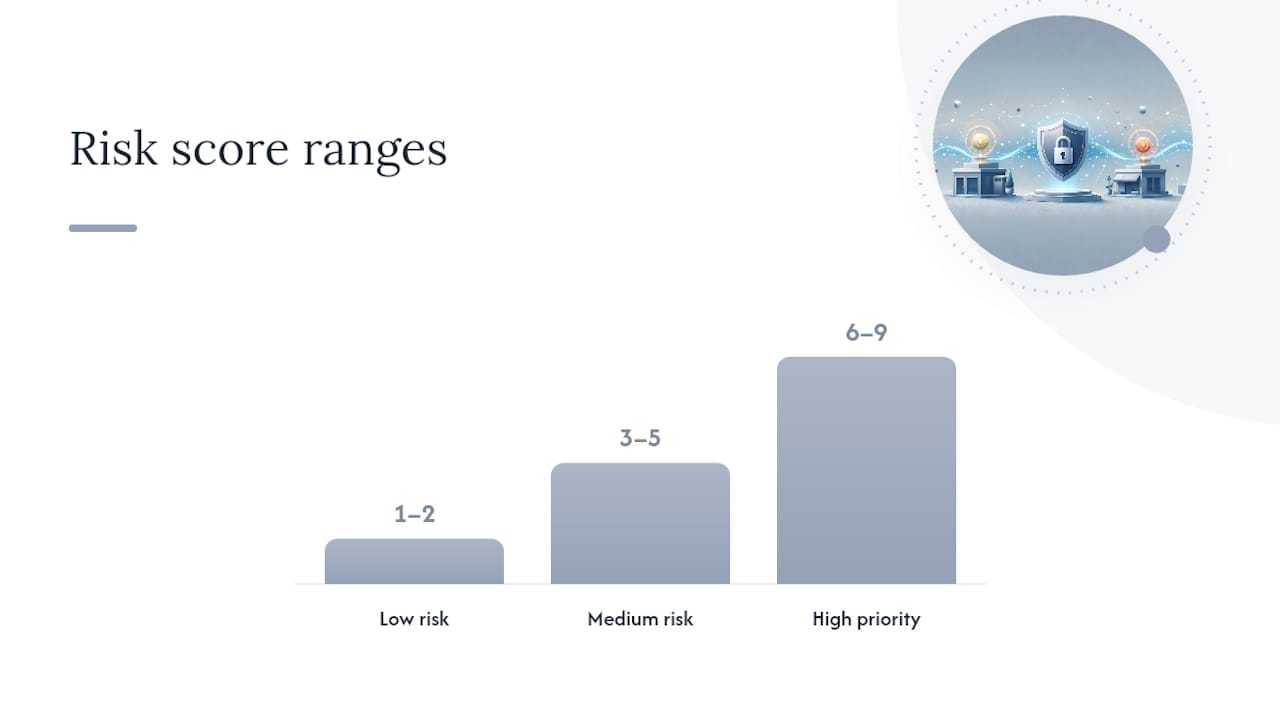
- Score each item for risk. Multiply likelihood of exposure (1–3) by impact if exposed (1–3). Anything scoring 6 or higher is high priority.
- Assign an owner and a due date for the top three risks. Print it, post it, and revisit it quarterly.
For the risk scoring, a simple example: customer payment card data stored in an unencrypted spreadsheet on a shared drive scores likelihood 3 (easily accessed) × impact 3 (PCI-DSS exposure, FTC notification risk) = 9. That goes to the top of the list.
If you cannot implement a specific control exactly as written, document why and describe the alternative you chose instead. The HIPAA Security Rule's addressable specification concept formalises this: "addressable" does not mean optional. You must document your rationale and implement an equivalent safeguard. The same logic applies to any written security programme.
Which low-cost technical controls reduce the most risk?
| Control | What It Does | Free Option | Paid Option |
|---|---|---|---|
| Phishing-resistant MFA | Blocks credential theft even if password is stolen | Google/Microsoft Authenticator | Hardware keys ~$50 each |
| Password manager | Eliminates weak and reused passwords | Bitwarden (free tier) | 1Password Teams ~$20/month |
| Endpoint patching | Closes known vulnerabilities | Windows Update, macOS updates | Patch management tools $50+/year |
| Email: SPF, DKIM, DMARC | Stops spoofed email from your domain | DNS record changes (free) | Email security gateway $10+/month |
| Encryption at rest | Reduces FTC notification obligation if breached | BitLocker (Windows), FileVault (Mac) | Cloud KMS services vary |
| Encryption in transit | Protects data moving between systems | TLS/HTTPS (free via Let's Encrypt) | CDN with TLS included |
NIST SP 1300 recommends enabling MFA first and using a password manager protected by a strong passphrase and MFA on the manager account itself. That combination closes the most common attack path for small businesses at near-zero cost.
Encryption matters beyond compliance. Under the FTC Safeguards Rule, encrypted data does not trigger a notification event unless the encryption key was also compromised. Encrypting customer data at rest with BitLocker or FileVault is free and can spare you a 30-day FTC reporting obligation.
How do you build ransomware-resilient backups without spending a lot?
Automated cloud-only backups can fail against ransomware. An attacker who gains access to your environment can cause infected files to sync, overwriting clean versions. CISA's Stop Ransomware Guide is explicit: backups must be offline or immutable to withstand modern ransomware actors.
A practical, affordable backup architecture for a small business:
- Local copy: an external drive, rotated weekly and stored off-site or in a locked cabinet
- Cloud copy with versioning: services like Backblaze B2 or AWS S3 with versioning enabled keep previous file versions even if current ones are overwritten; cost runs $5–$20/month
- Test monthly: restore one file or folder from each backup source every month. If you cannot restore it, the backup is not working
Pro Tip: Keep a "golden image" of your clean operating system and core software on an offline drive. If ransomware hits, you rebuild from the image rather than reinstalling everything from scratch. Store your software licence keys and installers in the same offline location.
What goes into a simple incident response plan, and when must you report a breach?
A one-page IR plan needs five elements: roles (who leads, who communicates), containment steps (isolate affected systems), evidence preservation (do not wipe before documenting), recovery steps (restore from clean backup), and external communications (customers, regulators, law enforcement).
FTC Safeguards Rule notification trigger: a "notification event" occurs when there is unauthorized acquisition of unencrypted customer information affecting at least 500 consumers. Covered financial institutions must notify the FTC electronically within 30 days of discovering the event. The notice must include the institution's contact information, the types of information involved, the date range of the event, the number of consumers affected, and a general description of what happened. Encrypted data is excluded from this trigger unless the encryption key was also accessed.
Prepare a draft notice template before an incident happens. When 30 days is your deadline, you do not want to be writing from scratch.
Call law enforcement (FBI or local) early if you suspect criminal activity. Engaging outside counsel before making public statements can help preserve attorney-client privilege on internal communications about the incident.
How do you train staff and manage access without a big security budget?
- Run a 30-minute phishing awareness session quarterly. Use free resources from CISA or the Anti-Phishing Working Group. Focus on one scenario per session: credential-harvesting emails, invoice fraud, and fake IT support calls cover most real-world attacks.
- Apply least privilege from day one. Every employee gets access only to the systems and data their role requires. Use your cloud platform's built-in role management (Google Workspace, Microsoft 365) at no extra cost.
- Run a quarterly access review. Pull a list of active accounts, compare it to current staff, and revoke anything that should not be there. This takes under an hour and catches former-employee accounts that are a common breach vector.
- Turn on native logging and alerts. Microsoft 365 and Google Workspace both log sign-in activity and flag suspicious logins by default. Enable admin alerts and review them weekly.
- Schedule a free vulnerability scan. Tools like OpenVAS or Tenable's free tier can scan your network for known vulnerabilities. Run one quarterly and patch what they find.
DIY or managed help: how do you decide?
| Situation | DIY Viable? | Consider Managed Help |
|---|---|---|
| Under 10 employees, no regulated data | Yes | Optional |
| Handles payment cards or health records | Partial | Strongly recommended |
| Phishing attack succeeded recently | No | Immediately |
| Cannot restore from backup on demand | No | Immediately |
| Evidence of data exfiltration detected | No | Call now |
| Compliance audit or assessment required | Partial | For scoping and evidence |
Managed security services for small businesses typically run $500–$2,500/month for a bundled package covering monitoring, patching, and incident response. Project-based compliance work (a SOC 2 readiness assessment, for example) often runs $3,000–$10,000 depending on scope. Both are cheaper than the average cost of a breach response.
Red flags that should trigger an immediate call to a provider: repeated phishing success, inability to restore backups on demand, or any sign that data has left your network without authorisation.
How AccountNext-Nexus approaches affordable customer-data security
AccountNext-Nexus delivers the controls this guide covers under a single fixed-fee managed contract, which removes the guesswork of pricing multiple vendors separately.
- 24/7 real-time monitoring and threat detection aligned with NIST CSF Detect and Respond functions
- Backup design and disaster recovery planning built to meet CISA's offline/immutable backup standard
- Incident response support with documented IR playbooks and breach notification guidance
- Compliance assessments for SOC 2, HIPAA, and PCI-DSS, including written risk assessments and security programme documentation required by the FTC Safeguards Rule
- MFA rollout and access management as part of onboarding for new managed clients
Nick, Senior Executive at AccountNext-Nexus, leads the team's small-business security practice. The team's approach starts with a prioritised assessment that maps directly to the checklist in this guide, so clients know exactly what gets addressed in week one versus month three. For owners who want to outsource the entire programme, Nexus managed security services cover the full stack under one agreement.
How to classify customer data so you know what to protect first
Not all customer data carries the same risk. A basic three-tier classification keeps the decision simple:
Tier 1 — Restricted: payment card numbers, Social Security numbers, health records, account credentials, and any data covered by a specific regulation (PCI-DSS, HIPAA, FTC Safeguards Rule). Encrypt at rest and in transit, apply strict access controls, and log every access event.
Tier 2 — Sensitive: names combined with addresses, email addresses, purchase history, and account numbers without full card data. Protect with access controls and encryption where feasible; include in your written risk assessment.

Tier 3 — Internal: aggregated or anonymised data, general business records with no personal identifiers. Standard access controls apply; lower monitoring priority.
The classification exercise takes under an hour for most small businesses and directly feeds your data inventory. Once you know which tier each data store falls into, you know where to spend your limited security budget first. For businesses handling cloud-hosted customer data, cloud compliance considerations for HIPAA and SOC 2 add another layer of specificity to this classification work.
Why fundamentals beat chasing every new security tool
The most common mistake small businesses make when budgets are tight is buying a shiny detection tool before finishing the basics. A next-generation endpoint platform does not help much if your staff are reusing passwords, your backups have never been tested, and you have no written incident plan.
CIS Controls Implementation Group 1 exists precisely for this situation. IG1 is the practical baseline for small organisations with limited resources, covering the foundational controls that defend against the most common attacks. Finishing IG1 with depth, meaning actually testing your backups and actually reviewing access quarterly, delivers better outcomes for a small team than partial implementation of advanced controls.
The NIST CSF 2.0 on-ramp reinforces the same principle: choose outcomes that fit your resources, not a full enterprise rollout. Protect and Recover functions first. Detection and advanced response come after the foundation is solid.
AccountNext-Nexus small-business security packages
Small businesses that have worked through this guide and want professional support have a clear option: AccountNext-Nexus bundles the controls covered here into fixed-fee managed packages sized for teams under 50.

The starter engagement covers your written risk assessment and data inventory, MFA rollout, backup architecture review, and a documented incident response plan. That maps directly to the Immediate and Short-term tiers in the checklist above. Ongoing managed packages add 24/7 monitoring, quarterly access reviews, and compliance support for FTC Safeguards Rule, HIPAA, or PCI-DSS obligations.
Pricing is fixed-fee with no hidden per-incident charges. To scope a package for your business or book a low-cost initial assessment, visit the AccountNext-Nexus services page.
Sources
- Standards for Safeguarding Customer Information (FTC final rule PDF)
- Stop Ransomware Guide (CISA/MS-ISAC/JRTF)
- Take a tour: NIST Cybersecurity Framework 2.0 small business quick start (NIST blog)
- HIPAA Security Rule: laws and regulations (HHS)
- Implementation groups (CIS Controls)
This article is general information, not a substitute for advice from a qualified lawyer. Consult a qualified legal professional about your own circumstances before acting on anything here.