
A free security audit checklist is a structured tool that helps small business owners systematically evaluate their cybersecurity controls, surface vulnerabilities, and prioritise remediation before a breach forces the issue. The industry term for this process is a cybersecurity audit, and the checklist is its working document. Frameworks like NIST CSF 2.0, ISO 27001:2022, and CIS Controls v8 define the gold standard for what that document should cover. Small businesses that skip this step leave access controls, data protection, and incident response entirely untested. This guide gives you a practical, no-cost path to fixing that.
What does a free security audit checklist actually cover?
A well-built security audit checklist maps directly to the six cybersecurity functions defined by NIST CSF 2.0: Govern, Identify, Protect, Detect, Respond, and Recover. Each function corresponds to controls in ISO 27001:2022 Annex A and the 18 CIS Controls v8 implementation groups. That cross-mapping means your checklist results are immediately comparable to internationally recognised standards, which matters when you face an insurance review or a client due-diligence request.
The checklist is divided into distinct categories. Each one targets a specific layer of your security posture:
- Asset inventory and infrastructure: List every device, server, and cloud service your business uses. You cannot protect what you have not catalogued.
- Access control and identity management: Verify that multi-factor authentication (MFA) is active on all accounts, that admin privileges are restricted, and that former employees no longer have access.
- Data protection: Confirm that sensitive data is encrypted at rest and in transit, and that backup strategies are tested regularly, not just scheduled.
- Network security: Check firewall rules, Wi-Fi segmentation, and whether remote access uses a VPN with strong authentication.
- Incident response: Confirm you have a written plan, that staff know their roles, and that contact lists are current.
- Compliance: Cross-reference your controls against any regulations that apply to your industry, such as PIPEDA in Canada or PCI DSS if you process card payments.
- Employee training: Validate that staff have completed security awareness training and that phishing simulations have been run recently.
Physical security belongs on the list too. Server rooms, workstations left unlocked, and unattended reception areas are entry points that purely digital checklists miss.
Pro Tip: Add a column for "Not Sure" alongside Pass and Fail. Every "Not Sure" answer is a conversation you need to have with your IT contact or a qualified security professional. Leaving it blank is the same as ignoring it.

A 12-step security audit template typically addresses OWASP Top 10 application controls, patch management policies, social engineering tests, and remediation prioritisation by risk level. That scope is the right target for a small business IT security checklist.
How do you effectively perform a security audit using a free checklist?
Preparation determines whether the audit produces real findings or just paperwork. Start by defining the scope: which systems, locations, and business processes are included. A retail business with a point-of-sale system has a different scope than a professional services firm handling client contracts. Write the scope down before you open the checklist.
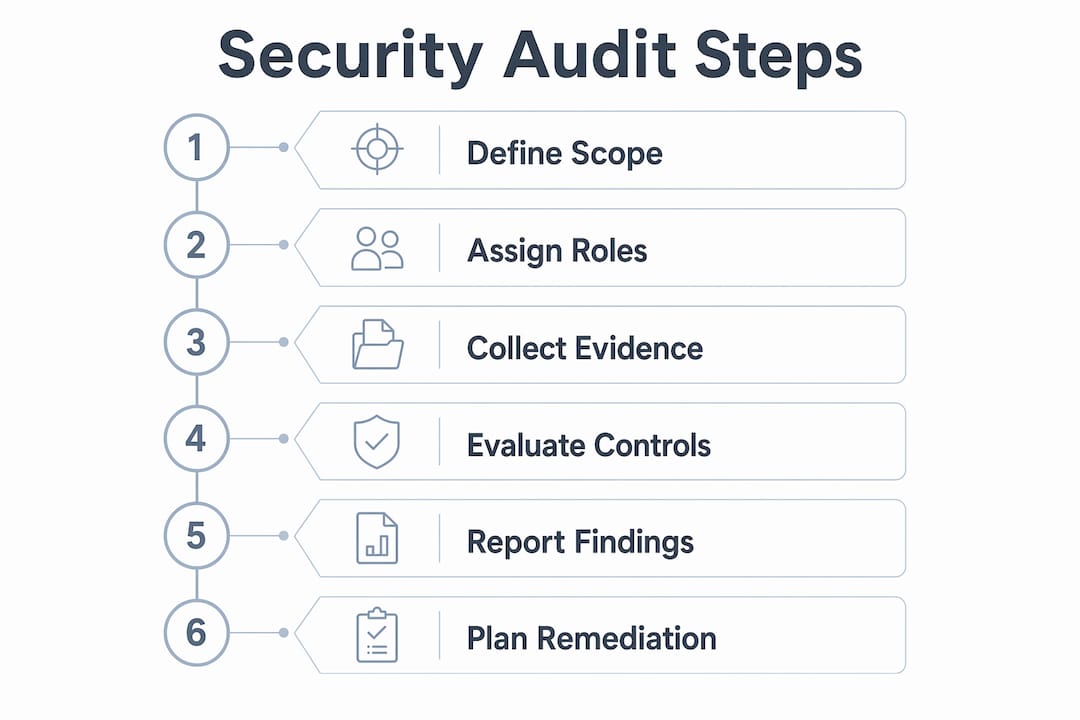
Assemble the right people. For most small businesses, that means the owner, whoever manages IT (even if that is a part-time contractor), and at least one person from operations who knows how data actually flows day to day. Gather existing documentation: network diagrams, software licences, previous audit reports, and any vendor security agreements.
Conducting the audit follows a clear sequence:
- Walk through each checklist section and mark every control as Pass, Fail, or Not Sure. Do not skip controls because they seem irrelevant. Justify any "Not Applicable" status in writing.
- Collect evidence for every Pass. A screenshot, a policy document, or a configuration export counts. Undocumented passes are unverifiable and will not hold up under a formal review.
- Record the exact nature of each Fail. "Firewall not configured" is not enough. Note which firewall, which rule set, and what the current state is.
- Flag all "Not Sure" items for follow-up with a named owner and a deadline. These are your highest-risk unknowns.
- Assign remediation owners. Every finding needs one person responsible for fixing it. Shared ownership means no ownership.
- Set deadlines by risk level. Critical findings (exposed credentials, no MFA on admin accounts) get a 48-hour deadline. Medium findings get two weeks. Low-risk items go into the next monthly review cycle.
- Retest after remediation. Closing a ticket is not the same as fixing the problem. Dry-run testing of specific controls confirms the fix actually works before you mark it resolved.
Pro Tip: Run a dry-run audit before the real one. Intentionally mark a few controls as Fail to test whether your remediation workflow actually functions. If no one responds, you have found a process gap that is more dangerous than any technical vulnerability.
ISO 27001 internal audits require scope definition, role assignment, evidence collection, and maintenance of nonconformity records. Following that structure, even informally, gives your findings credibility and prepares you for any future formal certification process.
What tools and resources make the audit process more effective?
Free tools extend what a checklist alone can find. A checklist tells you what controls should exist. Scanning tools tell you what is actually happening on your network.
Vulnerability scanning and penetration testing are the two most valuable additions to any network security assessment. Penetration testing, vulnerability scanning, and patch management tools are widely available at no cost for small business use cases. OpenVAS is a well-known open-source vulnerability scanner. Nmap maps your network and identifies open ports that should be closed. These tools require some technical knowledge, but their output translates directly into checklist findings.
Compliance cross-maps help you understand which checklist items satisfy which regulatory requirements. The NIST CSF 2.0 website publishes free mapping documents that connect its controls to ISO 27001 and CIS Controls v8. Downloading these saves hours of manual cross-referencing.
Documentation templates round out the toolkit:
- Incident response plan templates (available from CISA and the Canadian Centre for Cyber Security)
- Remediation tracking logs in spreadsheet format
- Evidence collection checklists aligned to ISO 27001 clauses 4 through 10
- Risk register templates that score findings by likelihood and impact
For small businesses without a dedicated IT team, the benefits of managed security services go beyond what any free tool provides. Managed services add continuous monitoring, which a point-in-time checklist cannot replicate.
Understanding the vulnerability management process also helps you prioritise what to fix first after the audit surfaces findings.
What mistakes do small businesses make with security audit checklists?
The most common mistake is treating the checklist as a box-ticking exercise. Security consultants consistently find that businesses mark controls as passing without verifying the underlying evidence. A policy document that exists but has never been tested is not a passing control.
Checklists are conversation starters, not finish lines. Every "Not Sure" answer represents a gap in your understanding of your own security posture. Those gaps are exactly where attackers look for entry points. Treat them as the most important findings in your audit, not as items to skip.
Incomplete scope is the second major pitfall. Audits that cover only the main office server but ignore remote workers, cloud storage, or third-party vendors miss the majority of modern attack surfaces. Map your assets before you open the checklist, and include every system that touches business data.
Ignoring remediation is the third failure mode. An audit that produces a list of findings and no follow-up action is worse than no audit at all. It creates a paper trail showing you knew about a vulnerability and did nothing. Assign owners, set deadlines, and retest.
Employee errors are among the leading causes of data breaches, which makes the training section of your checklist non-negotiable. Regular phishing simulations and security awareness training validate whether your staff can actually recognise an attack. Checking the box that says "training completed" without running a simulation is a false pass.
Finally, one-off audits create a false sense of security. Threats change faster than annual reviews can track. Schedule quarterly reviews of high-risk controls and a full audit at least once per year. Pair that schedule with a cybersecurity maturity model to measure whether your posture is actually improving over time.
Key takeaways
A free security audit checklist is only as valuable as the remediation plan it generates. Without assigned owners, deadlines, and retesting, findings stay on paper and risks stay open.
| Point | Details |
|---|---|
| Map to recognised frameworks | Align your checklist to NIST CSF 2.0, ISO 27001:2022, and CIS Controls v8 for credible, comparable results. |
| Cover all seven categories | Asset inventory, access control, data protection, network security, incident response, compliance, and employee training must all appear in scope. |
| Assign every finding an owner | Shared remediation responsibility produces no remediation. One named person per finding, with a deadline by risk level. |
| Retest after every fix | Closing a ticket without retesting leaves the vulnerability status unconfirmed. Dry-run testing validates the fix. |
| Audit on a schedule | A single annual audit is insufficient. Review high-risk controls quarterly and run a full audit at least once per year. |
Why I think most small businesses are auditing backwards
Nick, Sr. Executive
Most small business owners approach a security audit looking for reassurance. They want to confirm that things are probably fine. That mindset produces exactly the kind of superficial review that leaves real gaps untouched.
The audits I have seen produce genuine security improvement start from the opposite assumption: something is wrong, and the checklist is how we find it. That shift changes everything about how you handle "Not Sure" answers. Instead of moving past them, you treat them as the most important items on the list.
The other thing I would push back on is the idea that a checklist is a one-person job. The owner fills it out, files it away, and considers the work done. The most effective audits I have been part of involved at least three people: someone who knows the technical infrastructure, someone who knows the business operations, and someone who can ask uncomfortable questions without worrying about the answers. That combination surfaces findings that a solo review never would.
Documentation is the part that pays off in ways most owners do not anticipate. When your cyber insurance provider asks for evidence of controls, or when a prospective client requests a security questionnaire, a well-documented audit history is the difference between a quick answer and a scramble. Build the habit now, before you need it.
The checklist is the starting point. What you do with the findings is the actual security programme.
— Nick, Sr. Executive
How AccountNext-Nexus supports your security beyond the checklist
A checklist identifies where your defences stand today. Keeping them strong tomorrow requires continuous monitoring that no point-in-time document can provide.

AccountNext-Nexus delivers 24/7 threat detection and IT monitoring that picks up where your audit leaves off. The team handles real-time threat response, cloud infrastructure management, and compliance tracking, so vulnerabilities get addressed before they become incidents. For small businesses without a full-time security team, that coverage is available at a cost that fits a small business budget. If your audit has surfaced findings you are not sure how to remediate, AccountNext-Nexus provides access to seasoned IT professionals who can guide the fix and verify the result. Reach out to AccountNext-Nexus to discuss what ongoing protection looks like for your business.
FAQ
What is a free security audit checklist?
A free security audit checklist is a structured document that guides small businesses through evaluating their cybersecurity controls across areas like access management, data protection, and incident response. It is typically aligned to frameworks such as NIST CSF 2.0, ISO 27001:2022, or CIS Controls v8.
How often should a small business run a security audit?
Small businesses should conduct a full cybersecurity audit at least once per year, with quarterly reviews of high-risk controls such as access management and patch status. Threat conditions in 2026 make annual-only reviews insufficient for most businesses.
What is the difference between a security audit and a risk assessment?
A security risk assessment evaluates the likelihood and impact of specific threats, while a security audit verifies whether specific controls are in place and functioning. Both are needed for a complete picture of your security posture.
Do I need technical expertise to use a security audit checklist?
Basic checklist sections covering policy, access control, and employee training require no technical expertise. Sections covering network configuration, vulnerability scanning, and encryption verification benefit from IT support or a managed security provider.
What should I do after completing the checklist?
Assign a named owner and a deadline to every Fail and Not Sure finding, then retest each control after remediation is complete. Schedule the next audit before you close the current one to maintain a continuous improvement cycle.