
A cyberattack is an intentional attempt to gain unauthorised access to, steal from, disrupt, or damage a computer system, network, or digital device. Attackers typically go after one of three things, known together as the CIA triad: confidentiality (keeping your data private), integrity (keeping your data accurate and untampered), and availability (keeping your systems and services running). Break any one of these, and the fallout usually lands in the same three buckets: stolen or leaked data, hours or days of downtime, and a real financial hit.
That's the short version. Here's what a successful attack tends to compromise:
- Confidentiality — personal records, passwords, or trade secrets exposed to people who shouldn't see them
- Integrity — files, transactions, or databases altered without permission
- Availability — websites, apps, or entire networks knocked offline
Key Takeaways
Cyberattacks succeed most often not because defences are absent, but because detection is too slow to catch the attacker before real damage is done.
| Point | Details |
|---|---|
| Definition matters | A cyberattack targets confidentiality, integrity, or availability, and naming which one helps you respond correctly. |
| Know your attacker types | Malware, ransomware, phishing, DDoS, and account takeover each show different early warning signs. |
| The kill chain reveals opportunity | Interrupting an attack before command and control cuts remediation cost and complexity significantly. |
| Speed after detection is critical | Isolating systems, preserving logs, and restoring from verified backups shape recovery time. |
| Consolidation shortens dwell time | AccountNext-Nexus pairs 24/7 monitoring with incident response and compliance under one service agreement. |
Table of Contents
- What is a cyberattack according to security experts?
- What are the most common types of cyberattacks?
- Who launches cyberattacks and why?
- How do cyberattacks actually work?
- What are the real consequences of a cyberattack?
- How can you prevent and detect cyberattacks?
- What should you do if you suspect an attack?
- Why does consolidation shorten recovery time?
- What conventional advice gets wrong about cyberattacks
- How AccountNext-Nexus helps you close the detection gap
- Sources
What is a cyberattack according to security experts?
Ask three authorities to define the term and you'll get three slightly different angles, though they land in the same place. Microsoft Security describes a cyberattack as an attempt to breach, disrupt, or damage computer systems, networks, or devices, usually for a payoff like data theft or fraud. The NIST Computer Security Resource Center frames it more technically: malicious activity that tries to collect, disrupt, deny, degrade, or destroy information system resources or the information itself. Wikipedia's entry on the subject adds a useful nuance: definitions shift depending on scope, whether you're talking about a single phishing email or a coordinated campaign against national infrastructure.
The CIA triad is easier to grasp with plain examples:
- Confidentiality breaks when a hacker steals a hospital's patient database and sells the records.
- Integrity breaks when someone quietly edits a company's financial ledger to hide fraud.
- Availability breaks when a flood of junk traffic knocks a retailer's website offline during a sale.
It also helps to separate three terms people use interchangeably. A cyberthreat is the possibility that an attack could happen, like a known software flaw sitting unpatched. A cyberattack is the act itself, the moment someone exploits that flaw. Cyber risk is the broader calculation, how likely an attack is and how much damage it would cause if it succeeded. Knowing the difference matters because it changes what you measure and what you fix first.
What are the most common types of cyberattacks?
Most attacks fall into a handful of recognizable categories, and knowing the signs of each is the fastest way to catch one early.
- Malware covers viruses, worms, and Trojans. A worm might quietly copy itself across every device on your home network; a Trojan often disguises itself as a legitimate download, then opens a backdoor once installed.
- Ransomware encrypts your files and demands payment for the key to unlock them. You'll usually know instantly, since a ransom note typically replaces your desktop wallpaper or appears in every affected folder.
- Phishing and social engineering rely on urgency and disguise, a fake bank alert, a spoofed invoice, a text claiming your package is stuck in customs. Red flags include mismatched sender addresses, pressure to act immediately, and links that don't match the company they claim to be from.
- DDoS attacks and botnets flood a service with junk traffic until it buckles. If a website suddenly becomes painfully slow or unreachable with no announced outage, that's often the signature.
- Account takeover and credential stuffing happen when attackers reuse passwords leaked from other breaches. Watch for login alerts from unfamiliar locations, password reset emails you didn't request, or being locked out of your own account.
- Supply chain attacks target a trusted vendor or software update rather than you directly, letting attackers ride in through a connection you already trust.
- Advanced persistent threats (APTs) are drawn out, targeted campaigns, often against specific organizations. Signs you're facing one include repeated intrusion attempts after remediation and unusual data flows that persist over weeks or months.
Pro Tip: If you get a security alert that feels slightly off, don't click anything in the message itself. Open a new browser tab and log in to the account directly to check.
The scale of this problem is documented, not theoretical. The FBI's Internet Crime Complaint Center (IC3) 2024 annual report tracks the volume and financial toll of cybercrime complaints filed by the public, and the patterns it captures, from phishing to business email compromise, mirror exactly the categories above. Microsoft's research also notes that attackers increasingly blend automated commodity tools with hands-on-keyboard follow-up activity, meaning a mass phishing campaign can escalate into a targeted, human-driven intrusion once the attacker finds something worth pursuing.
Who launches cyberattacks and why?
Not every attacker wants the same thing, and that matters because the motive often shapes the method.
- Criminal gangs are the most common source of everyday attacks. Their goal is profit, through ransom payments, stolen credit card numbers, or reselling personal data on underground markets.
- Nation-state actors conduct espionage, sabotage, or politically motivated disruption, often targeting infrastructure, defence contractors, or government systems.
- Hacktivists attack for ideological reasons, defacing websites or leaking documents to make a political statement rather than a profit.
- Insiders are employees or contractors, sometimes negligent (clicking the wrong link), sometimes malicious (deliberately leaking data on their way out the door).
- Opportunists and script kiddies use off-the-shelf tools against whatever target is easiest to reach, with far less skill than the other groups but no shortage of volume.
Understanding which of these you're likely up against changes your defence priorities. A small business is far more likely to face an opportunist or a criminal gang running automated scans than a nation-state actor.
How do cyberattacks actually work?
Most serious attacks follow a recognizable sequence, often called the cyber kill chain, a model originally developed by Lockheed Martin and now widely adapted by security vendors including Microsoft and CrowdStrike. Each stage gives defenders a chance to interrupt the attack before it succeeds.
- Reconnaissance — the attacker researches the target, scraping employee names off LinkedIn or scanning for exposed servers. Defence: limit public information and monitor for scanning activity.
- Weaponization — a malicious payload, like a ransomware-laced attachment, gets built. Defence: email filtering and attachment sandboxing.
- Delivery — the payload reaches the target, often through a phishing email. Defence: spam filters and user training to spot suspicious messages.
- Exploitation — the victim opens the file or clicks the link, triggering the exploit. Defence: patched software and endpoint protection that blocks known exploit behaviour.
- Installation — malware embeds itself on the system. Defence: endpoint detection and response (EDR) tools that flag unusual file activity; our guide to how EDR works breaks down the mechanics.
- Command and control — the malware phones home to the attacker's server for instructions. Defence: network monitoring that flags outbound traffic to known malicious domains.
- Actions on objective (monetization) — files get encrypted, data gets exfiltrated, a ransom note appears. Defence: isolated backups and a tested recovery plan.
Pro Tip: The earlier in this chain you catch an attack, the cheaper it is to fix. CrowdStrike's analysis of the kill chain notes that interrupting an attack before it reaches command and control disproportionately reduces remediation cost and complexity compared with catching it after data has already left the network.
What are the real consequences of a cyberattack?
The damage rarely stays contained to one system, as explained in this detailed guide to types of data loss, causes, risks, and recovery approaches. A single breach typically triggers three overlapping problems: data exposure, operational downtime, and direct financial loss, and any one of those can spiral into reputational damage that outlasts the technical fix by months.
The scale here isn't abstract. The IC3 2024 annual report documents both the number of cybercrime complaints filed with the FBI and their financial impact, giving a rare public window into how often these schemes succeed and how much money moves through them. Ransomware alone regularly forces organizations to choose between paying a ransom with no guarantee of recovery, or rebuilding from scratch.
Consequences worth planning around:
- Data breaches exposing customer records, health information, or intellectual property
- Operational downtime that can shut down production, sales, or patient care for days
- Direct financial loss from ransom payments, fraud, or regulatory fines
- Reputational harm that shows up later, as customers or partners quietly move to competitors
- Safety risk, particularly where attacks touch industrial control systems or medical devices
For organizations trying to understand how attack surfaces keep growing, cloud adoption, IoT devices, and AI tools all add new entry points, which is part of why Microsoft frames continuous monitoring as increasingly non-optional rather than a nice-to-have.
How can you prevent and detect cyberattacks?
Prevention doesn't require a massive budget so much as consistent basics done well, layered so that if one control fails, another catches the problem.
- Multi-factor authentication (MFA) stops the majority of account takeover attempts even when a password leaks.
- Regular patching and updates close the exploitation gap attackers rely on, often within days of a vulnerability becoming public.
- Secure, offline backups are what actually gets you through a ransomware incident without paying.
- Least privilege access limits how far an attacker can move once inside, since not every employee needs admin rights to every system.
- Phishing training turns your staff into a detection layer instead of the weakest link, since most intrusions still start with a clicked link.
- Endpoint protection and network segmentation contain damage by preventing one infected device from reaching everything else.
Unprotected, internet-facing services get scanned and probed constantly. An exposed server can draw hundreds of automated probing attempts in a single day, which is exactly why reducing your exposed surface matters as much as defending it.
That volume of background noise is precisely why layered defence and threat intelligence matter, you're not just defending against a targeted human, you're defending against automated scanning happening around the clock. CISA's cybersecurity advisories publish real-time detail on active campaigns and the mitigations organizations should apply, and they're worth checking regularly if you manage any business network. For teams without in-house security staff, continuous monitoring delivered by a managed provider closes the gap that a nine-to-five IT person simply can't cover. This is also where managed detection and response earns its place: it's appropriate once you have systems worth protecting around the clock but lack the staff to watch them at 2 a.m., which describes most small and mid-sized organizations.
What should you do if you suspect an attack?
Speed and order matter here more than perfection. The first hour after discovering a suspected attack shapes how much damage gets done and how easily you recover from it.
- Isolate affected systems immediately, disconnect from the network rather than shutting devices down, since powering off can destroy evidence.
- Preserve logs and evidence before anything gets cleaned up or reinstalled; investigators and insurers will need them.
- Notify stakeholders, including leadership, affected customers where required, and your IT or security provider.
- Report to law enforcement when financial fraud or significant data theft is involved. The IC3 is the FBI's channel for this, and having transaction details, timestamps, and any attacker communication ready speeds up the process.
- Restore from trusted, verified backups, never from the same environment that was compromised, without confirming it's clean.
- Remediate the original vulnerability before reconnecting anything, otherwise you're just inviting a repeat visit.
- Confirm restore integrity by testing systems before declaring the incident closed.
A structured incident response checklist removes the guesswork from this sequence when adrenaline is running high and decisions need to happen fast.
Why does consolidation shorten recovery time?
Attacker dwell time, the gap between initial compromise and detection, is what usually decides the final cost of a breach. Shorter dwell time means less lateral movement and less data walking out the door. AccountNext-Nexus's approach ties 24/7 monitoring, incident response, and compliance into one coordinated workflow rather than three disconnected vendors trading emails during a crisis.

Pro Tip: When evaluating any provider, ask one direct question: "If you detect something at 3 a.m., who acts, and how fast?" The answer tells you more than any marketing sheet.
What conventional advice gets wrong about cyberattacks
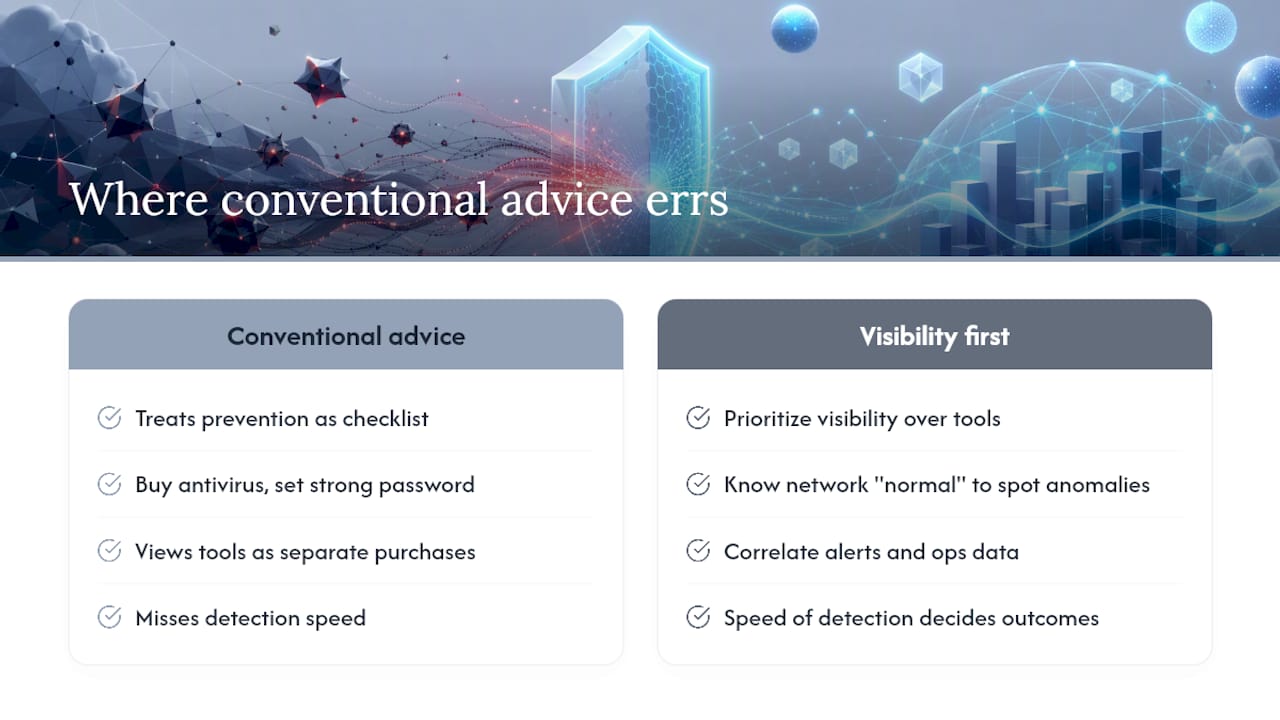
Most guidance on this topic treats prevention as a checklist: buy antivirus, set a strong password, done. That's not wrong, exactly, but it misses the part that actually decides outcomes, which is speed of detection once something slips through, because something eventually will. The IC3 data alone should put to rest any idea that this is a rare-event problem you can insure your way out of and forget.
Where the conventional wisdom really falls short is treating security tools and IT operations as separate purchases. A firewall alert that nobody correlates with a slow server and a strange login attempt is three isolated data points instead of one obvious pattern. That gap between individual tools and a coordinated response is exactly where dwell time balloons.
If you take one thing from this article, prioritize visibility before you prioritize more tools. Know what "normal" looks like on your network well enough to spot "not normal" quickly. Everything else, from patching cadence to backup frequency, matters, but it matters less if nobody's watching when the unusual thing happens.
How AccountNext-Nexus helps you close the detection gap
Most businesses juggling separate vendors for monitoring, incident response, and compliance lose time in the handoffs between them, and that lost time is exactly where attackers do their damage. AccountNext-Nexus is built to remove those handoffs entirely: one team runs 24/7 real-time threat detection, incident response, penetration testing, and compliance support (SOC 2, HIPAA, PCI-DSS, ISO 27001) under a single service agreement, so nothing falls into the gap between "IT's problem" and "security's problem."

This fits organizations that already know fragmented tools are slowing their response, small and mid-sized businesses, healthcare groups, and startups that need enterprise-grade monitoring without hiring an entire in-house security team. If your current setup means calling three different vendors when something looks wrong, it's worth comparing that against a single-provider managed cybersecurity service with transparent pricing and one point of accountability. Reach out to AccountNext-Nexus to get a look at how consolidated monitoring and response would apply to your specific environment.
Sources
- What is a cyberattack? | Microsoft Security
- Cyber Attack - Glossary | NIST Computer Security Resource Center
- IC3 2024 annual report
- CISA cybersecurity advisories