
Scalable cloud architecture cuts wasted infrastructure spend, keeps applications fast during traffic spikes, speeds up feature delivery, and builds resilience into cloud solutions for SMEs that used to fail under pressure. That is the deal, and it holds whether you run a fifty-person SaaS shop or a hospital network's back office. The pattern shows up consistently in Google Cloud's architecture guidance: automation, loose coupling, and data-driven scaling reduce downtime and keep performance steady under load. Pair that with a real FinOps discipline, and the cost side stops being a mystery too.
Here's what that actually looks like in practice:
- Infrastructure spend tracks real usage instead of worst-case guesswork
- Autoscaling and load balancing absorb demand spikes without manual intervention
- Infrastructure-as-code (IaC) and CI/CD pipelines shrink deployment cycles from weeks to hours
- Multi-zone redundancy keeps services running when a data centre has a bad day
AccountNext-Nexus works with organizations moving through exactly this shift, from legacy fixed-capacity setups to elastic, managed environments. Below, we unpack how each of these benefits materializes and what it takes to achieve them.
Key Takeaways
Scalable cloud architecture works because it ties infrastructure spend directly to real demand while automation handles the scaling decisions humans used to make manually and slowly.
| Point | Details |
|---|---|
| Cost follows usage | Pay-as-you-go and rightsizing replace fixed capex, but only pay off with active FinOps governance and budget alerts. |
| Performance stays steady under load | Autoscaling, load balancing, and CDNs keep latency low and error rates down during traffic spikes. |
| Automation drives operational speed | IaC and CI/CD pipelines cut deployment cycles from weeks to hours and reduce manual provisioning errors. |
| Security scales with infrastructure | Ephemeral instances and expanding attack surfaces require least-privilege access and shared-responsibility clarity, not an afterthought. |
| A consolidated provider reduces friction | AccountNext-Nexus pairs cloud migration and management with 24/7 threat detection under one SLA, cutting the handoff delay between vendors during incidents. |
Table of Contents
- What are the main benefits of scalable cloud architecture?
- Cost, ROI, and FinOps: governing the financial upside
- How scalable architecture improves performance and reliability
- Operational advantages: less manual work, faster releases
- Types of cloud scalability and the patterns that support them
- How to build scalable cloud architecture: a practical checklist
- Trade-offs and cost-control pitfalls to avoid
- When scalable cloud architecture makes sense for your business
- Where a managed provider fits into the scaling journey
- What does cloud scalability actually mean?
- Security implications of scaling cloud infrastructure
- How scalable architecture shapes user experience
- The environmental case for scalable cloud systems
- What IT leaders consistently get wrong about scaling
- Migrating to scalable infrastructure without the guesswork
- Sources
What are the main benefits of scalable cloud architecture?
Five benefits show up again and again once an organization moves to elastic infrastructure, and each one maps to something a CFO or a CIO actually tracks.
- Cost efficiency. Pay-as-you-go pricing replaces the old capital-expenditure model of buying servers for peak load you'll hit twice a year. Rightsizing workloads and avoiding over-provisioned hardware means you stop paying for idle capacity most of the year.
- Performance and availability. Autoscaling, load balancing, and content delivery networks (CDNs) push compute closer to users and spread load evenly, which lowers latency and cuts error rates during traffic surges.
- Operational agility. IaC tools and automated CI/CD pipelines mean a feature that once took a six-week release cycle can ship in days, sometimes hours.
- Resilience and disaster recovery. Multi-zone and multi-region redundancy, combined with managed backup services, mean a single hardware failure or even a full regional outage doesn't take your application down with it.
- Innovation enablement. Managed AI and analytics services give teams access to capabilities that would take months to build in-house, without hiring a specialized team to babysit them.
Here's the number that matters most to decision-makers: Google Cloud's own analysis ties cloud architecture directly to cost-effective infrastructure and faster time to market, with managed services accelerating modernization work that used to sit on internal roadmaps for years. That's not marketing language, it's the practical reason so many IT budgets have shifted from capital projects to operating line items.
Cost, ROI, and FinOps: governing the financial upside
Moving from capex to opex changes more than your accounting category. It changes how your finance team plans, because cloud spend flexes month to month instead of sitting as a fixed depreciation schedule. That flexibility is the whole point, but it only pays off if someone is watching the meter.
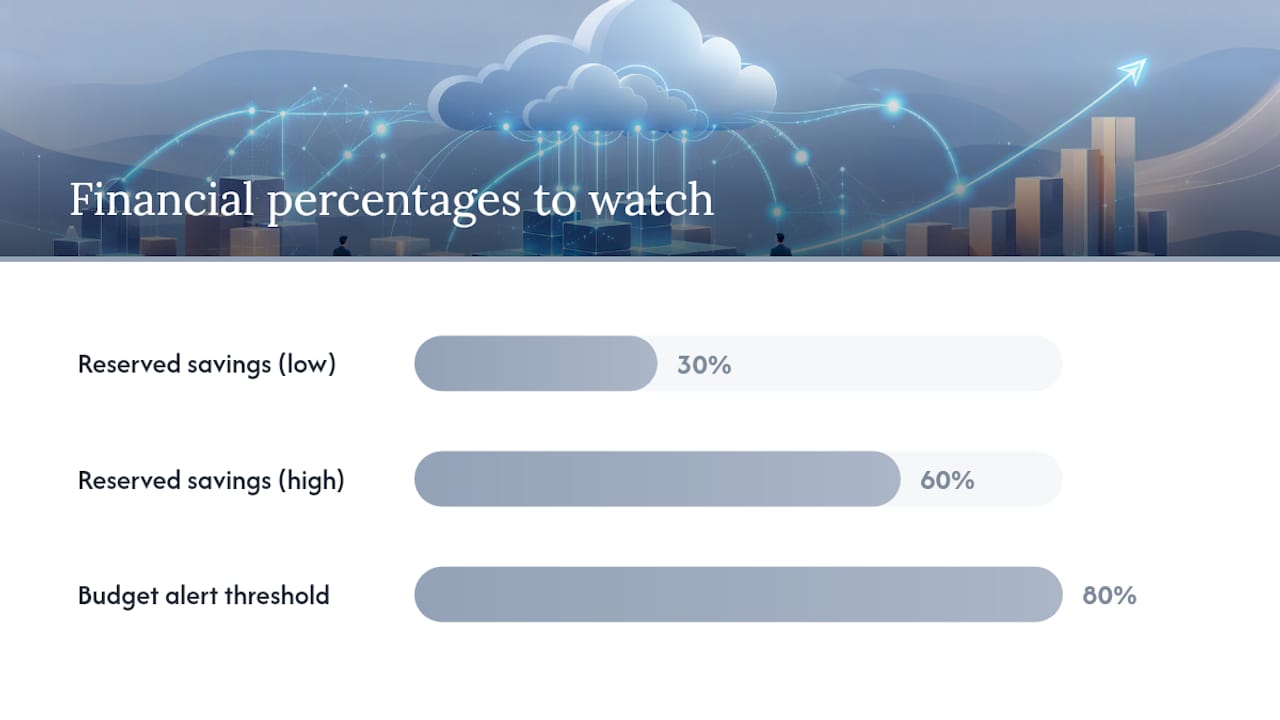
Rightsizing decisions and the on-demand-versus-reserved-instance tradeoff deserve real attention here. Reserved or committed-use pricing can cut costs 30 to 60% versus on-demand rates for predictable workloads, but only if you've correctly forecast the baseline. Guess wrong and you're paying for capacity you don't use, which defeats the entire purpose of going scalable in the first place.
This is where FinOps stops being a buzzword and starts being a job function. The FinOps community's own guidance centres on a few concrete practices:
- Tag every resource by team, project, and environment so costs map to owners, not just line items
- Build cost allocation dashboards that finance and engineering both actually check
- Set budget alerts before spend spikes, not after the invoice arrives
- Run optimization loops quarterly, not once at initial deployment and never again
Pro Tip: Set a hard budget alert at 80% of your monthly cloud forecast, not 100%. That twenty-percent buffer gives your team time to investigate an autoscaling anomaly before it becomes a five-figure surprise on next month's bill.
Measuring ROI on scalability means tracking things beyond the invoice: reduced downtime hours, time-to-market for new features, and how much engineering time gets freed up when infrastructure stops eating a third of every sprint.
How scalable architecture improves performance and reliability
Autoscaling and horizontal scaling are the mechanisms that keep an application responsive when traffic triples overnight, whether that's a retailer on Black Friday or a media site during a breaking news event. Instead of a fixed server fleet buckling under load, new instances spin up automatically and load balancers distribute traffic across them.
Caching layers and CDNs do a second job here: they cut latency by serving content from locations physically closer to users, which matters more than most teams assume until they measure it. Redundancy and automated failover reduce mean time to recovery (MTTR), which is the metric that actually determines whether you meet your service-level agreement (SLA) commitments.
The statistic worth remembering: VMware's analysis of cloud scalability notes that virtualization and managed services let organizations scale compute, storage, and networking with far less disruption than comparable on-premises expansions, which historically meant procurement cycles measured in weeks or months.
None of this works without observability. Latency, error rate, and saturation metrics are what trigger scaling events in the first place. Design for observability before you design for scale, or you'll end up with autoscaling rules that overreact to noise and waste money reacting to phantom spikes.
Operational advantages: less manual work, faster releases
The hidden cost of static infrastructure isn't the hardware, it's the human hours spent provisioning, patching, and babysitting it. Scalable architecture flips that equation by automating the repetitive parts of infrastructure management.
Infrastructure-as-code turns server provisioning into a version-controlled script instead of a manual checklist prone to typos and forgotten steps. Containers and orchestration platforms make deployments repeatable, so what works in staging behaves identically in production, which sounds obvious until you've debugged an environment-specific bug at 2 a.m.
- IaC and automated provisioning cut human error and reduce setup time from days to minutes
- Container orchestration standardizes deployments across dev, staging, and production environments
- Managed database and networking services eliminate routine patching and maintenance tasks
- Smaller, more frequent release windows shorten feedback loops between engineering and users
Managed services matter here specifically because they remove undifferentiated work, the patching and version upgrades that don't make your product better but eat calendar time regardless. Teams that offload that work report shipping smaller, safer releases more often, which tightens the loop between building something and learning whether it actually works. A managed services approach extends the same logic to security operations, freeing internal staff from tasks that don't require their specific expertise.
Types of cloud scalability and the patterns that support them
Not every workload scales the same way, and picking the wrong pattern costs money or uptime later.
- Vertical scaling adds more power (CPU, RAM) to an existing machine. It's simple but has a ceiling, and it often requires downtime to apply.
- Horizontal scaling adds more machines instead of bigger ones. It costs more coordination up front but has no practical ceiling and avoids downtime during scale events.
- Hybrid and multicloud setups keep sensitive workloads on-premises or in a private cloud while public cloud handles elastic, non-sensitive demand. IBM's architecture guidance frames this as the compliance-and-performance compromise many regulated industries land on.
- Stateless services and microservices are what make horizontal scaling practical, because any instance can handle any request without needing session data stored locally.
Supporting patterns, caching, message queues, database sharding, and command query responsibility segregation (CQRS), all exist to keep these approaches from falling over under real-world load. You'll want a cloud infrastructure primer if any of this is new territory for your team.
How to build scalable cloud architecture: a practical checklist
Getting from "we should be scalable" to an architecture that actually behaves that way under load takes a specific sequence of decisions, not a single migration project.
- Design services to be stateless and containerize workloads wherever the application logic allows it
- Automate infrastructure through IaC and build CI/CD pipelines with canary or blue-green rollout strategies
- Instrument everything with observability tooling before setting autoscaling triggers, so thresholds reflect real behaviour, not guesses
- Offload undifferentiated infrastructure work to managed services rather than maintaining it internally
- Build FinOps guardrails, tagging, budgets, alerts, into the architecture from day one, not as an afterthought
Pro Tip: Run your first autoscaling test in a staging environment with synthetic load, not production traffic. You'll catch oscillation problems (where the system scales up and down repeatedly without stabilizing) before they show up on a customer-facing dashboard.
Microsoft Azure's documentation offers detailed reference implementations for these patterns if your team is standardizing on a specific cloud provider, and the same principles hold whether you're on Azure, AWS, or Google Cloud.
Trade-offs and cost-control pitfalls to avoid
Scalability isn't free of risk. Autoscaling without governance is how a traffic spike turns into a five-figure bill nobody approved. Distributed systems are also genuinely harder to debug than a monolith on one server, because a failure can originate three services away from where it surfaces.
- Set hard budget caps and alerts before turning on aggressive autoscaling policies
- Write runbooks for common failure scenarios so on-call engineers aren't improvising at 3 a.m.
- Use chaos engineering and staged rollouts to test how the system actually behaves under failure, not just under normal load
- Enforce tagging and least-privilege access as standard governance, not optional hygiene
When scalable cloud architecture makes sense for your business
Scalable architecture earns its cost fastest for workloads with real demand variability: e-commerce during seasonal peaks, SaaS platforms with growing user bases, media streaming during live events, and analytics pipelines that spike around reporting deadlines.
- Check your demand pattern. If traffic is flat year-round, the ROI case for elastic scaling weakens considerably.
- Check your compliance posture. Regulated or latency-sensitive workloads, healthcare records or financial transaction systems, often need a hybrid approach that keeps sensitive data under tighter control.
- Check your team's readiness. Scalable architecture demands operational maturity, monitoring discipline, and someone accountable for cost governance, before you flip the switch.
Where a managed provider fits into the scaling journey
Consolidating security and cloud management under one provider removes a specific kind of friction: the coordination tax that shows up when your cloud team, your security team, and your compliance team all use different tools and none of them talk to each other during an incident.
- Unified monitoring means threat detection and infrastructure scaling decisions get made with the same data, not siloed dashboards
- A single service-level agreement across IT and security shortens incident response time because there's no handoff delay between vendors
- A consolidated approach typically reduces the operational overhead of managing multiple point solutions
A practical engagement path looks like this: an infrastructure and security assessment first, then a scoped migration or refactor pilot on one workload, then a transition into ongoing managed operations once the pattern proves out.
What does cloud scalability actually mean?
Cloud scalability is the ability of a system to handle increased (or decreased) demand by adjusting its compute, storage, or networking resources, without a redesign and largely without service disruption. That's the plain-language version, and it's worth stating clearly because the term gets used loosely.
The distinction that matters practically is between scalability and elasticity, terms often used interchangeably but not quite identical. Scalability is the capacity to grow, sometimes requiring planning and provisioning lead time. Elasticity is the automatic, real-time adjustment of resources based on current demand, scaling up during a traffic spike and back down an hour later without anyone touching a console. Most modern cloud platforms deliver both, but they're not the same capability.
VMware's definition frames this well: virtualization and managed infrastructure let organizations scale compute, storage, and networking quickly with little disruption, a sharp contrast to on-premises expansion, which typically meant ordering hardware, waiting on delivery, and scheduling downtime to install it.
This matters because "scalable" gets applied loosely to systems that technically can grow but require weeks of manual reconfiguration to do it. True cloud scalability means the growth path is largely automated and the disruption is minimal or zero. If your "scalable" system still needs a change request and a maintenance window every time traffic grows 20%, it's scalable in name only.
Security implications of scaling cloud infrastructure
Scaling out means your attack surface grows too, every new instance, container, and service endpoint is a potential entry point, and that reality doesn't get enough attention in most scaling conversations.

Autoscaled environments create ephemeral infrastructure, servers that spin up and disappear within minutes, which complicates traditional security monitoring built around static assets with fixed IP addresses. Your security tooling needs to work with infrastructure that changes shape hourly, not infrastructure that sits still.
Identity and access management becomes more critical, not less, as you scale horizontally. Every new instance needs the right permissions and nothing more, and least-privilege access controls prevent a single compromised container from becoming a path to your entire environment.
The shared responsibility model also needs to be understood clearly at scale. Cloud providers secure the underlying infrastructure, but configuration, access management, and data protection remain the customer's job, and that responsibility multiplies with every new service you spin up. Misconfigured storage buckets and overly permissive access rules are still among the most common causes of cloud breaches, and they get harder to catch manually as your environment grows. Understanding shared responsibility before scaling, not after, prevents a lot of expensive cleanups later. Secrets management also needs rethinking at scale, since manually rotating credentials across hundreds of ephemeral instances simply doesn't work.
How scalable architecture shapes user experience
Users notice when an application is slow, and they notice even more when it's slow specifically during the moments that matter most, checkout during a flash sale, login during a product launch, video playback during a live event. Scalable architecture is, in a very direct sense, a customer satisfaction strategy disguised as an infrastructure decision.
Load balancing and autoscaling exist specifically to prevent the scenario where legitimate demand looks like a denial-of-service attack to an under-provisioned system. A retailer whose checkout page times out during a sale isn't just losing that one transaction, they're losing the customer's trust that the site will work next time they try.
CDNs play a quieter but equally important role here. Serving content from a location physically closer to the user cuts the round-trip time for every request, and that difference compounds across a session, page loads, image renders, video buffering. Users rarely articulate this as "better content delivery network routing," they just describe the experience as "fast" or "reliable," and that perception drives repeat usage far more than any feature announcement does.
The reliability side matters just as much as speed. An application with 99.99% uptime versus 99.9% sounds like a rounding error until you calculate it in hours: the difference is roughly 43 minutes of downtime per year versus almost nine hours. For a business running customer-facing services, that gap is the difference between an outage nobody notices and one that makes the news.
The environmental case for scalable cloud systems
Rightsizing isn't just a cost discipline, it's an efficiency discipline with a real environmental footprint attached. Over-provisioned, always-on infrastructure running at 15% utilization burns power around the clock regardless of whether anyone's using it, while elastic infrastructure that scales down during low-demand periods only draws power for the capacity actually in use.
Large cloud providers also operate data centres at a scale and efficiency that most individual organizations can't match on their own hardware, with cooling systems, server utilization rates, and renewable energy sourcing optimized in ways a company's on-premises server closet typically isn't. Consolidating workloads onto shared, efficiently managed infrastructure generally means less aggregate energy waste than the same workloads spread across underused private servers.
None of this makes cloud computing environmentally free, data centres still consume real power and water for cooling. But scalable, elastic architecture is a meaningfully more efficient default than static, over-provisioned infrastructure sized for a peak load that shows up a handful of days a year. For organizations tracking environmental, social, and governance (ESG) commitments, that efficiency gain is worth quantifying alongside the cost and performance benefits.
What IT leaders consistently get wrong about scaling
The conventional advice on cloud scalability treats it as a purely technical migration, move the workloads, turn on autoscaling, done. That framing undersells the two things that actually determine whether scaling succeeds: governance and sequencing.
Most failed scaling initiatives aren't technical failures, they're governance failures. A team enables autoscaling without budget alerts, gets blindsided by a bill, and concludes cloud is expensive, when the real problem was the absence of FinOps discipline from day one. The technology worked exactly as designed. Nobody was watching the meter.
Sequencing gets underrated too. Teams often jump straight to horizontal scaling and microservices when a simpler vertical scale or better caching layer would have solved the immediate problem at a fraction of the complexity. Scalability should be sized to the actual demand pattern, not to what looks impressive in an architecture diagram.
The organizations that get the most out of scalable architecture treat it as an operating discipline, monitoring, cost governance, incident response, not a one-time infrastructure project. That's also where a consolidated approach to IT and security tends to outperform a patchwork of point solutions, because someone is actually accountable for watching the whole system, not just their assigned slice of it.
— Nick - Sr. Executive
Migrating to scalable infrastructure without the guesswork
If you've read this far, you already know scaling isn't just flipping a switch, it's assessment, migration, and ongoing governance working together. AccountNext-Nexus consolidates the cloud migration, security monitoring, and compliance work that usually gets split across three or four vendors into a single service relationship, with one SLA covering the whole stack instead of separate contracts you have to coordinate during an incident.

That consolidation is the practical advantage: when a scaling event triggers a security alert at 2 a.m., there's no handoff delay between your cloud provider, your security vendor, and your internal team figuring out whose job it is to respond. AccountNext-Nexus's 24/7 threat detection and IT services cover exactly that gap, real-time monitoring paired with the cloud infrastructure management needed to scale safely across AWS, Azure, or Google Cloud.
If your organization is weighing a cloud migration or trying to get autoscaling costs under control, start with an infrastructure and security assessment. Visit AccountNext-Nexus to scope out where your current architecture is leaving performance or budget on the table.
Sources
- Patterns for scalable and resilient apps | Cloud Architecture Center | Google Cloud Documentation
- What is cloud architecture? Benefits & Components | Google Cloud